OK so iCandy got approved for TestFlight so
Uncategorized
14
Posts
3
Posters
5
Views
-
OK so iCandy got approved for TestFlight so
✨ Jump to the good stuff: https://testflight.apple.com/join/KQdyDRsj
A few details in the following posts.
So, what can you do in iCandy?
- Import icons in the ICNS format individually or in bulk.
- Import .icontainer
- Export .icandy
- Export .icns
- Export .png- Organise your icons into Sets and Groups (Folders)
- Tag icons
- Star icons
- Assign System Folders for easy filtering
- Grid and List Views- *Optional* on-device analysis with Apple’s Vision Framework used to suggest tags (some terrible, not gonna lie 😂) and pull the primary colour.
-
So, what can you do in iCandy?
- Import icons in the ICNS format individually or in bulk.
- Import .icontainer
- Export .icandy
- Export .icns
- Export .png- Organise your icons into Sets and Groups (Folders)
- Tag icons
- Star icons
- Assign System Folders for easy filtering
- Grid and List Views- *Optional* on-device analysis with Apple’s Vision Framework used to suggest tags (some terrible, not gonna lie 😂) and pull the primary colour.
Icon Sets
- Icon sets can have an icon from within the set assigned as the set icon
- Add metadata to a set such as Author Name, Email & URL
- Specify a custom background colour for the set
All of this is also included if you export a set to a .icandy -
Icon Sets
- Icon sets can have an icon from within the set assigned as the set icon
- Add metadata to a set such as Author Name, Email & URL
- Specify a custom background colour for the set
All of this is also included if you export a set to a .icandyViews
- All Icons
- Starred
- Recently Added
- Colors
- Tags
- System Folders -
Views
- All Icons
- Starred
- Recently Added
- Colors
- Tags
- System Folders- You can pick to use either a Local Library, or use iCloud (CloudKit) for your Library.
- The items in the Sidebar can be customised (hide anything you don’t want)
- Clear Importing, Icon Analysis and (with CloudKit Library) Syncing Statuses
- Buttery smooth scrolling even with thousands of icons
- Bulk editing metadata & organising
- Quick Look to easily view available sizes included with an icon
- Easily apply an icon to a user created folder -
- You can pick to use either a Local Library, or use iCloud (CloudKit) for your Library.
- The items in the Sidebar can be customised (hide anything you don’t want)
- Clear Importing, Icon Analysis and (with CloudKit Library) Syncing Statuses
- Buttery smooth scrolling even with thousands of icons
- Bulk editing metadata & organising
- Quick Look to easily view available sizes included with an icon
- Easily apply an icon to a user created folderKnown issues
---
One (relatively) significant issue I’ve come across is a crash when deleting an icon (or icons) from an iCloud (CloudKit) Library. Force quitting and relaunching works fine, but the icon(s) you tried deleting will still be there.
One other is when importing .icontainers, it’s very 50/50 whether the icon names will get imported correctly. -
OK so iCandy got approved for TestFlight so
✨ Jump to the good stuff: https://testflight.apple.com/join/KQdyDRsj
A few details in the following posts.
@keir Awesome! Looks super cool. Now there’s at least one thing to look forward to once I’m forced to upgrade to Tahoe…
-
Known issues
---
One (relatively) significant issue I’ve come across is a crash when deleting an icon (or icons) from an iCloud (CloudKit) Library. Force quitting and relaunching works fine, but the icon(s) you tried deleting will still be there.
One other is when importing .icontainers, it’s very 50/50 whether the icon names will get imported correctly.What's next?
- Support for the new .icon format including the ability to easily open one in Icon Composer, make changes, save it and have it automatically update in iCandy.
- Adding a Drives section (similar to System Folders)
- Also, been playing around with iOS/iPad apps.LASTLY (Sorry for the spam 🤣) - iCandy will be FREEEEEEE. no IAP's, no Subscriptions (inc the mobile apps if/when they're done and/or are allowed on the App Store 😂)
-
@keir Awesome! Looks super cool. Now there’s at least one thing to look forward to once I’m forced to upgrade to Tahoe…
@zhcet hahaha well, although i haven't tested it yet, i believe it should work on Sequoia (I will do some testing at some point and refine anything that looks a bit janky)
-
@zhcet hahaha well, although i haven't tested it yet, i believe it should work on Sequoia (I will do some testing at some point and refine anything that looks a bit janky)
@keir Oooh that would be really cool. I’ll get my icons collected and organized in the meantime then haha 👌
-
What's next?
- Support for the new .icon format including the ability to easily open one in Icon Composer, make changes, save it and have it automatically update in iCandy.
- Adding a Drives section (similar to System Folders)
- Also, been playing around with iOS/iPad apps.LASTLY (Sorry for the spam 🤣) - iCandy will be FREEEEEEE. no IAP's, no Subscriptions (inc the mobile apps if/when they're done and/or are allowed on the App Store 😂)
oh and a lil sneak peek of the .icon support which will be in the next beta 👀
-
@keir Oooh that would be really cool. I’ll get my icons collected and organized in the meantime then haha 👌
@zhcet you should be safe to! I'm don't foresee any changes to the Library format that will require you to start over :)
-
So, what can you do in iCandy?
- Import icons in the ICNS format individually or in bulk.
- Import .icontainer
- Export .icandy
- Export .icns
- Export .png- Organise your icons into Sets and Groups (Folders)
- Tag icons
- Star icons
- Assign System Folders for easy filtering
- Grid and List Views- *Optional* on-device analysis with Apple’s Vision Framework used to suggest tags (some terrible, not gonna lie 😂) and pull the primary colour.
@keir will it be possible to handle .car ?
-
@keir will it be possible to handle .car ?
@tibimac I have thought about that. The trouble is that .car's often contain a ton of UI assets other than icons. I guess *maybe* if you went to import a .car, it could present you with what's in them so you could select what to install. No idea if it is possible, but i'll have to dig into it!
-
 undefined mora@mastodon.uno shared this topic



Gli ultimi otto messaggi ricevuti dalla Federazione
-
@haubles @firesidefedi That's a cute hat! Is it edible too?
 Get better soon girl!!
-
That's kind of you to say, @evan . I'm still somewhat concerned people will think I'm spamming the timeline.
@pluralistic does it and people don't mind; but I'm not the same kind of writer.
Really, this ought to be a blog post, not a thread; I should really reactivate my blog.
-
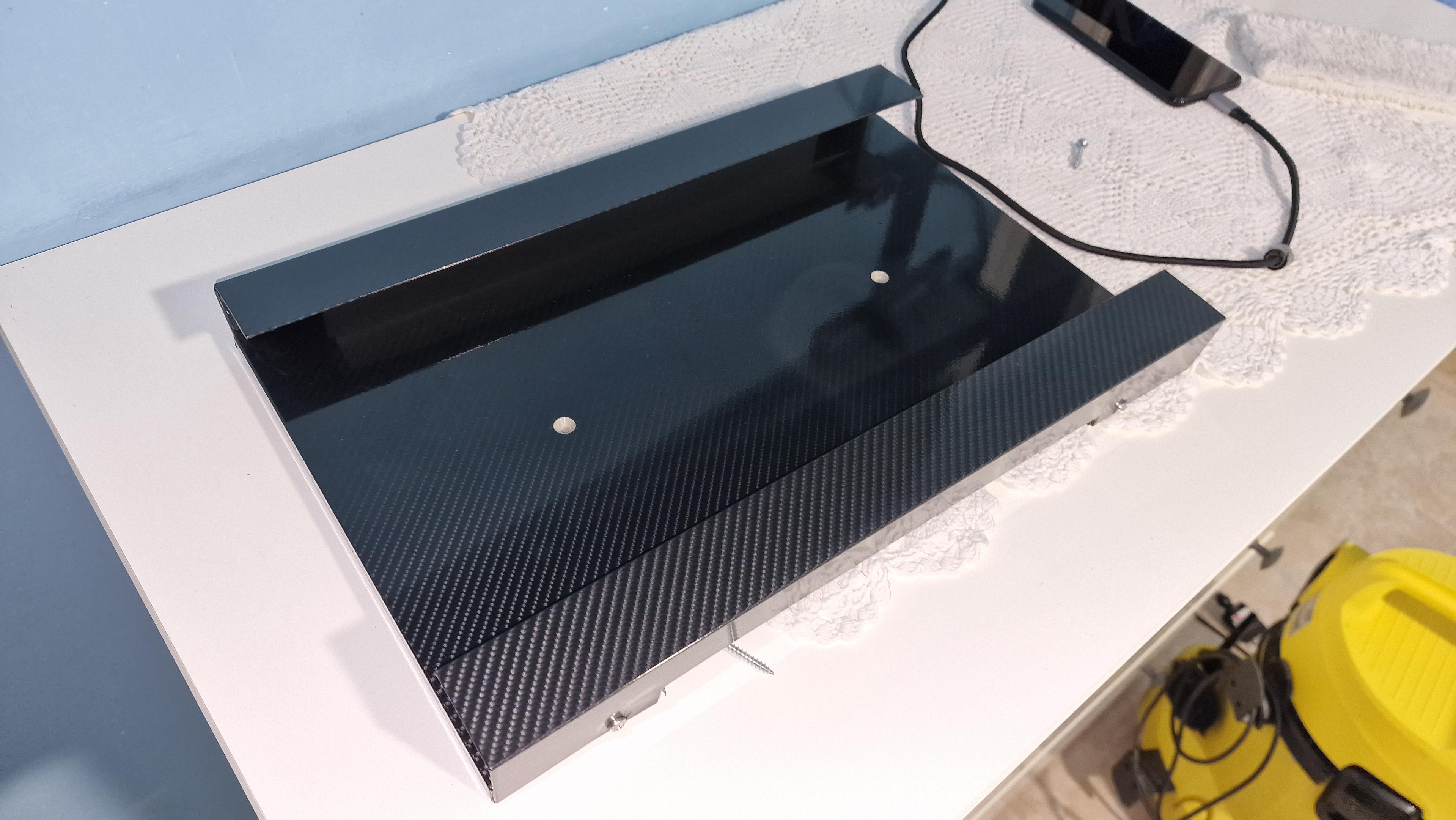
Vi ho mai mostrato il porta PC portatile da parete che feci qualche anno fa? Stasera ho smontato tutto per sfilare e ripulire la PS4 accanto.
Quello bianco è un pannello in PVC di recupero dalla galvanica, lo buttavano via, poi c'è un profilo ad angolo in alluminio e pellicola lucida effetto carbonio del negozio di cinesi.
Si nota la presa d'aria che ho fatto di sotto verso il centro?
-
@mpjgregoire this is a great thread. Thank you!
-
@mcc@mastodon.social absolutely — they just look nicer that way.
-
That said, about 13% of delegates voted non-confidence, so support is
not unanimous. I ran into delegates who lamented that people they knew who'd
always supported the Conservatives wouldn't vote for the party with
Mr. Poilievre as leader.12/12
-
5. Pierre Poilievre. Members of the CPC like him personally, like where he
stands on issues, like the way he's a fighter, like the way he's brought new
support into the party. I ran into one guy who said that he'd be another
Robert Stanfield, someone who'd be an excellent PM but who would never win.
But I didn't run into anyone who'd admit to opposing Mr. Poilievre; there was
no one organising against him; there were not even anti-Poilievre buttons
around.11/n
-
I did bring up Pres. Trump a few times,
and when I did so, the response I received was that he was doing crazy things
and that he was bad for our electoral chances. But people weren't really
talking about Pres. Trump one way or another, so I can't claim to know that
that was the general feeling.10/n