These images from the Creator Studio announcement perfectly illustrate the failure of Liquid Glass.
Uncategorized
28
Posts
24
Posters
121
Views

-
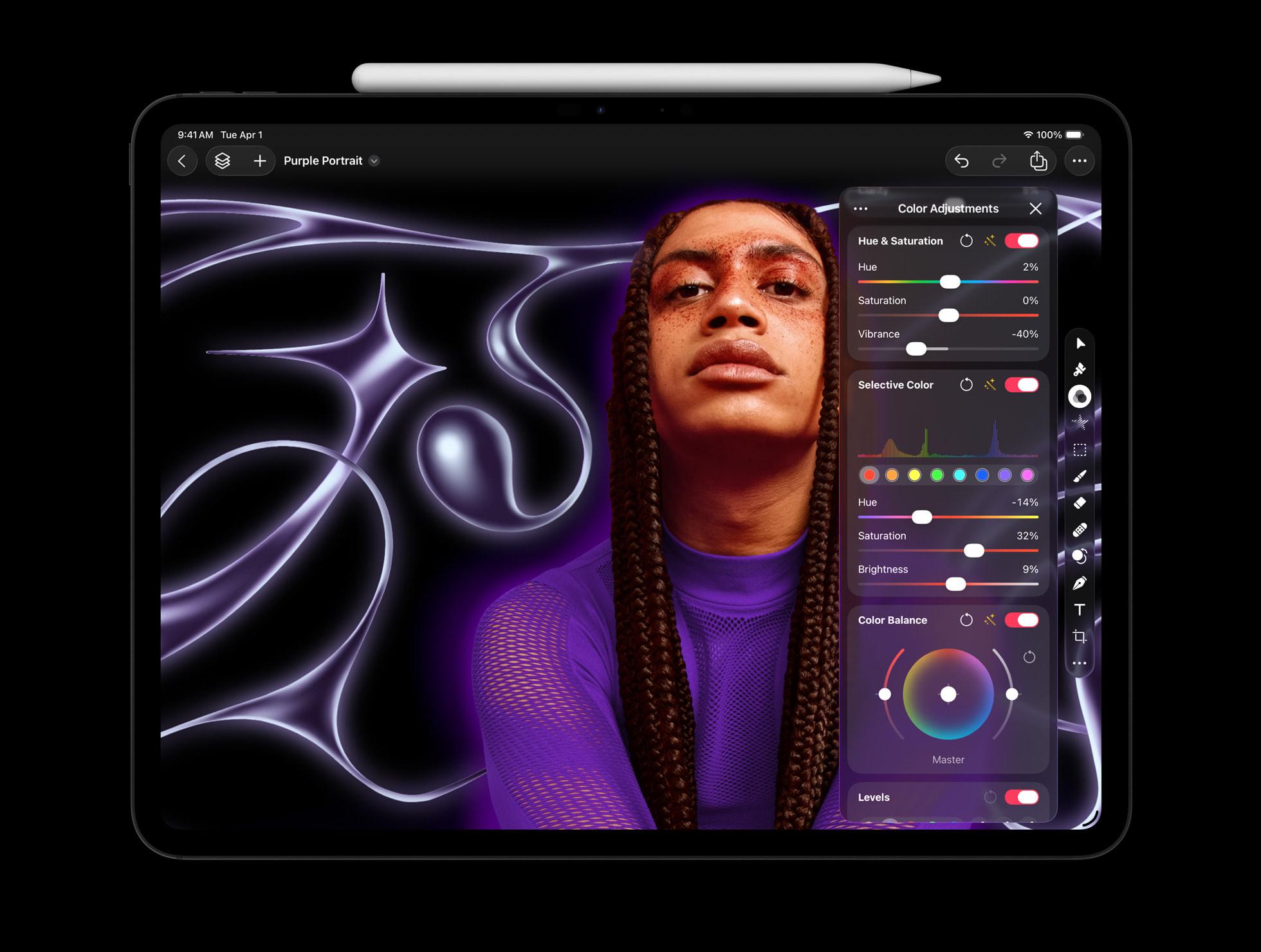
These images from the Creator Studio announcement perfectly illustrate the failure of Liquid Glass.
It doesn't get out of the way of your content — it INVADES your content.
This is an image editor! Yet HUGE regions of the image are invaded, blurred, and obscured by translucent UI, making both the image and the UI worse.
Low-contrast UI on blurry content doesn't clarify anything or get out of your way — it distorts the content AND the UI into an ugly, unusable slurry.
@marcoarment I don't think I've ever seen an image editor that pops up editing panels overtop the image before. Wow.
-
@Sumocat @marcoarment No they specifically designed content that would look less bad in the ui. The leaves continue on the left under the sidebar.
@dandylyons @marcoarment The screenshot of the Mac version is presented the same way, but the overflow and top of her head are completely cut off.
-
@marcoarment I actually love it. If it wasn't translucent, it would still be there in the way, so I don't understand what's wrong?
@marcoarment @d4v, but it would be less in the way: look how much space is wasted on the unnecessary padding around the sidebars and other UI elements that previously would be flush to the screen edge. I mean I’m not against negative space in UI but those double paddings, ubiquitous in the new design, are useless, imho.
And the UI would be so much more readable without all that translucency!
-
@marcoarment @d4v, but it would be less in the way: look how much space is wasted on the unnecessary padding around the sidebars and other UI elements that previously would be flush to the screen edge. I mean I’m not against negative space in UI but those double paddings, ubiquitous in the new design, are useless, imho.
And the UI would be so much more readable without all that translucency!
@volemo @marcoarment On second thought, I have to agree with you that’s a lot of wasted space. 😵💫
-
These images from the Creator Studio announcement perfectly illustrate the failure of Liquid Glass.
It doesn't get out of the way of your content — it INVADES your content.
This is an image editor! Yet HUGE regions of the image are invaded, blurred, and obscured by translucent UI, making both the image and the UI worse.
Low-contrast UI on blurry content doesn't clarify anything or get out of your way — it distorts the content AND the UI into an ugly, unusable slurry.
@marcoarment NOT GOOD
-
These images from the Creator Studio announcement perfectly illustrate the failure of Liquid Glass.
It doesn't get out of the way of your content — it INVADES your content.
This is an image editor! Yet HUGE regions of the image are invaded, blurred, and obscured by translucent UI, making both the image and the UI worse.
Low-contrast UI on blurry content doesn't clarify anything or get out of your way — it distorts the content AND the UI into an ugly, unusable slurry.
-
These images from the Creator Studio announcement perfectly illustrate the failure of Liquid Glass.
It doesn't get out of the way of your content — it INVADES your content.
This is an image editor! Yet HUGE regions of the image are invaded, blurred, and obscured by translucent UI, making both the image and the UI worse.
Low-contrast UI on blurry content doesn't clarify anything or get out of your way — it distorts the content AND the UI into an ugly, unusable slurry.
@marcoarment The "Fantastical Creatures" one is particularly funny; obviously the image and text are positioned so that they're aligned in the UI, not for the ostensible end-use of the image.
I'm no designer, but I do a little photo editing for personal stuff. I absolutely need to see the full image for some adjustments and cropping; having floating blurry UI panels covering part of it would mess with my ability to judge the composition. I can't imagine it's much different with these tools.
-
These images from the Creator Studio announcement perfectly illustrate the failure of Liquid Glass.
It doesn't get out of the way of your content — it INVADES your content.
This is an image editor! Yet HUGE regions of the image are invaded, blurred, and obscured by translucent UI, making both the image and the UI worse.
Low-contrast UI on blurry content doesn't clarify anything or get out of your way — it distorts the content AND the UI into an ugly, unusable slurry.
@marcoarment How could someone think this was a good idea?







Feed RSS
Gli ultimi otto messaggi ricevuti dalla Federazione
-
Checked in at 튜링의사과 by @hongminhee@hollo.social
出튜
-
Istanti fatali (ebook)
@libri - C'è sempre un prima e un dopo per una scoperta matematica
-
아, 昨日이 春分이었구나.
-
@aeva I'm so mad about console exclusives 😭😭😭
-
Very new moon over the gate tonight.
-
Are you allowed to protest the war on Iran at #NoKings / #NoTyrants ?
-
@informapirata @signorina37 @eticadigitale ottima analisi: un concentrato di verità assoluta, senza se e senza ma.
Io spesso mi soffermo sugli aspetti della tecnologia dove eri praticamente costretto a leggere il manuale per saperla usare, e avere una dose di pazienza non indifferente, tipo regolare l'azimuth di un lettore di cassette, ma c'era anche il discorso giochi, decisamente più incisivo e comune, che avevo "rimosso".
Con le Crystal Ball e il DAS ci sono cresciuto 😃
-
Slug Algorithm for On-GPU Rendering of Fonts with Bézier Curves now in Public Domain
The Slug Algorithm has been around for a decade now, mostly quietly rendering fonts and later entire GUIs using Bézier curves directly on the GPU for games and other types of software, but due to its proprietary nature it didn’t see much adoption outside of commercial settings. This has now changed with its author, [Eric Lengyel], releasing it to the public domain without any limitations.
Originally [Eric] had received a software patent in 2019 for the algorithm that would have prevented anyone else from implementing it until the patent’s expiration in 2038. Since 2016 [Eric] and his business have however had in his eyes sufficient benefit from the patent, making it unnecessary to hold on to it any longer and retain such exclusivity.
To help anyone with implementing their own version of the algorithm, there is a GitHub repository containing reference shader implementations with plenty of inline comments that should help anyone with some shader experience get started.
Although pretty niche in the eyes of the average person, the benefits of using on-GPU rendering of elements like fonts are obvious in terms of rendering optimization. With this change open source rendering engines for games and more can finally also use it as well.
Thanks to [Footleg] for the tip.