Enigmatick ActivityPub C2S
General Discussion
3
Posts
2
Posters
10
Views
-
From its conception, #Enigmatick has leaned heavily on the
/inboxand/outboxendpoints for client operations. There are some/apiendpoints, but I avoid that were I can shoehorn operations into the #ActivityPub specification and #ActivityStreams vocabulary.While typical operational activities are fairly well accounted for, administration is a weak point. For example: I haven't identified a clear way to use the currently described mechanisms for an administrative user to pull up and manage instances or actors on a server.
I've relied on CLI tools (e.g.,
./enigmatick --help) to manage some of that. And in some cases, I know how to manipulate data in my database, so I haven't worried too much about building tooling. But I'd like to ship something that other folks can use to share in my efforts, so I've been thinking about how to model those activities in an ActivityPub-esque way to use in the Svelte UI.ActivityPub Messages
To that end, I'm now using
BlockandDeleteactivities sent from the client to the serveroutboxto manage the blocking of instances and purging of data.{ "@context": [ "https://www.w3.org/ns/activitystreams", { "ek": "https://enigmatick.social/ns#", "Instance": "ek:Instance" } ], "id": "https://enigmatick.social/activities/550e8400-e29b-41d4-a716-446655440000", "type": "Block", "actor": "https://enigmatick.social/user/system", "object": { "type": "Instance", "id": "https://spammy-instance.example" } }In practice, my client does not generate the
id, but that attribute is generated by the server and theActivityis stored alongside other typically federated activities. These localBlockactivities are not federated out to other servers; they are intended solely for local server management.The
Blockactivity is sent as a message signed at the client by a user with administrative privileges on the server. Enigmatick's user authentication is unique (i.e., I use a separate set of encryption keys for client-signing executed by awasmmodule in the browser). That can be a topic for a future article.That the
actoras the systemApplicationuser is important. That is used by the server to establish the scope of this action as system-wide, not just for a single user. The system actor is discoverable in thenodeinfometadata.I'm using a typed object rather than just an
idreference. This is so that I can use this same flow for blocking and purgingActorobjects (i.e., thetypewould bePerson,Service, orApplication).The purge action is similar, using the
Deleteactivity.{ "@context": [ "https://www.w3.org/ns/activitystreams", { "ek": "https://enigmatick.social/ns#", "Instance": "ek:Instance" } ], "id": "https://enigmatick.social/activities/550e8400-e29b-41d4-a716-446655440000", "type": "Delete", "actor": "https://enigmatick.social/user/system", "object": { "type": "Instance", "id": "https://spammy-instance.example" } }The term, "delete" is a bit of a misnomer in this case as it applies to the instance specifically. The instance will remain, but the
objects,activities, andactorsassociated with that instance will be fully deleted (i.e., not set toTombstone).Collection Endpoints
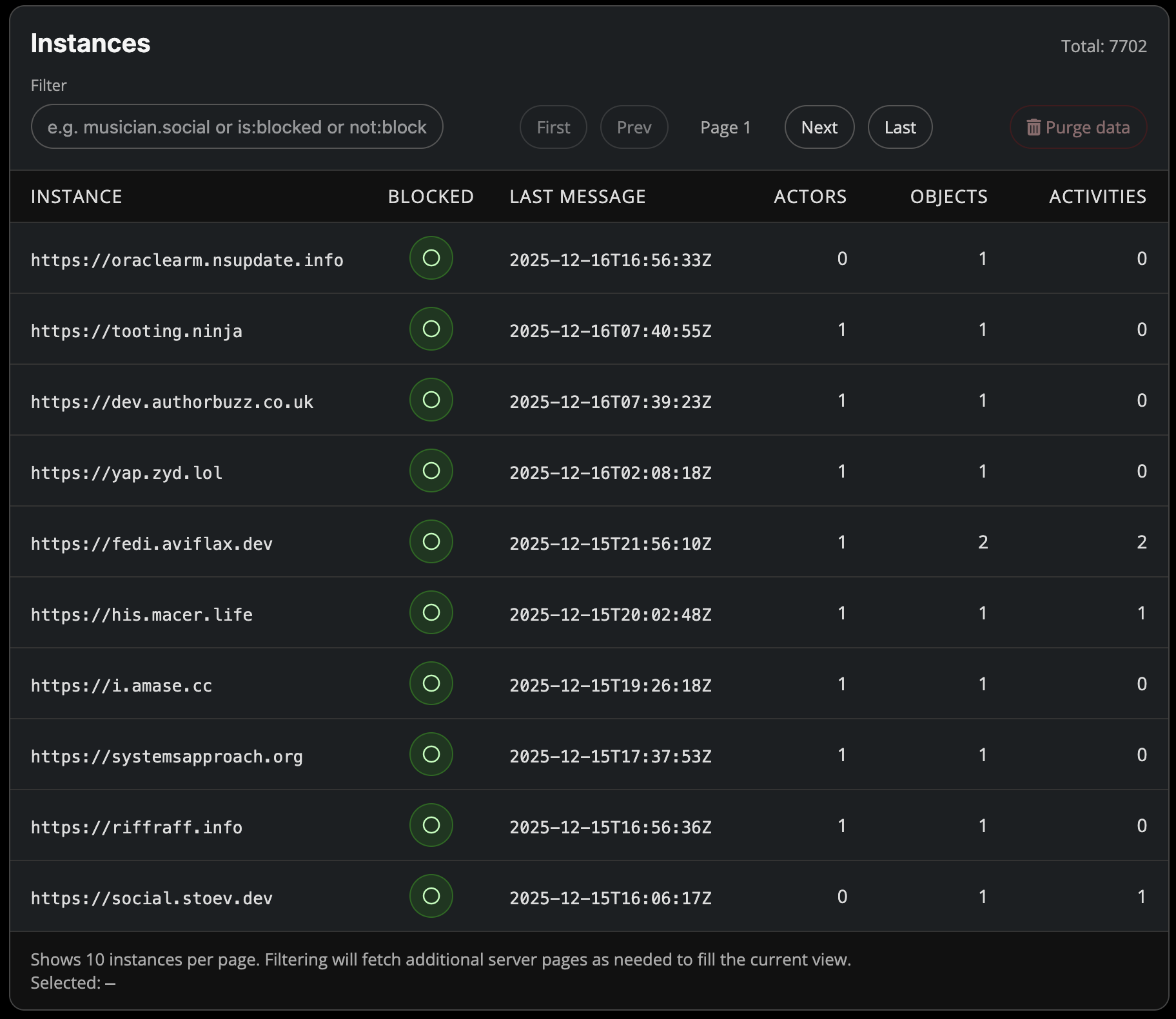
To facilitate the UI operations, I've created two new collection endpoints on my server:
/instancesand/actors. These endpoints provide typical ActivityPubCollectionobjects.{ "@context": [ "https://www.w3.org/ns/activitystreams", { "Instance": "ek:Instance", "activitiesCount": "ek:activitiesCount", "actorsCount": "ek:actorsCount", "blocked": "ek:blocked", "ek": "https://enigmatick.social/ns#", "lastMessageAt": "ek:lastMessageAt", "objectsCount": "ek:objectsCount" } ], "type": "OrderedCollection", "id": "https://enigmatick.social/instances", "totalItems": 7702, "orderedItems": [ { "type": "Instance", "id": "https://example-instance.name", "blocked": false, "created": "2025-12-16T16:56:33Z", "lastMessageAt": "2025-12-16T16:56:33Z", "actorsCount": 0, "objectsCount": 1, "activitiesCount": 0 } ], "first": "https://enigmatick.social/instances?max=9223372036854775807", "last": "https://enigmatick.social/instances?min=0", "next": "https://enigmatick.social/instances?max=1765657395402834" }I've added some extensions in the
@contextto account for a few non-standard attributes.That collection is used by the UI.
Collection Discovery
nodeinfois a common protocol used for discovering information about ActivityPub-speaking servers. I've extended my use of that to facilitate client-discovery of these new endpoints using themetadataobject contained in thenodeinfoJSON."metadata": { "actor": "https://enigmatick.social/user/system", "adminActors": "https://enigmatick.social/actors", "adminInstances": "https://enigmatick.social/instances", "domain": "enigmatick.social", "url": "https://enigmatick.social" }Final Thoughts
As I'm reading through this, I see some opportunities for refinement. I should probably be using
OrderedCollectionPageinstead ofOrderedCollectionfor my collection endpoints. I'm sure there are other tweaks to be made. -
From its conception, #Enigmatick has leaned heavily on the
/inboxand/outboxendpoints for client operations. There are some/apiendpoints, but I avoid that were I can shoehorn operations into the #ActivityPub specification and #ActivityStreams vocabulary.While typical operational activities are fairly well accounted for, administration is a weak point. For example: I haven't identified a clear way to use the currently described mechanisms for an administrative user to pull up and manage instances or actors on a server.
I've relied on CLI tools (e.g.,
./enigmatick --help) to manage some of that. And in some cases, I know how to manipulate data in my database, so I haven't worried too much about building tooling. But I'd like to ship something that other folks can use to share in my efforts, so I've been thinking about how to model those activities in an ActivityPub-esque way to use in the Svelte UI.ActivityPub Messages
To that end, I'm now using
BlockandDeleteactivities sent from the client to the serveroutboxto manage the blocking of instances and purging of data.{ "@context": [ "https://www.w3.org/ns/activitystreams", { "ek": "https://enigmatick.social/ns#", "Instance": "ek:Instance" } ], "id": "https://enigmatick.social/activities/550e8400-e29b-41d4-a716-446655440000", "type": "Block", "actor": "https://enigmatick.social/user/system", "object": { "type": "Instance", "id": "https://spammy-instance.example" } }In practice, my client does not generate the
id, but that attribute is generated by the server and theActivityis stored alongside other typically federated activities. These localBlockactivities are not federated out to other servers; they are intended solely for local server management.The
Blockactivity is sent as a message signed at the client by a user with administrative privileges on the server. Enigmatick's user authentication is unique (i.e., I use a separate set of encryption keys for client-signing executed by awasmmodule in the browser). That can be a topic for a future article.That the
actoras the systemApplicationuser is important. That is used by the server to establish the scope of this action as system-wide, not just for a single user. The system actor is discoverable in thenodeinfometadata.I'm using a typed object rather than just an
idreference. This is so that I can use this same flow for blocking and purgingActorobjects (i.e., thetypewould bePerson,Service, orApplication).The purge action is similar, using the
Deleteactivity.{ "@context": [ "https://www.w3.org/ns/activitystreams", { "ek": "https://enigmatick.social/ns#", "Instance": "ek:Instance" } ], "id": "https://enigmatick.social/activities/550e8400-e29b-41d4-a716-446655440000", "type": "Delete", "actor": "https://enigmatick.social/user/system", "object": { "type": "Instance", "id": "https://spammy-instance.example" } }The term, "delete" is a bit of a misnomer in this case as it applies to the instance specifically. The instance will remain, but the
objects,activities, andactorsassociated with that instance will be fully deleted (i.e., not set toTombstone).Collection Endpoints
To facilitate the UI operations, I've created two new collection endpoints on my server:
/instancesand/actors. These endpoints provide typical ActivityPubCollectionobjects.{ "@context": [ "https://www.w3.org/ns/activitystreams", { "Instance": "ek:Instance", "activitiesCount": "ek:activitiesCount", "actorsCount": "ek:actorsCount", "blocked": "ek:blocked", "ek": "https://enigmatick.social/ns#", "lastMessageAt": "ek:lastMessageAt", "objectsCount": "ek:objectsCount" } ], "type": "OrderedCollection", "id": "https://enigmatick.social/instances", "totalItems": 7702, "orderedItems": [ { "type": "Instance", "id": "https://example-instance.name", "blocked": false, "created": "2025-12-16T16:56:33Z", "lastMessageAt": "2025-12-16T16:56:33Z", "actorsCount": 0, "objectsCount": 1, "activitiesCount": 0 } ], "first": "https://enigmatick.social/instances?max=9223372036854775807", "last": "https://enigmatick.social/instances?min=0", "next": "https://enigmatick.social/instances?max=1765657395402834" }I've added some extensions in the
@contextto account for a few non-standard attributes.That collection is used by the UI.
Collection Discovery
nodeinfois a common protocol used for discovering information about ActivityPub-speaking servers. I've extended my use of that to facilitate client-discovery of these new endpoints using themetadataobject contained in thenodeinfoJSON."metadata": { "actor": "https://enigmatick.social/user/system", "adminActors": "https://enigmatick.social/actors", "adminInstances": "https://enigmatick.social/instances", "domain": "enigmatick.social", "url": "https://enigmatick.social" }Final Thoughts
As I'm reading through this, I see some opportunities for refinement. I should probably be using
OrderedCollectionPageinstead ofOrderedCollectionfor my collection endpoints. I'm sure there are other tweaks to be made.>nodeinfo is a common protocol used for discovering information about ActivityPub-speaking servers
NodeInfo is used primarily by sites like https://fediverse.observer, it is not intended to be used by clients. There is a similar entity in ActivityPub: server actor (instance actor). In your case it seems to be located at https://enigmatick.social/user/system ?
I prefer Webfinger discovery method, as described in this FEP: https://codeberg.org/fediverse/fep/src/branch/main/fep/d556/fep-d556.md.
-
>nodeinfo is a common protocol used for discovering information about ActivityPub-speaking servers
NodeInfo is used primarily by sites like https://fediverse.observer, it is not intended to be used by clients. There is a similar entity in ActivityPub: server actor (instance actor). In your case it seems to be located at https://enigmatick.social/user/system ?
I prefer Webfinger discovery method, as described in this FEP: https://codeberg.org/fediverse/fep/src/branch/main/fep/d556/fep-d556.md.
@silverpill@mitra.social Thanks - that solves a number of issues I've been encountering. From the outset, I wanted to use the
systemactor to point at the relevant administrative collections, but couldn't think of a good way to identify the actor to the client (without hard-coding it). Thatwebfingeradjustment solves that.


Feed RSS
Gli ultimi otto messaggi ricevuti dalla Federazione
-
@macgirvin
I thought Punycode was only for domain names. Are you saying you also use it for the user part?
-
@edent@mastodon.social -- I've just tested and that account also works fine with Hubzilla. I will mention that your implementation in this case uses url-encoded usernames while ours uses punycode. They should be able to interact just fine, but the fact that there are multiple ways to arrive at a solution could cause a bit of confusion for implementers.
You'll need to use punycode if you wish to federate with the diaspora protocol or email or any other projects or protocols which restrict the character set for usernames. So it might end up being a more flexible solution in the long run and should work fine with every other fediverse project today. ASCII-restricted software will just use the xn-- name; and all their links and buttons should work fine.
Url-encoding should also work, but perhaps not so universally and easily as punycode; as witnessed by the number of issues documented in this thread.
-
-
@jandi
Yes, that would really help. I will set the priority in the Weblate project for the part used to understand tags inside messages. Thank you for your continuous support on projects :)
-
@edent@mastodon.social -- Just looked again... this was first introduced as a hidden feature in redmatrix around 2013-2014, and so may also be available currently in Hubzilla (behind the "system.unicode_usernames" feature toggle). There were some major changes in 2019 that to my knowledge weren't ever backported. I think these only applied to local usernames and not remote usernames, but the functionality in hubzilla still might need to be verified.
-
The map combines community reports from the #Fediverse and shelters and veterinaries from #OpenStreetMap loaded in real time as you zoom in.
PawFed is built to be a community project, not a one person effort. There will be many ways to contribute beyond posting reports.
If you find the project useful, don't hesitate to share it. Thank you. (3/3)
-
PawFed is not tied to any country or language. Right now it works in French and English: #chat #perdu and #cat #lost produce the same report.
But the goal is to go further. Hashtag and keyword detection is based on translation files. When someone contributes a new language, PawFed starts understanding posts in that language automatically. (2/3)
-
RE: https://toot.fedilab.app/@apps/116245941766830884
#PawFed is not limited to reports about animals found or in distress. You can use it to offer help or ask for it.
Use #offer when you provide help, #request when you need it, #info to share useful information.
Everything works through #ActivityPub. If you delete your original post mentioning @PawFed, the related report is automatically removed from the map. No database ghost. You stay in control of your data. (1/3)