🧙♂️💻 Ho riesumato un antico artefatto tecnologico!
Uncategorized
16
Posts
3
Posters
102
Views
-
🧙♂️💻 Ho riesumato un antico artefatto tecnologico!
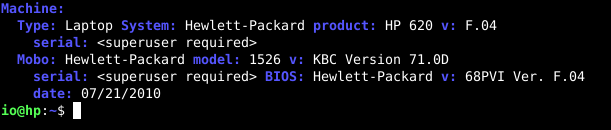
Un vecchio laptop HP del 2010, sepolto da ere geologiche di polvere e oblio…
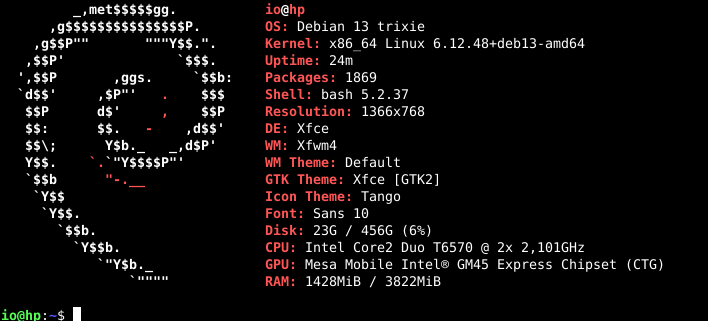
eppure… ⚡ con #Debian 13 Trixie è tornato a vivere!Non scherzo: parte, naviga, compila e sforna finestre #XFCE come un guerriero ruggente del passato!
Certo, non è che puoi aprire Firefox, Kismet, GIMP e Mastodon tutti insieme come con i miei tre i7… 😅
ma questo vecchio Core 2 Duo ha ritrovato la gloria perduta.🔥 Resuscitato dal silicio, serve di nuovo la causa del libero software!
🐧 Viva Debian, viva il retro-hardware che non molla mai! -
 undefined ju@nugole.it shared this topic on
-
🧙♂️💻 Ho riesumato un antico artefatto tecnologico!
Un vecchio laptop HP del 2010, sepolto da ere geologiche di polvere e oblio…
eppure… ⚡ con #Debian 13 Trixie è tornato a vivere!Non scherzo: parte, naviga, compila e sforna finestre #XFCE come un guerriero ruggente del passato!
Certo, non è che puoi aprire Firefox, Kismet, GIMP e Mastodon tutti insieme come con i miei tre i7… 😅
ma questo vecchio Core 2 Duo ha ritrovato la gloria perduta.🔥 Resuscitato dal silicio, serve di nuovo la causa del libero software!
🐧 Viva Debian, viva il retro-hardware che non molla mai!@snow il mio server yunohost è del 2011 ma il tuo mi batte.
-
@snow il mio server yunohost è del 2011 ma il tuo mi batte.
@ilarioq No, i miei server sono recentissimi, quello è per uso personale.
-
@ilarioq No, i miei server sono recentissimi, quello è per uso personale.
@snow gente che può...🤣
-
@snow gente che può...🤣
@ilarioq Non ho altri sfizi, ma no spreco niente.🙏
-
@ilarioq Non ho altri sfizi, ma no spreco niente.🙏
@snow con quello che costano i PC.
-
@snow con quello che costano i PC.
@ilarioq Per i server vado di VPS o VDS
-
@ilarioq Per i server vado di VPS o VDS
@snow cosa sono i vds?
-
@snow cosa sono i vds?
La differenza principale è quanta parte del server è “solo tua” (virtuale o fisica) e come viene gestita la risorsa.
Ti faccio un riassunto pratico, senza troppi fronzoli:VPS (Virtual Private Server)
Cos’è
È una macchina virtuale dentro un server fisico che ospita anche altri clienti. Il nodo fisico ha una grossa CPU, tanta RAM e dischi; sopra ci girano tante VM (VPS) separate.
Risorse
CPU e RAM di solito condivise con altri (anche se ti garantiscono un minimo).
Lo storage può essere condiviso (SAN, Ceph, ecc.).
Se il nodo fisico è sovraccarico (troppi VPS o male configurati), puoi risentirne.Pro
Costa meno.
Flessibile: si scala facilmente (più RAM, più vCPU).
Perfetto per siti, piccoli servizi, ambienti di test, ecc.Contro
Rumore degli altri vicini: se il provider non gestisce bene l’overselling, puoi avere rallentamenti.
Meno controllo sulle prestazioni “reali” della CPU.VDS (Virtual Dedicated Server)
Cos’è
È sempre una macchina virtuale, ma con un concetto più vicino al “dedicato”: ti assegnano core CPU e RAM riservati, che non vengono condivisi in modo elastico con altri.
Risorse
vCPU dedicate (es. 6 core solo per te, non “fino a 6 se il nodo è libero”).
RAM riservata.
In molti casi anche I/O su disco e banda sono più stabili/garantiti.Pro
Prestazioni più prevedibili e costanti.
Ideale per servizi pesanti o delicati (database grossi, istanze fediverse attive, ecc.).
È una via di mezzo tra VPS economico e server dedicato fisico.Contro
Costa di più di un VPS “normale”.
Meno “elastico” lato risorse rispetto ad alcuni piani cloud puri.In pratica: quando scegliere cosa
Scegli un VPS se…
Devi ospitare siti, piccoli servizi, roba non critica.
Vuoi spendere poco e accetti che, ogni tanto, le prestazioni possano ballare un po’.Scegli un VDS se…
Hai servizi che devono essere stabili e reattivi (es. Mastodon con tanti utenti, database importanti).
Vuoi sapere che quei core e quella RAM sono veramente tuoi, senza troppa variabilità.🙏 -
La differenza principale è quanta parte del server è “solo tua” (virtuale o fisica) e come viene gestita la risorsa.
Ti faccio un riassunto pratico, senza troppi fronzoli:VPS (Virtual Private Server)
Cos’è
È una macchina virtuale dentro un server fisico che ospita anche altri clienti. Il nodo fisico ha una grossa CPU, tanta RAM e dischi; sopra ci girano tante VM (VPS) separate.
Risorse
CPU e RAM di solito condivise con altri (anche se ti garantiscono un minimo).
Lo storage può essere condiviso (SAN, Ceph, ecc.).
Se il nodo fisico è sovraccarico (troppi VPS o male configurati), puoi risentirne.Pro
Costa meno.
Flessibile: si scala facilmente (più RAM, più vCPU).
Perfetto per siti, piccoli servizi, ambienti di test, ecc.Contro
Rumore degli altri vicini: se il provider non gestisce bene l’overselling, puoi avere rallentamenti.
Meno controllo sulle prestazioni “reali” della CPU.VDS (Virtual Dedicated Server)
Cos’è
È sempre una macchina virtuale, ma con un concetto più vicino al “dedicato”: ti assegnano core CPU e RAM riservati, che non vengono condivisi in modo elastico con altri.
Risorse
vCPU dedicate (es. 6 core solo per te, non “fino a 6 se il nodo è libero”).
RAM riservata.
In molti casi anche I/O su disco e banda sono più stabili/garantiti.Pro
Prestazioni più prevedibili e costanti.
Ideale per servizi pesanti o delicati (database grossi, istanze fediverse attive, ecc.).
È una via di mezzo tra VPS economico e server dedicato fisico.Contro
Costa di più di un VPS “normale”.
Meno “elastico” lato risorse rispetto ad alcuni piani cloud puri.In pratica: quando scegliere cosa
Scegli un VPS se…
Devi ospitare siti, piccoli servizi, roba non critica.
Vuoi spendere poco e accetti che, ogni tanto, le prestazioni possano ballare un po’.Scegli un VDS se…
Hai servizi che devono essere stabili e reattivi (es. Mastodon con tanti utenti, database importanti).
Vuoi sapere che quei core e quella RAM sono veramente tuoi, senza troppa variabilità.🙏@snow più che una risposta direi un corso on line. Grazie.
-
@snow il mio server yunohost è del 2011 ma il tuo mi batte.
@ilarioq@poliversity.it
io ho un portatile HP del 2010 con su Alpine, avevo installato Debian per prova ma onestamente faccio volentieri a meno di tanti "bagai" che ha su, tipo systemd...
Comunque confermo che Debian ci girava senza troppi problemi, "bagai" compresi.
@snow@snowfan.it
-
Vero, Debian non è certo tra le più “user-friendly”, ma quando c’è da fare le cose serie e non solo smanettare per gioco è ancora una garanzia 💪 Ognuno ha i suoi gusti, ma per me quando serve roba solida vado sempre lì a colpo sicuro 🙂
-
@snow@snowfan.it @ilarioq@poliversity.it
ben insomma...io uso Gentoo sul pc principale, ognuno ha i suoi gusti 🙂
-
Usato quello e anche Arch, ma ho scelto una filosofia che posso condividere con i server che gestisco.🙏
-
Usato quello e anche Arch, ma ho scelto una filosofia che posso condividere con i server che gestisco.🙏
@snow@snowfan.it @ilarioq@poliversity.it
Spetta perchè forse c'è un equivoco: non è che disapprovo Debian, anzi se devo consigliare una distro in generale consiglio Debian e uso Debian sul mio server.
In linea di massima, dal momento che è possibile lavorare senza determinate sovrastrutture (systemd è il caso macroscopico), preferisco che mi sia data la scelta se utilizzarle o meno, ma è una preferenza non un "ma se fai in quell'altro modo ti faccio la guerra".
-
Ah ok, allora avevo capito male io 😊
Sì sì, siamo d’accordo: l’importante è poter scegliere come lavorare e non trasformare le preferenze tecniche in guerre di religione.
Io sui server che gestisco mi trovo bene con il “pacchetto completo” Debian (systemd incluso), ma capisco benissimo chi preferisce qualcosa di più minimale. Alla fine l’importante è che ognuno usi gli strumenti con cui lavora meglio e ci si scambi esperienze, non cannonate 😄 -
 undefined oblomov@sociale.network shared this topic on


Gli ultimi otto messaggi ricevuti dalla Federazione
-
@MikeTheGray ma partecipasse a titolo personale non da premier...chessò...da cortigiana!
-
@matz i treni in Grecia mi sembrano peggiori che in Italia come comodità, e sono Gruppo Ferrovie dello Stato italiane
-
This post did not contain any content.
-
Quindi nel CSM vigerebbe un sistema para mafioso secondo Nordio? Essendo il CSM presieduto dal Presidente della Repubblica, questi sarebbe a capo di un sistema para mafioso?
Apperò, non si vince a spararle più grosse, si fa solo brutta figura
-
@tante boosting for reach. Consider editing the post to add Gibraltar as a tag, might help reach more.
-
Chi é ora che si comporta con atteggiamento "eversivo"?.
-
@cstross It's weird to me how the UK insists that its constituent parts are "countries" not provinces. Similar to how the USA insists its provinces are actually "states".
Otherwise, this whole situation is pretty similar for most countries. One big province where most of the people live, especially the rich people, that bullies everyone else: Ontario, Ile de France, CDMX, Tokyo. A rural province with a much smaller population that often feels bullied (often this is where you find separatist movements and/or anti-immigrant movements). And then there's the problem child that just doesn't fit in: Quebec, French Guiana, Norfolk Island, Puerto Rico, Xinjiang...
-
@Zambunny beh contento lui 😅