Suppose you want to give a child a computer that is 100% #offline, no Internet at all.
Uncategorized
12
Posts
5
Posters
2
Views
-
@skyfaller How young is this kid?
@ptvirgo My child is only 4 months old, so my question is certainly premature; but there are older children in my extended family for whom this question may be more immediately relevant.
Still, imagine my child is precocious and able to use a computer at a shockingly young age. My parents always said they put me in front of a computer as soon as I was able to sit up, and true or not I've always been comfortable with computers.
-
Suppose you want to give a child a computer that is 100% #offline, no Internet at all. What is the ideal "baby's first computer"? What is the most empowering platform for them to learn about #computers and #programming?
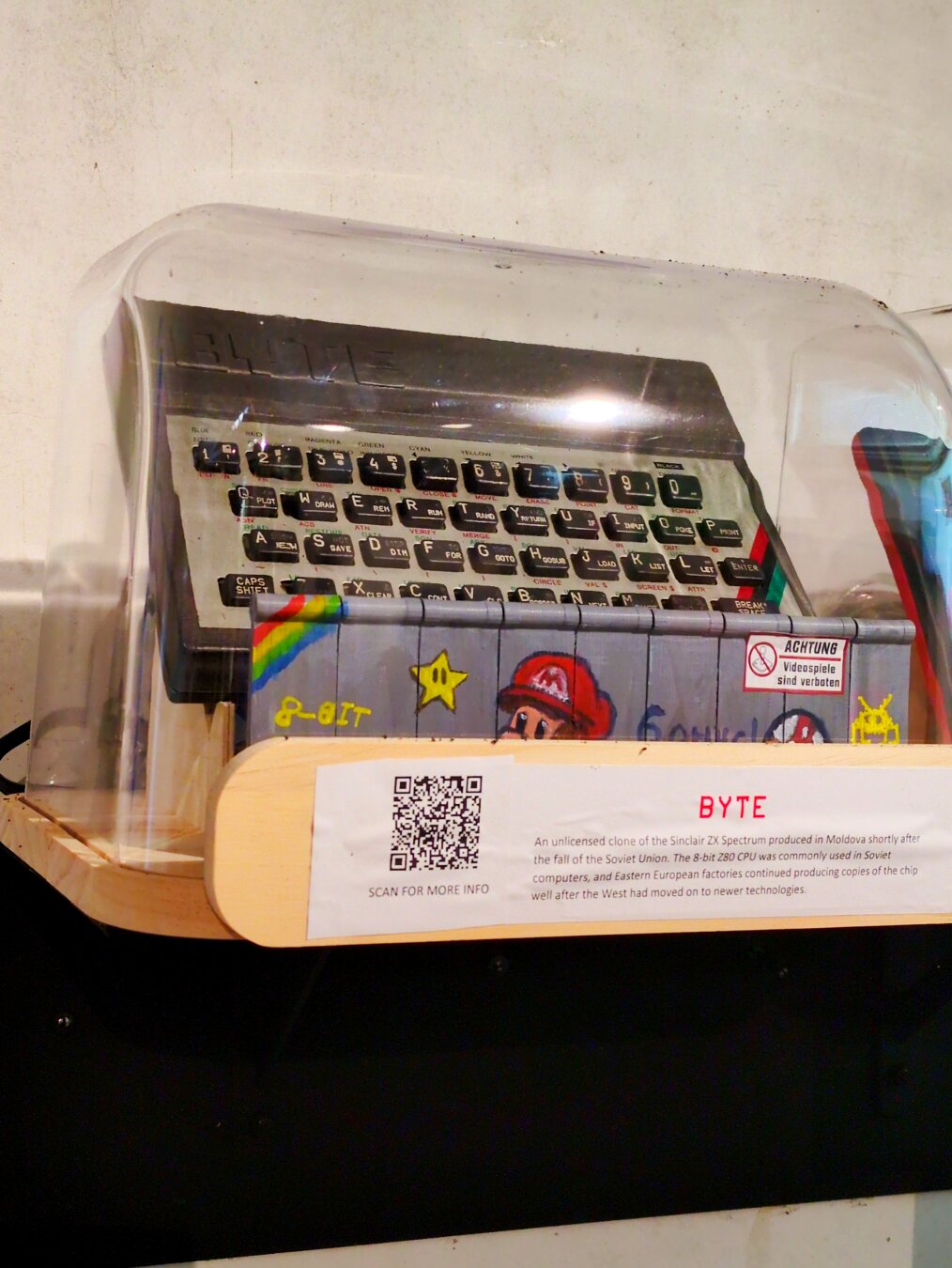
A standard modern Linux machine that simply has no Internet? (what distro still works well offline?) A #retrocomputing relic? Some weird hardware specifically designed for #children, like the dear departed One Laptop Per Child?
I especially want to keep my child away from LLMs.
A standard modern Linux machine that simply has no Internet? (what distro still works well offline?)
IF I was going to do the linux version of this. I'd set them up with Debian Stable, and use Jigdo to download the full DVD set, so they would basically have ALL possible packages offline on optical media. ( Currently 28 DVDs https://cdimage.debian.org/debian-cd/13.3.0/amd64/jigdo-dvd/ )
AND then make sure the sources.list file is set to reference the optical media. (Which it does by default, I think; if you do your installation wholly offline with optical media.)
THIS would give them pretty much everything available for debian offline.
-
A standard modern Linux machine that simply has no Internet? (what distro still works well offline?)
IF I was going to do the linux version of this. I'd set them up with Debian Stable, and use Jigdo to download the full DVD set, so they would basically have ALL possible packages offline on optical media. ( Currently 28 DVDs https://cdimage.debian.org/debian-cd/13.3.0/amd64/jigdo-dvd/ )
AND then make sure the sources.list file is set to reference the optical media. (Which it does by default, I think; if you do your installation wholly offline with optical media.)
THIS would give them pretty much everything available for debian offline.
@trashheap This sounds like a good idea, but one question I have is, are there any LLMs in Debian stable? I'm assuming most LLM integration is with the commercial LLMs that require Internet access, but I don't think offline LLMs are safe for developing minds either.
There are likely other age inappropriate programs in Debian stable (excessively adult or violent games? Does anything else come to mind?) but I imagine I would have to do *some* curation.
-
@trashheap This sounds like a good idea, but one question I have is, are there any LLMs in Debian stable? I'm assuming most LLM integration is with the commercial LLMs that require Internet access, but I don't think offline LLMs are safe for developing minds either.
There are likely other age inappropriate programs in Debian stable (excessively adult or violent games? Does anything else come to mind?) but I imagine I would have to do *some* curation.
@skyfaller @trashheap any LLM in Debian (main) would need to have full source available and be built from sources, including parameters, and I suspect that very few available LLMs allow *that*.
But depending on the age of the child there would definitely be a need to curate the software installed, because there is probably plenty of non-suitable material.
I think that an offline debian, maybe with something like kiwix to get access to local copies of online stuff (wikipedia and/or others, depending on the age) would work quite well offline, anyway
-
Suppose you want to give a child a computer that is 100% #offline, no Internet at all. What is the ideal "baby's first computer"? What is the most empowering platform for them to learn about #computers and #programming?
A standard modern Linux machine that simply has no Internet? (what distro still works well offline?) A #retrocomputing relic? Some weird hardware specifically designed for #children, like the dear departed One Laptop Per Child?
I especially want to keep my child away from LLMs.
Personal thought - YMMV
Just about any Linux distro that doesn't keep nagging about updates. Debian, perhaps.
Ensure it's disconnected, though. No ethernet, no wifi. Should be possiible to set that up somehow. However, you need to have the internet yourself to install packages and updates. -
Personal thought - YMMV
Just about any Linux distro that doesn't keep nagging about updates. Debian, perhaps.
Ensure it's disconnected, though. No ethernet, no wifi. Should be possiible to set that up somehow. However, you need to have the internet yourself to install packages and updates.@TheLancashireman *Why* would I need to install updates if the computer is fully offline? Security is much less of a problem when airgapped. There's something to be said for learning in an environment that doesn't change.
Certainly I would need Internet for the initial setup, but I don't see why I would need it afterwards.
-
@ptvirgo My child is only 4 months old, so my question is certainly premature; but there are older children in my extended family for whom this question may be more immediately relevant.
Still, imagine my child is precocious and able to use a computer at a shockingly young age. My parents always said they put me in front of a computer as soon as I was able to sit up, and true or not I've always been comfortable with computers.
@skyfaller You're probably after a tablet or e-ink device with a locked down desktop UI.
Maybe only a single app (drawing? push button to make a noise?) in full screen mode to start.
Balanced against a collection of physical toys, books, etc, curated with the idea that your kid is building a brain right now and needs a lot of play and as little commercial interference as humanly possible.
Distro will matter less than the curation. Did OLPC quit?
-
@skyfaller You're probably after a tablet or e-ink device with a locked down desktop UI.
Maybe only a single app (drawing? push button to make a noise?) in full screen mode to start.
Balanced against a collection of physical toys, books, etc, curated with the idea that your kid is building a brain right now and needs a lot of play and as little commercial interference as humanly possible.
Distro will matter less than the curation. Did OLPC quit?
@ptvirgo oh yeah OLPC is super dead, expired in 2014 according to Wikipedia:
https://en.wikipedia.org/wiki/One_Laptop_per_Child
Some of the software, like the Sugar desktop environment, still exists, but it's not clear to me how compelling it is now, or how much it suffers from not being paired with the hardware it was designed for: https://en.wikipedia.org/wiki/Sugar_%28desktop_environment%29
-
@ptvirgo oh yeah OLPC is super dead, expired in 2014 according to Wikipedia:
https://en.wikipedia.org/wiki/One_Laptop_per_Child
Some of the software, like the Sugar desktop environment, still exists, but it's not clear to me how compelling it is now, or how much it suffers from not being paired with the hardware it was designed for: https://en.wikipedia.org/wiki/Sugar_%28desktop_environment%29
@skyfaller @ptvirgo back when it was alive I played around with sugar on different hardware and it wasn't bad: if the project is actually alive and not just on life support it may be worth looking into it -
@TheLancashireman *Why* would I need to install updates if the computer is fully offline? Security is much less of a problem when airgapped. There's something to be said for learning in an environment that doesn't change.
Certainly I would need Internet for the initial setup, but I don't see why I would need it afterwards.
@skyfaller @TheLancashireman sometimes updated in debian stable fix bugs that aren't security bugs but functional ones, so maybe it can be worth connecting it to the internet yourself now and then for updates?
or maybe only if those bugs are actually relevant





Gli ultimi otto messaggi ricevuti dalla Federazione
-
@_elena People get offended when they realize they are slaves and you are not, and your ethics are important to you while they are selling their soul for two cents.
I wonder why!
-
@FraEmme il nano onirico è una fonte più affidabile dell' ia
-
I still use AI as an agent when I know what I need to do looks like, and I don’t feel like typing boilerplate.
For completion, it’s too disruptive.
-
@grumpygamer It's technically another IDE suggestion, but VSCodium is the non-proprietary parts of VSCode (similar to running Chromium in lieu of Chrome). You can point it to the normal Microsoft marketplace trivially.
I think it would not have any of the A"I" features in it
-
@un_mugnaio Sì.
-
@oblomov @ro mi chiedo quanto il fatto di non essere veramente una birra (nel senso della battuta) li abbia impattati di più di altri marchi, nel senso che se uno beve per sfondarsi una (dozzina di) Heineken va pure bene, ma se ci si sta concedendo una birra di tanto in tanto magari uno vuole pure bere qualcosa di buono?
-
@grumpygamer I've tried using Copilot with Python, as it's "encouraged" in my workplace, but as you've found, it keeps producing generic and boring code that is *almost* right but needs proof-reading.
Just for "fun" I asked it to produce some code to print out all primes from 0 to an input number. It made code that worked, but was slow. After I'd tweaked it, it ran about ten times faster for primes up to 10000. I don't think I'll keep using it somehow...
-
@BackFromTheDud if I understood what you need, this
https://github.com/Genymobile/scrcpy
should do the job