Skip to content

Piero Bosio Social Web Site Personale Logo Fediverso

Social Forum federato con il resto del mondo. Non contano le istanze, contano le persone

#IntroductionI'm Alex (they/them) living in Canada.

Uncategorized
1 1 7

Gli ultimi otto messaggi ricevuti dalla Federazione
Post suggeriti
  • 0 Votes
    1 Posts
    11 Views
    RIP: the paperback"‘We’re losing #accessibility’: America says goodbye to the mass-market #paperbackThe so-called ‘pocket #book’ sold in supermarkets is being phased out across the USThey had that democratic aspect to them where you can just find them anywhere and it always felt like... there is something here for everyone, whether it’s the Harlequin romance novel or something very pulpy like a sci-fi or horror novel that you could quickly get”https://www.theguardian.com/books/2026/feb/24/america-says-goodbye-paperback#books #bookstodon
  • 0 Votes
    1 Posts
    12 Views
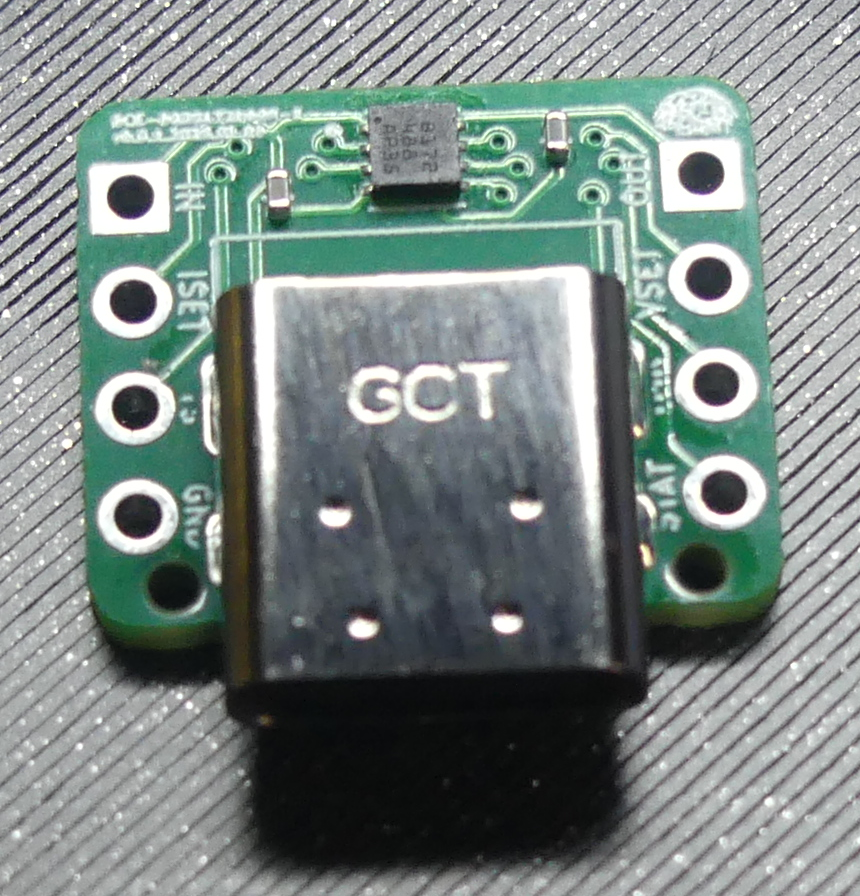
    Just received our first prototype of a Nickel-metal Hydride battery charger with a USB plug. This board is made to charge from 1 to 6 cells in series and supports a thermister for sensing overheating batteries.This circuit design is planned to be a part of a pen-like stylus with a camera and haptic feedback for blind people to feel visual art.https://codeberg.org/bcecoop/bce-pcb-bq25172dsgr#blind #a11y #accessibility #ee #pcb #fosh #foss #bce #prototype #maker #nimh #battery #charger
  • 0 Votes
    1 Posts
    5 Views
    Reposting. Slots available.After a short break, I’m returning to accessibility training services. I provide one-on-one training for blind and visually impaired users across multiple platforms. My teaching is practical and goal-driven: not just commands, but confidence, independence, and efficient workflows that carry into daily life, study, and work. I cover: iOS: VoiceOver gestures, rotor navigation, Braille displays, Safari, text editing, Mail and Calendars, Shortcuts, and making the most of iOS apps for productivity, communication, and entertainment. macOS: VoiceOver from basics to advanced, Trackpad Commander, Safari and Mail, iWork and Microsoft Office, file management, Terminal, audio tools, and system upkeep. Windows: NVDA and JAWS from beginner to advanced. Training includes Microsoft Office, Outlook, Teams, Zoom, web browsing, customizing screen readers, handling less accessible apps, and scripting basics. Android: TalkBack gestures, the built-in Braille keyboard and Braille display support, text editing, app accessibility, privacy and security settings, and everyday phone and tablet use. Linux: Orca and Speakup, console navigation, package management, distro setup, customizing desktops, and accessibility under Wayland. Concrete goals I can help you achieve: Set up a new phone, tablet, or computer Send and manage email independently Browse the web safely and efficiently Work with documents, spreadsheets, and presentations Manage files and cloud storage Use social media accessibly Work with Braille displays and keyboards Install and configure accessible software across platforms Troubleshoot accessibility issues and build reliable workflows Make the most of AI in a useful, productive way Grow from beginner skills to advanced, efficient daily use I bring years of lived experience as a blind user of these systems. I teach not only what manuals say, but the real-world shortcuts, workarounds, and problem-solving skills that make technology practical and enjoyable. Remote training is available worldwide. Pricing: fair and flexible — contact me for a quote. Discounts available for multi-session packages and ongoing weekly training. Contact: UK: 07447 931232 US: 772-766-7331 If these don’t work for you, email me at aaron.graham.hewitt@gmail.com If you, or someone you know, could benefit from personalized accessibility training, I’d be glad to help. #Accessibility #Blind #VisuallyImpaired #ScreenReaders #JAWS #NVDA #VoiceOver #TalkBack #Braille #AssistiveTechnology #DigitalInclusion #InclusiveTech #LinuxAccessibility #WindowsAccessibility #iOSAccessibility #AndroidAccessibility #MacAccessibility #Orca #ATTraining #TechTraining #AccessibleTech
  • 0 Votes
    1 Posts
    12 Views
    Okay Fediverse, you will know: A friend suggested I might try my luck searching for a job with things related to accessibility since my psychology background might come in handy there and I also have a knack for UX anyway. We were thinking haptics for deafblind people, braille tools, one-handed gamepads etc. My problem is: I have no idea where to even start searching for companies. Does anyone know a good starting point to learn about assistive aids and related tools?#fedihelp #accessibility