Yes, I really should have tried to learn more Blender, any Blender actually.
Uncategorized
16
Posts
7
Posters
5
Views
-
Yes, I really should have tried to learn more Blender, any Blender actually.
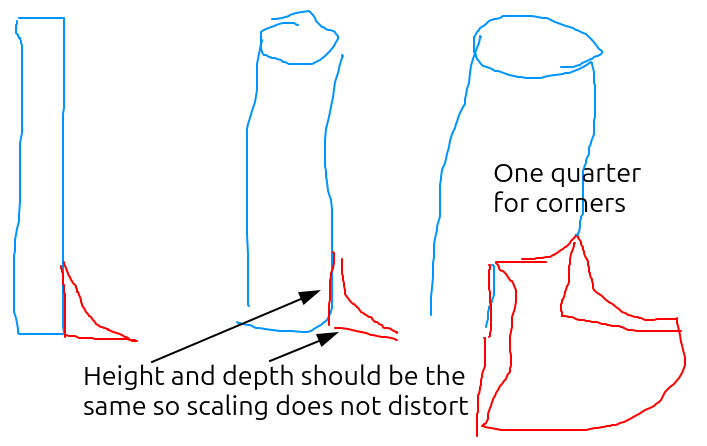
Is there anywhere I could learn to make a circular wedge with slope like in my bad drawing (the red part)?
Ideally, a quarter of said wedge should help me cover corner, semicircle, and cylinder scenarios.
I've seen some wedge tutorials, but no slopes. Maybe I should look for a slope tutorial and combine the two...
-
Yes, I really should have tried to learn more Blender, any Blender actually.
Is there anywhere I could learn to make a circular wedge with slope like in my bad drawing (the red part)?
Ideally, a quarter of said wedge should help me cover corner, semicircle, and cylinder scenarios.
I've seen some wedge tutorials, but no slopes. Maybe I should look for a slope tutorial and combine the two...
@afreytes roughing out the sloped ramp part from a separate cylinder, deleting 3/4 of the verts, adding in faces on the sides, and boolean and'ing the ramp with the larger cylinder is one approach
-
Yes, I really should have tried to learn more Blender, any Blender actually.
Is there anywhere I could learn to make a circular wedge with slope like in my bad drawing (the red part)?
Ideally, a quarter of said wedge should help me cover corner, semicircle, and cylinder scenarios.
I've seen some wedge tutorials, but no slopes. Maybe I should look for a slope tutorial and combine the two...
-
@dogzilla I dont want any "AI" slop. Please block me.
-
@dogzilla I dont want any "AI" slop. Please block me.
@afreytes Mkay. Done.
-
Yes, I really should have tried to learn more Blender, any Blender actually.
Is there anywhere I could learn to make a circular wedge with slope like in my bad drawing (the red part)?
Ideally, a quarter of said wedge should help me cover corner, semicircle, and cylinder scenarios.
I've seen some wedge tutorials, but no slopes. Maybe I should look for a slope tutorial and combine the two...
@afreytes If you use the Bevel Edges tool, say on an edge that runs across the middle of a sloped face, you can define multiple sections to round it out.
https://docs.blender.org/manual/en/latest/modeling/meshes/editing/edge/bevel.html
Let me know if that makes sense or needs clarification.
-
@afreytes If you use the Bevel Edges tool, say on an edge that runs across the middle of a sloped face, you can define multiple sections to round it out.
https://docs.blender.org/manual/en/latest/modeling/meshes/editing/edge/bevel.html
Let me know if that makes sense or needs clarification.
@afreytes Another option is to define the shape you want with flat faces, and use cylinders and the Boolean Modifier to essentially subtract the space of the cylinder from your wedge shape using Difference.
https://docs.blender.org/manual/en/latest/modeling/modifiers/generate/booleans.html
-
Yes, I really should have tried to learn more Blender, any Blender actually.
Is there anywhere I could learn to make a circular wedge with slope like in my bad drawing (the red part)?
Ideally, a quarter of said wedge should help me cover corner, semicircle, and cylinder scenarios.
I've seen some wedge tutorials, but no slopes. Maybe I should look for a slope tutorial and combine the two...
@afreytes
If you’re trying to just get a shape like this to 3D print, TinkerCAD can take you surprisingly far.After that, probably Plasticity.
Blender is terrible at CAD. People keep trying to adapt it, but then they give up.
-
Yes, I really should have tried to learn more Blender, any Blender actually.
Is there anywhere I could learn to make a circular wedge with slope like in my bad drawing (the red part)?
Ideally, a quarter of said wedge should help me cover corner, semicircle, and cylinder scenarios.
I've seen some wedge tutorials, but no slopes. Maybe I should look for a slope tutorial and combine the two...
@afreytes Is it taking that red cross section and extruding it around a cylinder or corner? I’ve done similar in blender using the bevel object under curve geometry: https://docs.blender.org/manual/en/2.80/modeling/curves/properties/geometry.html
-
@afreytes
If you’re trying to just get a shape like this to 3D print, TinkerCAD can take you surprisingly far.After that, probably Plasticity.
Blender is terrible at CAD. People keep trying to adapt it, but then they give up.
@JoshuaACNewman @afreytes I agree with the above, but if you want to stick to Blender for some reason, I might have misunderstood but I think you might want just a bevel modifier with edge weights, or a revolve using geometry nodes (you can look up tutorials using either of those keywords).
-
Yes, I really should have tried to learn more Blender, any Blender actually.
Is there anywhere I could learn to make a circular wedge with slope like in my bad drawing (the red part)?
Ideally, a quarter of said wedge should help me cover corner, semicircle, and cylinder scenarios.
I've seen some wedge tutorials, but no slopes. Maybe I should look for a slope tutorial and combine the two...
I heeded the advice from @JoshuaACNewman and @eobet to try TinkerCAD.
Except I used FreeCAD, from the Linux Mint Software Manager instead.
I have never used CAD software but somehow FreeCAD wasn't too hard to use. Though making the wedge took me a few tries and is still not perfect.
FreeCAD has "Sketch", where I just did the lines and the arc in 2D. Then I used the "Revolve" function to make it extrude into the quarter wedge.
Equidistant points make for easy scaling to fit.
-
I heeded the advice from @JoshuaACNewman and @eobet to try TinkerCAD.
Except I used FreeCAD, from the Linux Mint Software Manager instead.
I have never used CAD software but somehow FreeCAD wasn't too hard to use. Though making the wedge took me a few tries and is still not perfect.
FreeCAD has "Sketch", where I just did the lines and the arc in 2D. Then I used the "Revolve" function to make it extrude into the quarter wedge.
Equidistant points make for easy scaling to fit.
-
I heeded the advice from @JoshuaACNewman and @eobet to try TinkerCAD.
Except I used FreeCAD, from the Linux Mint Software Manager instead.
I have never used CAD software but somehow FreeCAD wasn't too hard to use. Though making the wedge took me a few tries and is still not perfect.
FreeCAD has "Sketch", where I just did the lines and the arc in 2D. Then I used the "Revolve" function to make it extrude into the quarter wedge.
Equidistant points make for easy scaling to fit.
The only downside to this was that Godot Engine seemingly cannot parse a FreeCAD GLTF export. But GLB and OBJ exports both worked.
-
@JoshuaACNewman @afreytes is you want a slightly more polished variant, there's AstoCAD. Although you currently need to pay for a subscription to use it. Also, there's something called Plasticity which is a bit interesting (but again not free, but a very good price for what you get).
-
@JoshuaACNewman @afreytes is you want a slightly more polished variant, there's AstoCAD. Although you currently need to pay for a subscription to use it. Also, there's something called Plasticity which is a bit interesting (but again not free, but a very good price for what you get).
-
@JoshuaACNewman @afreytes is you want a slightly more polished variant, there's AstoCAD. Although you currently need to pay for a subscription to use it. Also, there's something called Plasticity which is a bit interesting (but again not free, but a very good price for what you get).
-
 undefined oblomov@sociale.network shared this topic on







Gli ultimi otto messaggi ricevuti dalla Federazione
-
To read a compressed file without having to first uncompress it, use
"zcat" or "zless" to view it. There is also "bzcat", "bzless", "xzcat"
and "xzless".
-- Dru <genesis@istar.ca>
-
-
@max forse questa è visione meno esagerata https://www.fanpage.it/spettacolo/eventi/il-meglio-del-peggio-di-andrea-pucci-perche-sanremo-non-fa-per-lui/
-
I think Poupou thinks the fish are her friends
-
Thanks to everyone who replied. I am a Yes, But... I haven't been working very hard on them.
-
What is your personal "Killer App"? You can choose only one.
-
@ben awwwww!