A while back I bought two of those Maclocks with the intention of modding one into a tiny Mac.
Uncategorized
105
Posts
31
Posters
0
Views


-
A while back I bought two of those Maclocks with the intention of modding one into a tiny Mac. After seeing the success of @WiteWulf I decided to give it a go.
Opening the case is definitely the hardest part. Gary said to use guitar picks to start, so I began on the bottom and opened a gap to get a stronger metal spudger inside to lift up the rear case to release the six clips (circled in third pic) from the front. We're inside!
-
A while back I bought two of those Maclocks with the intention of modding one into a tiny Mac. After seeing the success of @WiteWulf I decided to give it a go.
Opening the case is definitely the hardest part. Gary said to use guitar picks to start, so I began on the bottom and opened a gap to get a stronger metal spudger inside to lift up the rear case to release the six clips (circled in third pic) from the front. We're inside!
To make a Mac, I'm using a Pi Zero 2 W, a Waveshare 2.8" DPI LCD, and the MacintoshPi image which includes Basillisk II and SheepShaver already installed, and they work without X11 running, perfect for the thin-resourced Pi Zero.
https://jm.iq.pl/macintoshpi-mac-os-7-8-9-for-raspberry-pi/
One thing that was missing was AppleTalk support but I solved that by installing sheep_net from these instructions. And works over WiFi!
https://www.ecliptik.com/blog/2025/Live-Laugh-Localtalk-with-Basilisk-II/
-
To make a Mac, I'm using a Pi Zero 2 W, a Waveshare 2.8" DPI LCD, and the MacintoshPi image which includes Basillisk II and SheepShaver already installed, and they work without X11 running, perfect for the thin-resourced Pi Zero.
https://jm.iq.pl/macintoshpi-mac-os-7-8-9-for-raspberry-pi/
One thing that was missing was AppleTalk support but I solved that by installing sheep_net from these instructions. And works over WiFi!
https://www.ecliptik.com/blog/2025/Live-Laugh-Localtalk-with-Basilisk-II/
@paulrickards If you want that screen to look more like a CRT, get a fresnel lens. Mount that to the 5:4 frame (inside is fine. Then mount that display about 10mm behind it. The offset will magnify the display to fill the frame space, give it a bit of a line-like distortion, and bow it to be a bit more curvy looking.
Kind of the candle on top finish for such a great project.
-
To make a Mac, I'm using a Pi Zero 2 W, a Waveshare 2.8" DPI LCD, and the MacintoshPi image which includes Basillisk II and SheepShaver already installed, and they work without X11 running, perfect for the thin-resourced Pi Zero.
https://jm.iq.pl/macintoshpi-mac-os-7-8-9-for-raspberry-pi/
One thing that was missing was AppleTalk support but I solved that by installing sheep_net from these instructions. And works over WiFi!
https://www.ecliptik.com/blog/2025/Live-Laugh-Localtalk-with-Basilisk-II/
@paulrickards That looks like a great mod. I did a bit of a double-take on the photo as I could see it wasn't an original Mac case, but it took a moment to work out the scale.
-
To make a Mac, I'm using a Pi Zero 2 W, a Waveshare 2.8" DPI LCD, and the MacintoshPi image which includes Basillisk II and SheepShaver already installed, and they work without X11 running, perfect for the thin-resourced Pi Zero.
https://jm.iq.pl/macintoshpi-mac-os-7-8-9-for-raspberry-pi/
One thing that was missing was AppleTalk support but I solved that by installing sheep_net from these instructions. And works over WiFi!
https://www.ecliptik.com/blog/2025/Live-Laugh-Localtalk-with-Basilisk-II/
@paulrickards oo, good tip on the Macintosh pi image. I’ve been struggling to get my pi and waveshare working with SDL/no X today. It’s always better if someone else has already put the legwork in! 👍
Also: I received a Raspberry Pi 3A+ today. It’s not a commonly used variant, being a hybrid of the 3B+ and the Zero 2W. It fits fine in the Maclock case, but is clocked faster, at 1.5GHz (Zero 2W is 1GHz), and has 3.5mm audio out. I’m going to try and put a small amp and speaker inside mine.
-
@paulrickards oo, good tip on the Macintosh pi image. I’ve been struggling to get my pi and waveshare working with SDL/no X today. It’s always better if someone else has already put the legwork in! 👍
Also: I received a Raspberry Pi 3A+ today. It’s not a commonly used variant, being a hybrid of the 3B+ and the Zero 2W. It fits fine in the Maclock case, but is clocked faster, at 1.5GHz (Zero 2W is 1GHz), and has 3.5mm audio out. I’m going to try and put a small amp and speaker inside mine.
@WiteWulf Oh nice, didn't know about the Pi 3A+. It does solve the missing audio issue I have with the Zero 2 W. Although I did see it's possible to use PWM on GPIO to do audio.
https://learn.adafruit.com/adding-basic-audio-ouput-to-raspberry-pi-zero/pi-zero-pwm-audio
But the Waveshare DPI LCD is probably using the pins I need (or not?) I can't really tell if it's possible or not.
-
@WiteWulf Oh nice, didn't know about the Pi 3A+. It does solve the missing audio issue I have with the Zero 2 W. Although I did see it's possible to use PWM on GPIO to do audio.
https://learn.adafruit.com/adding-basic-audio-ouput-to-raspberry-pi-zero/pi-zero-pwm-audio
But the Waveshare DPI LCD is probably using the pins I need (or not?) I can't really tell if it's possible or not.
@paulrickards here's the pins used by the 2.8" DPI display:
https://www.waveshare.com/wiki/2.8inch_DPI_LCD#Pinout_DefinitionWouldn't bitbanging PWM audio via GPIO be quite CPU intensive, though?
-
@paulrickards here's the pins used by the 2.8" DPI display:
https://www.waveshare.com/wiki/2.8inch_DPI_LCD#Pinout_DefinitionWouldn't bitbanging PWM audio via GPIO be quite CPU intensive, though?
@WiteWulf Yeah been using that page and bumping it against the PWM pins needed and it looks like they're being used for the display.
As for performance, maybe not? I think it's just using a hardware timer for PWM (but I could be wrong!)
BTW Does touch work on your display? Doesn't seem to work for me, although I doubt I'd ever use it (with the clear plexi being in the way and also way too small).
-
@WiteWulf Yeah been using that page and bumping it against the PWM pins needed and it looks like they're being used for the display.
As for performance, maybe not? I think it's just using a hardware timer for PWM (but I could be wrong!)
BTW Does touch work on your display? Doesn't seem to work for me, although I doubt I'd ever use it (with the clear plexi being in the way and also way too small).
@paulrickards I downloaded the MacintoshPi image and got no display when it first booted on my Pi Zero 2W or 3A. I expected to see a console? Not sure what I'm doing wrong.
There doesn't seem to be an opportunity to specify what display you're using, and the author isn't using the same small Waveshare display from what I can see.
Did you use the image, or build on a clean Buster install as the git page also suggests?
-
@paulrickards I downloaded the MacintoshPi image and got no display when it first booted on my Pi Zero 2W or 3A. I expected to see a console? Not sure what I'm doing wrong.
There doesn't seem to be an opportunity to specify what display you're using, and the author isn't using the same small Waveshare display from what I can see.
Did you use the image, or build on a clean Buster install as the git page also suggests?
@WiteWulf I used the pre-installed image on the site. SSH is off on the image 😕 I got a console on HDMI, auto logs in at user pi. Then I installed the overlays and change the /boot/config.txt for the LCD to work. It's a Buster release so follow those install instructions. Except for rotation which was squirrel to get working! In /boot/config.txt comment out the framebuffer_width=960 and framebuffer_height=600 lines and add display_rotate=3 to the top.
-
@WiteWulf I used the pre-installed image on the site. SSH is off on the image 😕 I got a console on HDMI, auto logs in at user pi. Then I installed the overlays and change the /boot/config.txt for the LCD to work. It's a Buster release so follow those install instructions. Except for rotation which was squirrel to get working! In /boot/config.txt comment out the framebuffer_width=960 and framebuffer_height=600 lines and add display_rotate=3 to the top.
@paulrickards yeah, I managed to enable WiFi by editing the config files before it booted it, but having ssh turned off hamstrung me. I don’t have a monitor with HDMI at home (have to take over the TV 😀), so I’ll take it into work with me to configure it tomorrow. It’s good to know that it’s easy enough to configure by adding the display drivers.
-
@WiteWulf I used the pre-installed image on the site. SSH is off on the image 😕 I got a console on HDMI, auto logs in at user pi. Then I installed the overlays and change the /boot/config.txt for the LCD to work. It's a Buster release so follow those install instructions. Except for rotation which was squirrel to get working! In /boot/config.txt comment out the framebuffer_width=960 and framebuffer_height=600 lines and add display_rotate=3 to the top.
@paulrickards when you say "It's a Buster release so follow those install instructions" do you mean these, or something else?
https://www.waveshare.com/wiki/2.8inch_DPI_LCD#For_Raspberry_Pi_OS_Buster_and_Ubuntu_SystemI ask ask there's no framebuffer_width/framebuffer_height lines in that config.txt
*edit* ignore me, you were referring to the config.txt on the MacintoshPi image
-
@paulrickards when you say "It's a Buster release so follow those install instructions" do you mean these, or something else?
https://www.waveshare.com/wiki/2.8inch_DPI_LCD#For_Raspberry_Pi_OS_Buster_and_Ubuntu_SystemI ask ask there's no framebuffer_width/framebuffer_height lines in that config.txt
*edit* ignore me, you were referring to the config.txt on the MacintoshPi image
@WiteWulf If you have a keyboard, you can boot it up and wait about a minute and carefully type
sudo raspi-config nonint do_ssh 0
That should enable SSH (according to the docs).
https://www.raspberrypi.com/documentation/computers/configuration.html
-
@WiteWulf If you have a keyboard, you can boot it up and wait about a minute and carefully type
sudo raspi-config nonint do_ssh 0
That should enable SSH (according to the docs).
https://www.raspberrypi.com/documentation/computers/configuration.html
-
@paulrickards top tip: don't use the function that allows you to automatically launch a version of macos at boot. It overwrites /boot/config.txt and blows away the settings for the waveshare DPI 🙄
-
@paulrickards top tip: don't use the function that allows you to automatically launch a version of macos at boot. It overwrites /boot/config.txt and blows away the settings for the waveshare DPI 🙄
@WiteWulf Ugh.. thanks for the tip, I hadn't done the auto startup thing yet.
I had difficultly actually finding where the Basillisk II config file actually was that it was using (so I could change the ethernet to wlan0 to use sheep_net). Tip, os7 is here:
/usr/share/macintoshpi/macos7/macos7.cfg
Edit: I guess I'll just use /etc/rc.local to start it. Along with loading the sheep_net kernal module and setting permissions.
-
@WiteWulf Ugh.. thanks for the tip, I hadn't done the auto startup thing yet.
I had difficultly actually finding where the Basillisk II config file actually was that it was using (so I could change the ethernet to wlan0 to use sheep_net). Tip, os7 is here:
/usr/share/macintoshpi/macos7/macos7.cfg
Edit: I guess I'll just use /etc/rc.local to start it. Along with loading the sheep_net kernal module and setting permissions.
@WiteWulf Something else that might help you that I use, you can add additional .dsk images to mount on the commandline.
mac os7 /full/path/to/harddisk.dsk
Also, filenames with spaces failed for me (tried quoting and escaping), YMMV.
-
@WiteWulf Something else that might help you that I use, you can add additional .dsk images to mount on the commandline.
mac os7 /full/path/to/harddisk.dsk
Also, filenames with spaces failed for me (tried quoting and escaping), YMMV.
@paulrickards ah, that's handy. I wonder if there's a way to add them on the fly like you can with drag'n'drop in the GUI version
-
@paulrickards ah, that's handy. I wonder if there's a way to add them on the fly like you can with drag'n'drop in the GUI version
@WiteWulf Not sure, I've not used Basillisk II a lot.
I couldn't get Open Transport TCP/IP on the included Macintosh Pi OS7 image to work. I used the Network Software Selector to choose Classic networking instead (in the Apple Extras folder).
Another drawback of the Pi Zero 2 W: It only does 2.4GHz WiFi, which where I am is terrible. Have a 3A+ inbound which will do 5GHz WiFi.
-
To make a Mac, I'm using a Pi Zero 2 W, a Waveshare 2.8" DPI LCD, and the MacintoshPi image which includes Basillisk II and SheepShaver already installed, and they work without X11 running, perfect for the thin-resourced Pi Zero.
https://jm.iq.pl/macintoshpi-mac-os-7-8-9-for-raspberry-pi/
One thing that was missing was AppleTalk support but I solved that by installing sheep_net from these instructions. And works over WiFi!
https://www.ecliptik.com/blog/2025/Live-Laugh-Localtalk-with-Basilisk-II/
@paulrickards I need to build one of these, Not sure I got a spare case.. (need to look) if not I know there are some 3d printable classic mac inspired cases out there.





Feed RSS
Gli ultimi otto messaggi ricevuti dalla Federazione
-
@h3artbl33d thank you, my friend!
-
@garantepiracy.it
"Perché è fascista" vale come risposta tecnico-giuridica?
-
@byteseu anche in treno
-
Prague, 23 November 1911
Highly esteemed Mrs.#Curie,
[...]
I am impelled to tell you how much I have come to admire your intellect, your drive, and your honesty, and that I consider myself lucky to have made your personal acquaintance [...]
yours very truly,A.Einstein
(Source Albert.IAS.edu)
#11Feb #WomeninScienceDay
-
@stefano sending all the hugs Stefano! 🤞
A wax sealed letter in this day and age - wow!
-
Portaventura World https://www.byteseu.com/1792586/ #España #Spain
-
@evan I’m counting having seen Hamnet the film recently. Not by Shakespeare, but about him and his family!
-
Meloni dopo tre anni partorisce il decretino anti migranti






Post suggeriti
-
A little light reading, from when we were actually a civilization that respected expertise.
Uncategorized 1
1
-
-
Il 13 ottobre 1994 Netscape Communications annunciò che avrebbe reso gratuito, per uso non commerciale, il browser Netscape Navigator 1.0, poi rilasciato il 15 dicembre.
Uncategorized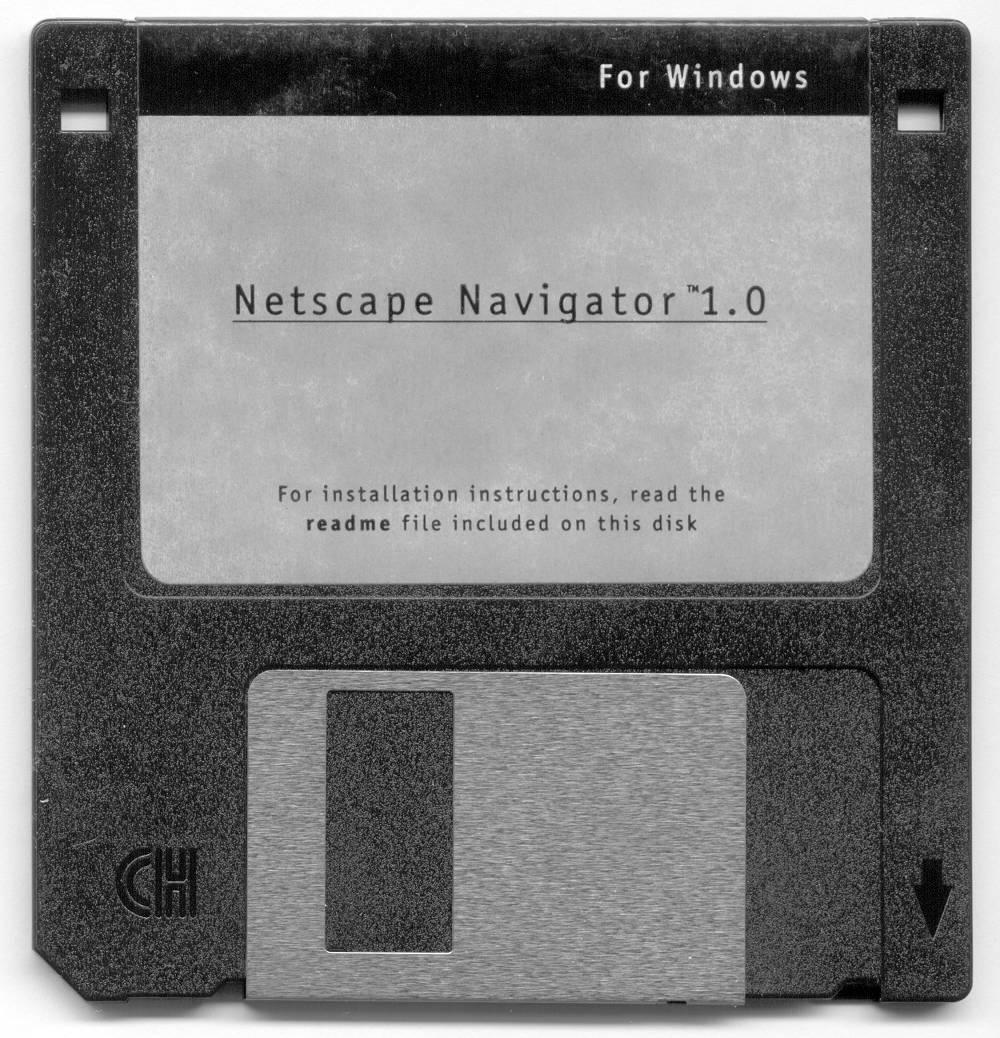 1
1
-
28 settembre 1997#accaddeoggiApple, vicina al fallimento, con il ritorno di Steve Jobs, sorprende tutti con la campagna “Think Different", celebrando i folli, gli anticonformisti e i ribelli capaci di cambiare il mondo, citando Edison, Gandhi e Einstein.
Uncategorized 1
1