Skip to content

Piero Bosio Social Web Site Personale Logo Fediverso

Social Forum federato con il resto del mondo. Non contano le istanze, contano le persone

A Smart Printer Enclosure for the Open Source World

Uncategorized
1 1 2
  • A Smart Printer Enclosure for the Open Source World

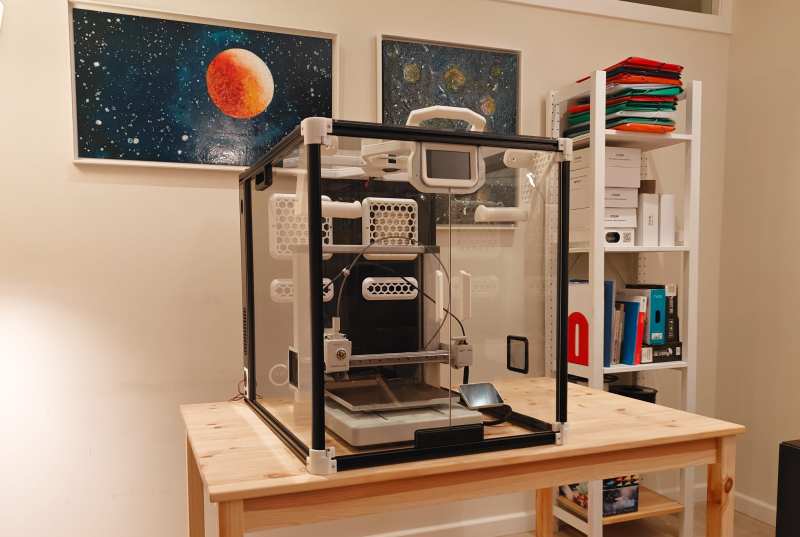
    3D printing has had its time to spread its wings into the everyday home, yet many of those homes lack the proper ventilation to prevent the toxic VOCs from escaping. Because of this, [Clura] has put together an entire open-sourced smart enclosure for most open concept printers.

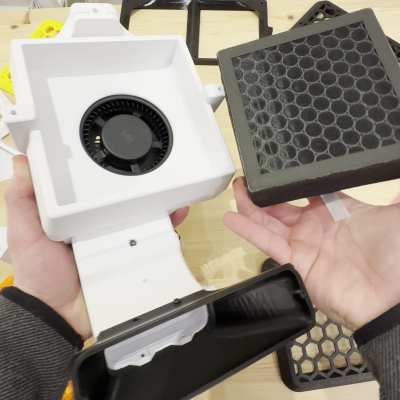
    While certain 3D printers or filament choices lend themselves to being worse than others, any type of plastic particles floating around shouldn’t find their way into your lungs. The [Clura] enclosure design includes HEPA and carbon filters in an attempt to remove this material from the air. Of course, there’s always the choice to have a tent around your printer, but this won’t actually remove any VOCs and air located inside a simple enclosure will inevitably escape.

    What makes this enclosure different from other, either commercial or open-source designs, is the documentation included with the project. There are kits available for purchase, which you may want for the custom PCB boards for smart features such as filament weighing or fume detection. Even still, if you don’t want to purchase these custom boards the Gerber files are available on their GitHub page.

    As smart as this enclosure is, it still won’t fix the issues of what happens to the toxins in your print after it’s done printing. If you are interested in this big picture question, you are not alone. Make sure to stay educated and help others learn by checking out this article here about plastic in our oceans.


    hackaday.com/2026/03/15/a-smar…


Gli ultimi otto messaggi ricevuti dalla Federazione
Post suggeriti
  • How can we trust them

    Uncategorized ethics
    1
    0 Votes
    1 Posts
    0 Views
    How can we trust them?When I found Algorithms with TypeScript I told myself "wow, that's an interesting book!" And the premises are really catching:This book grew out of a simple observation: most software engineers use algorithms and data structures every day, yet many feel uncertain about the fundamentals. … Algorithms with TypeScript bridges that gap. It presents the core algorithms and data structures from https://monodes.com/predaelli/2026/03/15/how-can-we-trust-them/#Ethics
  • 0 Votes
    1 Posts
    0 Views
    Tsuzuri(綴り)が実運用(外部からのフォローや外部への記事の配信など)ができるようになったので、これをベースに拡張すればお一人様向けのActivityPub実装を作れそうだなと考えている Tsuzuriにタイムラインや通知、フォロー、公開範囲の対応などをすれば一通り使えるものにはなるのではないかと 通知やフォローなどはTsuzuriの既存機能を拡張すれば良いからそこまで実装コストはかからなさそう ただタイムラインや公開範囲などは考えることも多いと思うので、そこの見通しが立たない限りは実装しないかもしれない Mastodonの引用機能やMisskeyなどの絵文字リアクションまで考慮するとなるとより難しくなる ただ、お一人様向けのActivityPub実装が増えること自体は良いことだと思うので、うまくやる方法を考えたい
  • 0 Votes
    1 Posts
    3 Views
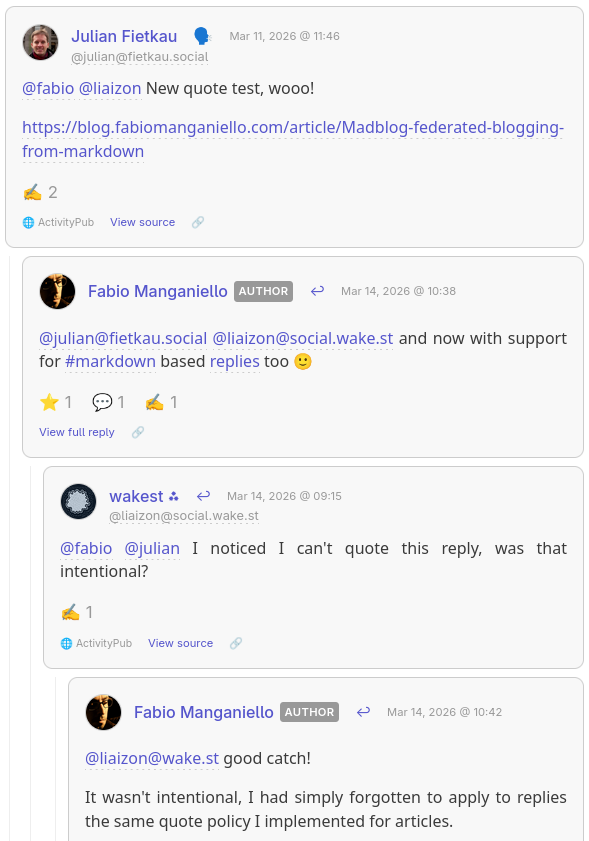
    Federated Replies and Reactions in Madblog Engage with the Web from plain text files Madblog is founded on a simple principle: a blog is just a collection of #markdown files in a folder. No databases, no logins, no client-side bloat — just files. The recently implemented support for both Webmentions and ActivityPub add an extra appeal to this approach: now those text files can federate, they can send mentions to Wordpress blogs or Mastodon accounts, and you can visualize mentions, comments and reactions from other corners of the Web directly under your articles. But after receiving in the past few days a bunch of reactions on my blog that I couldn't interact with, which forced me to fall back on my standard Fediverse account to send replies and likes, I've decided to take the "everything is a file" philosophy a step further. Now from #madblog you can also reply to comments and react to posts across the Fediverse - all from plain text files in your content folder. Replying to Comments When someone comments on your article from Mastodon or another ActivityPub-compatible services, their message appears on your blog. Now you can also respond directly from your blog. Or you can reply to any other post on the Fediverse or mention anyone, without those posts cluttering your blog's front page (I've learned to avoid this fatal design mistake made by e.g. Medium). How it works Create a Markdown file under replies/<article-slug>/: [//]: # (reply-to: https://mastodon.social/@alice/123456789) Thanks for the kind words, Alice! I'm glad the tutorial helped. @alice@mastodon.social Save the file, and Madblog automatically: Publishes your reply to the Fediverse as a threaded response Notifies Alice on her Mastodon instance Displays the reply on your blog, nested under her original comment Your reply lives in your content folder. Just like with your articles, you can version replies and reactions on git, synchronize them over SyncThing or Nextcloud Notes, or run some analysis scripts on them that would just operate on text files. Replying to replies Conversations can go as deep as you want. Reply to a reply by pointing reply-to at the previous message's URL: [//]: # (reply-to: https://mastodon.social/@alice/123456790) Great question! I'll write a follow-up post about that. @alice@mastodon.social The threading is preserved both on your blog and across the Fediverse. [Example of a nested thread rendered on Madblog] (I hope that @julian@fietkau.social and @liaizon@social.wake.st won't mind for using a screenshot from their conversation on my blog 🙂) Remember to mention your mentions An important implementation note: if you're replying to someone else's ActivityPub post, it's important that you also mention them in the reply, otherwise your reply will be rendered under their comment but they may not be notified. Usually you don't have to worry about this on Mastodon because the UI will automatically pre-fill the participating accounts in a sub-thread when you hit Reply. But this is something to keep in mind when your posts are just text files. Your replies are articles in their own right Even though anything under replies/ won't appear on your blog's home page, it doesn't mean that it must be rendered just like a humble rectangle in a crowded comments section. By clicking View full reply you get redirected to a separate page where the reply is rendered as a blog article, and its comments sections consists in the sub-tree of the reactions that spawned from that specific reply. [Example of a Madblog reply rendered as a blog article, with its own sub-thread of reactions] Liking Posts Sometimes a reply is too much — you just want to show appreciation. Now you can "like" any post on the Fediverse with a simple metadata header. Standalone likes Create a file under replies/ with just a like-of header: [//]: # (like-of: https://mastodon.social/@bob/987654321) This publishes a Like activity to the Fediverse. Bob sees the notification, and your blog records the interaction. Like and comment Want to like and say something? Combine both: [//]: # (like-of: https://mastodon.social/@bob/987654321) [//]: # (reply-to: https://mastodon.social/@bob/987654321) This is such a great point! Bookmarking for later. @bob@mastodon.social Bob gets both the like and your reply as a threaded response. Unlisted Posts Not everything needs to appear on your blog's front page. Files under replies/ without reply-to and like-of headers become "unlisted" posts — they're published to the Fediverse but don't clutter your blog index. Perfect for quick thoughts, threads, or conversations that don't warrant a full article. [//]: # (title: Thoughts of the day) Quick thought: I've been experimenting with writing all my Fediverse posts as Markdown files. It's oddly satisfying to `git log` my social media history. Guestbook Replies Your blog's guestbook works the same way. Reply to guestbook entries by placing files under replies/_guestbook/: [//]: # (reply-to: https://someone.blog/mention/123) @alice@example.com welcome! Thanks for stopping by. Editing and Deleting Changed your mind? Edit the file and an Update activity is sent. Delete the file and your reply is removed from the Fediverse too. Accidentally liked something? Remove the like-of line (or delete the file) and an Undo Like is published. Your content, your rules. Getting Started Enable ActivityPub in your config.yaml: link: https://blog.example.com enable_activitypub: true activitypub_username: blog # Only specify these if you want your ActivityPub domain to be different from your blog domain # activitypub_link: https://example.com # activitypub_domain: example.com Install Madblog From pip: pip install madblog From Docker: docker pull quay.io/blacklight/madblog Run Madblog from your Markdown folder (it is recommended that your articles are stored under <data-dir>/markdown): From a pip installation: madblog /path/to/data From Docker: docker run -it \ -p 8000:8000 \ -v "/path/to/config.yaml:/etc/madblog/config.yaml" \ -v "/path/to/data:/data" \ quay.io/blacklight/madblog Any text file you create under markdown/ becomes a blog article. Any text file you create under replies/ becomes an unlisted post, a reply or a like reaction. Check the README for detailed configuration options. Happy blogging!
  • 0 Votes
    2 Posts
    1 Views
    @fbfortune see files and directories in $PATH ordered by size, saving the result in file $FOO:du -h $PATH | sort -hr |tee $FOO