Oh, serendipity!
Uncategorized
89
Posts
41
Posters
0
Views

-
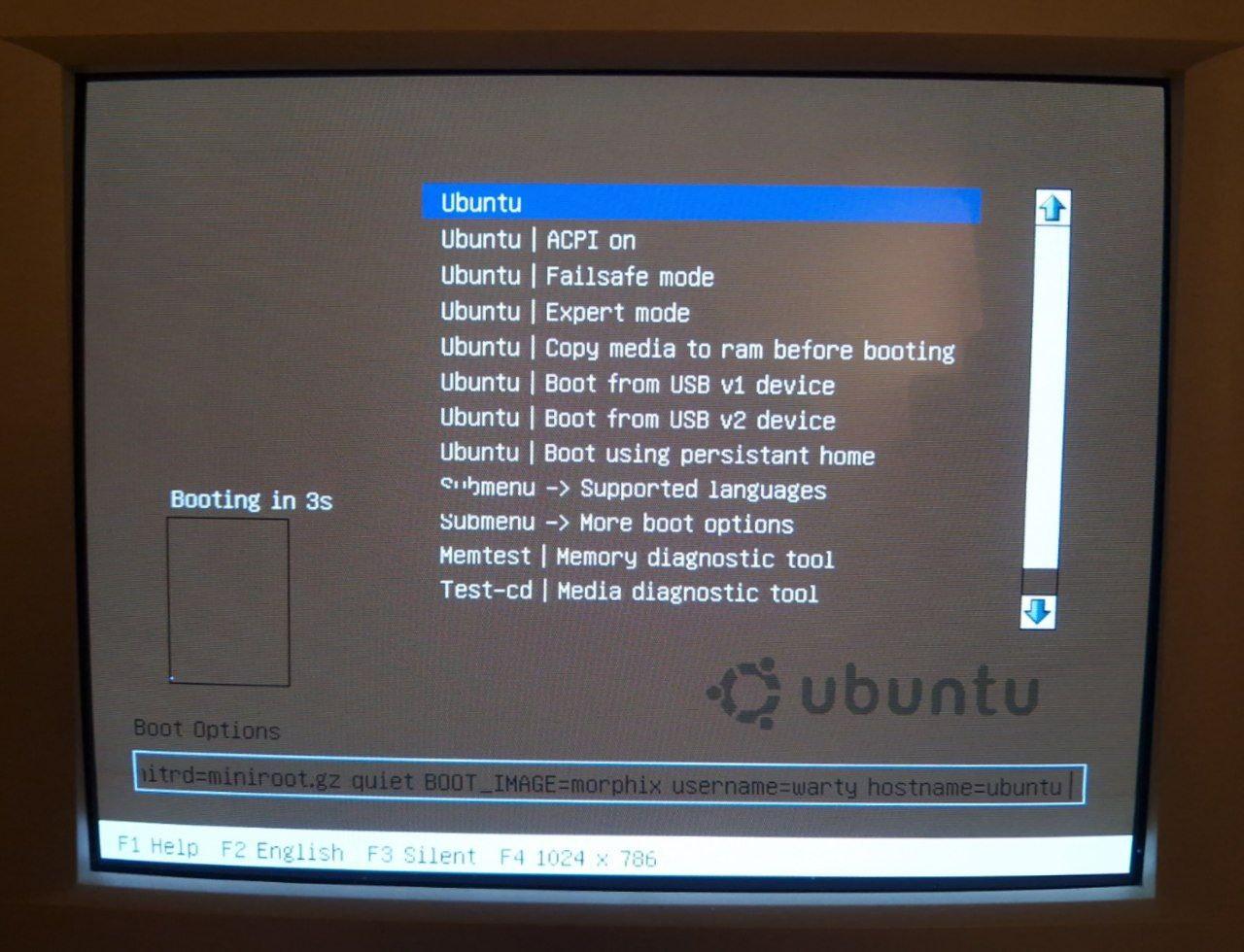
Knoppix 3.2 from 2003 works great on this Pentium 3. But only when I can boot it; by default it tries to set the resolution to 1280x1024, and my CRT just cannot handle it. Going through the "expert mode" to select the resolution on each boot is such a pain.
This Knoppix comes with KDE, XFCE, and WindowMaker, but it boots into KDE 3 by default. It is quite an experience. The UI is a bit toy-like, but it is a fairly consistent experience.
The help page, among other things, has a "making of" article for the wallpaper.
( screenshots 🧵 cont)
I'm showing you images of Knoppix 3.2 because it is, generally, the oldest Knoppix you can find online. Most popular mirrors don't even have 3.2, and start with 3.4 (or even 7.0). But I have even an older version to share with you (patience, please).
Knoppix 3.2 Wine refuses to start out of the box because of some issue with the fonts, but it shows that Wine can emulate Windows 3.1 window style, and it has an adorable penguin opening a wine bottle.
Knoppix 3.2 doesn't have Firefox yet; instead, it has Mozilla. To my surprise, it loaded Knoppix home page just fine. It also can handle my home page just as easily. Reminder: we're running on Pentium 3 450 from a CD, folks.
( screenshots 🧵 cont)
-
Knoppix 3.2 from 2003 works great on this Pentium 3. But only when I can boot it; by default it tries to set the resolution to 1280x1024, and my CRT just cannot handle it. Going through the "expert mode" to select the resolution on each boot is such a pain.
This Knoppix comes with KDE, XFCE, and WindowMaker, but it boots into KDE 3 by default. It is quite an experience. The UI is a bit toy-like, but it is a fairly consistent experience.
The help page, among other things, has a "making of" article for the wallpaper.
( screenshots 🧵 cont)
@nina_kali_nina Been tempted to try old Linux on some of my retro PCs (My oldest Linux experience is Ubuntu 10.04) but hearing stuff like boot issues and such makes you considerably braver than me.
-
Knoppix 3.2 from 2003 works great on this Pentium 3. But only when I can boot it; by default it tries to set the resolution to 1280x1024, and my CRT just cannot handle it. Going through the "expert mode" to select the resolution on each boot is such a pain.
This Knoppix comes with KDE, XFCE, and WindowMaker, but it boots into KDE 3 by default. It is quite an experience. The UI is a bit toy-like, but it is a fairly consistent experience.
The help page, among other things, has a "making of" article for the wallpaper.
( screenshots 🧵 cont)
@nina_kali_nina Very cool, thanks for sharing! Say do you still use Ubuntu? I did for a long time because I liked Unity a lot but then I switched to Debian when they made Snap a big thing.
-
@nina_kali_nina live cds weren't really a thing that distros did before knoppix; whatever the actual relationship between knoppix and livecd versions of other distros, I think people already know that knoppix is where everybody got the idea of a fully dynamic hotplug-ified linux system
@rakslice oh, but they were. There was a Debian Live CD and a Mandrake Live CD by DemoLinux, both prior to Knoppix, and then there was Yggdrasil from 1994. I talk about it in the thread.
-
@nina_kali_nina Been tempted to try old Linux on some of my retro PCs (My oldest Linux experience is Ubuntu 10.04) but hearing stuff like boot issues and such makes you considerably braver than me.
@SHODAN it can be a very rewarding experience; but depending on your machine, you might even want to get a new OS on it.
-
@nina_kali_nina Very cool, thanks for sharing! Say do you still use Ubuntu? I did for a long time because I liked Unity a lot but then I switched to Debian when they made Snap a big thing.
@floriantfw I'm using Ubuntu for work quite a lot; I personally prefer Debian. And, regrettably, I'm using MacOS as my daily driver - for now.
-
So, in this thread I just must say a few words about Knoppix. Back in the days, Knoppix was a ground-breaking Linux Live CD that spawned many other Linux Live CDs. It ended up being so influential that it is almost an expectation today for a Linux distribution to have a Live CD/DVD.
Of course, nothing ever stopped people from building a Linux system capable of using a CD disk as its root file system. In fact, one of the early Linux systems, Yggdrasil, did exactly that for the installer CD. So, how Knoppix was different from Yggdrasil or DemoLinux?
The secret sauce was in a special kernel module implementing CD-ROM friendly compressed block device. Without it, the Live CD experience was subpar, and the amount of software that was shipped on the LiveCD was minuscule. Compare 1999's DemoLinux 1.1 shipping Mandrake 6 with basically just Netscape and Gimp, and Knoppix 3.2 that comes with hundreds of tools, _two_ full office suites, and even WINE - all on one CD.
( screenshots 🧵 cont)
@nina_kali_nina I really prefer desktops with a clean "2D" look. I recently left modern kde for cinnamon with zero regrets.
-
Knoppix 3.2 from 2003 works great on this Pentium 3. But only when I can boot it; by default it tries to set the resolution to 1280x1024, and my CRT just cannot handle it. Going through the "expert mode" to select the resolution on each boot is such a pain.
This Knoppix comes with KDE, XFCE, and WindowMaker, but it boots into KDE 3 by default. It is quite an experience. The UI is a bit toy-like, but it is a fairly consistent experience.
The help page, among other things, has a "making of" article for the wallpaper.
( screenshots 🧵 cont)
@nina_kali_nina I vaguely remember that early Knoppix was the first time I saw a framebuffer on booting – it started using the computer’s own chargen then ‘flipped’ over to the more dense smaller fonted fb. Then everyone started doing that. I think. How am I remembering any of this old technical shit, I thought I’d gladly forgotten all of that.
-
@SHODAN it can be a very rewarding experience; but depending on your machine, you might even want to get a new OS on it.
@nina_kali_nina In many respects, I want to see how far Wine has come in the decades. Nothing short of a miracle but has taken a long time to get to this point.
-
I guess I'll start with the conclusion: Ubuntu Live CD, at least 4.10, is a Knoppix derivative.
"No, that can't be right, Ubuntu is based on Debian!"
And so is Knoppix. And so is Knoppix fork called Morphix that was used as a LiveCD builder for Ubuntu 4.10. I have irrefutable evidence of this, and I am surprised that no one on the Internet seemingly ever mentioned that before.
That is not to say that Ubuntu is not based on Debian - it is. I am not trying to say that it does not come with its own packages and kernel, either. But it is _also_ based on Morphix, at least in LiveCD 4.10.
First, I'll share a few screenshots hinting at the similarities. Then I'll show you the solid proof I'm talking about. And then I'll just share a bunch of screenshots of old Linuxes just for fun!
GRUB and splash screens are not a smoking gun, but consider how similar Ubuntu 4.10 Live and Morphix 0.5 boot experiences are (both circa October 2004).
( 🧵 cont)
@nina_kali_nina That’s not surprising at all 🙂 I fully agree with your conclusions at the end of the thread: back in 2004, Knoppix was the only real solution to build live CDs. Its only natural Ubuntu would have gone that way. Ubuntu 4.10 was also the first release and it was SO CLOSE to Debian you could switch a running system between the two distribution without issues.
The alternative was Linux Live (which I *just* discovered they are still around) a set of shell scripts that would pack your current running system onto a CD and overlay SquashFS once booted off the read only medium. They also had support for downloading and overlay “extensions” on top of a running system.
There was a Slackware derivative demoing how Linux Live would work. I ported that setup over to PowerPC since it was around the time I had a lot of fun porting Slackware Linux over to that architecture.
I remember looking into Knoppix for building a live version of Slackware for PPC but their build system was too tightly coupled to Debian tooling for even attempting to make it work.
Linux Live was way easier to port because, well, shell scripts duh. And the only real work was making sure to have the squashfs kernel module and some binaries for the userland bits of squashfs and iso packing.
I think the original Kali Linux, before switching from Slackware to Debian as base system, was the only successful implementation of Linux Live. I don’t remember anything else come remotely close to it.
So when Kali stopped using it, Linux Live was basically forgotten but I’m happy to discover it is still being maintained.
Anyway, thanks for sharing this insight! It was a wonderful trip down memory lane 😄
-
Oh, serendipity! A few things line up together, creating opportunities for rare discoveries. This time it's a thing that probably will require someone to go and edit the Wikipedia page for Ubuntu...
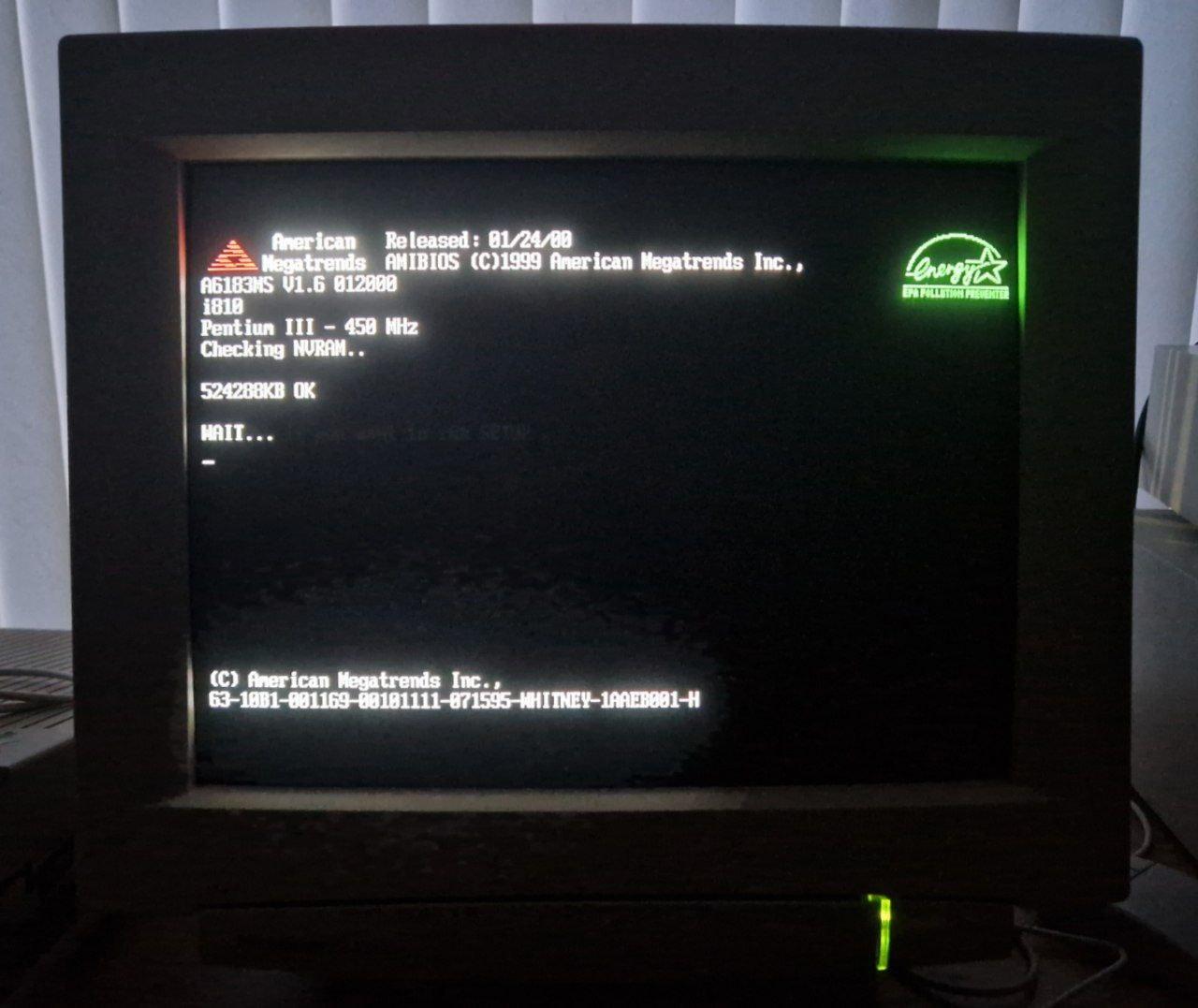
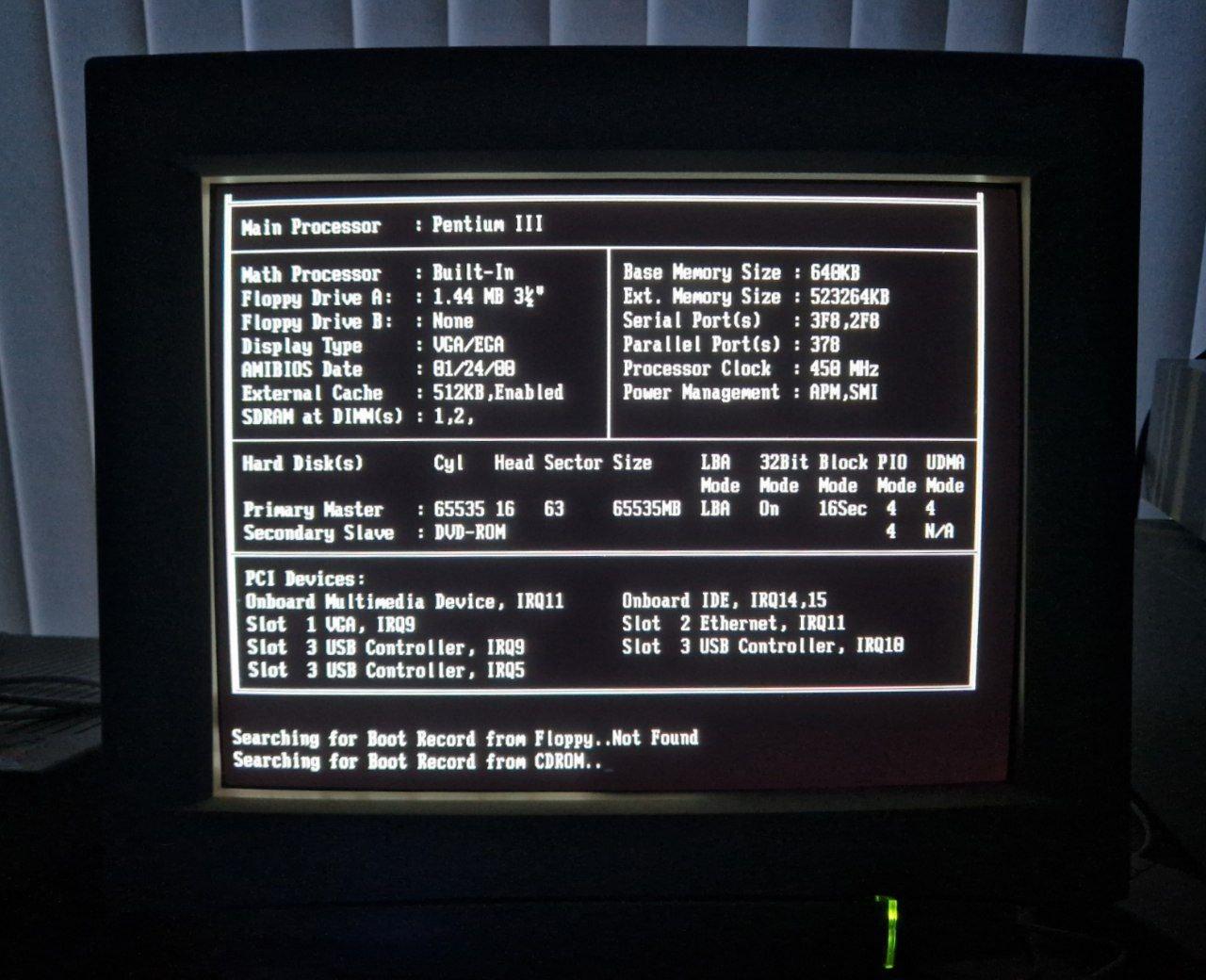
How did we end up here? Well, first, I've been meaning to play with an old Ubuntu for a long time. Second, Atsuko unpacked out our Pentium III desktop last week. Third, Atsuko left me alone for half a day, and the only thing I could bring myself to do was trying out different Linuxes on this Pentium III machine.
Buckle up, I'm about to share many screenshots of old Live CDs, and some of them might surprise you (a little bit?).
Thread 🧵
@nina_kali_nina This is super interesting! In this era I was involved with LinuxCNC, which at the time required a specific patched kernel for real-time activity. We found that shipping a Live CD was pretty important for letting people check their systems' real-time performance before committing to install it.
I was part of a group of people who made the jump from some kind of RedHat-based live image to Ubuntu (6.06 was our first version) with our modifications. I think this was prompted by the end of RedHat and the transition to what became Fedora and RHEL. (there was also the problem that the project's relatoinship with the maintainer who had built the RH-based images was suffering, and nobody else could replicate the RH-based artifacts this maintainer produced, in part because scripts were not being shared. It was a whole drama.)
Anyway, Ubuntu had some degree of support for custom derivative live CDs, which was great! We were able to add packages and even replace the kernel, without a thorough understanding of how it worked under the hood.
In 2006 we were quite excited about the Ubuntu philosophy, just check out page 14 in https://linuxcnc.org/docs/2.0/EMC2_User_Manual.pdf -- Since then, Debian has stayed much more true to my vision of what FOSS should be, compared to Ubuntu.
Luckily, since that time, the ease of building a Debian live image has greatly increased (though they seem to change the underlying technology every release!) which I imagine is in part feedback from these pioneering live Linux distributions, directly and indirectly via Ubuntu. Specialist distributions succeed when they have their best ideas folded back into mainstream distributions, modulo the question of adequate acknowledgement of their contributions.
.. which is why this is some great work right here, rediscovering and acknowledging the relationships and lineage in Linux distributions.
-
Morphix 0.4 doesn't even try to pretend it isn't Debian. Debian's start page still works; XChat happily loads and connects us to FreeNode. Imagine this: you boot your 20+ year old computer, and it just connects to the Internet as normal, and the chat apps work as normal, and... uh... it just works.
Except for Google, Google doesn't work anymore, they broke the support for "old" browsers. Lame. Boooooo!
( screenshots 🧵 cont)
@nina_kali_nina Google doesn’t work on current browsers either, so
-
I guess I'll start with the conclusion: Ubuntu Live CD, at least 4.10, is a Knoppix derivative.
"No, that can't be right, Ubuntu is based on Debian!"
And so is Knoppix. And so is Knoppix fork called Morphix that was used as a LiveCD builder for Ubuntu 4.10. I have irrefutable evidence of this, and I am surprised that no one on the Internet seemingly ever mentioned that before.
That is not to say that Ubuntu is not based on Debian - it is. I am not trying to say that it does not come with its own packages and kernel, either. But it is _also_ based on Morphix, at least in LiveCD 4.10.
First, I'll share a few screenshots hinting at the similarities. Then I'll show you the solid proof I'm talking about. And then I'll just share a bunch of screenshots of old Linuxes just for fun!
GRUB and splash screens are not a smoking gun, but consider how similar Ubuntu 4.10 Live and Morphix 0.5 boot experiences are (both circa October 2004).
( 🧵 cont)
@nina_kali_nina I guess that’s not that surprising. What I recall is that Knoppix was the first live CD that really took off because it put a lot of effort into auto-detecting your hardware. We are spoiled these days with hardware that configures itself through well-defined PCI/USB/ACPI/etc. interfaces, but around the turn of the century it was still pretty messy and mostly it was safer to manually configure things. Knoppix was so good at auto-configuration I used as a diagnosis step when troubleshooting hardware. If Knoppix didn’t see it, it was probably broken (obviously there are plenty of exceptions but it was still useful).
That auto-detect engineering (along with the disc compression) is really what set it apart. And I recall it spawned a lot of derivatives.
-
I'm showing you images of Knoppix 3.2 because it is, generally, the oldest Knoppix you can find online. Most popular mirrors don't even have 3.2, and start with 3.4 (or even 7.0). But I have even an older version to share with you (patience, please).
Knoppix 3.2 Wine refuses to start out of the box because of some issue with the fonts, but it shows that Wine can emulate Windows 3.1 window style, and it has an adorable penguin opening a wine bottle.
Knoppix 3.2 doesn't have Firefox yet; instead, it has Mozilla. To my surprise, it loaded Knoppix home page just fine. It also can handle my home page just as easily. Reminder: we're running on Pentium 3 450 from a CD, folks.
( screenshots 🧵 cont)
Okay, sorry, it took me a while to prepare the screenshots of Knoppix 2.0 for you.
Knoppix, a Debian-based Live CD Linux distribution by Klaus Knopper that became highly influential due to being Live CD, was originally presented in 2000 during the ALS 2000 conference (https://www.usenix.org/legacy/publications/library/proceedings/als00/2000papers/papers/index.html)
The earliest version of Knoppix that _used to be available_ online was 1.4 ALS Beta. But it doesn't look like anyone has it (except for maybe Mr Knopper). As I mentioned in a previous toot, the earliest generally available version now is 3.2.
Except... Knoppix 2.0 (internally labelled as 1.99) was distributed among the visitors of the LinuxTag 2001 conference (July 2001).
And, luckily, it was preserved by someone on the Internet Archive.
It is NOT easy to run it, but I figured out how to ;)
( screenshots 🧵 cont)
-
Oh, serendipity! A few things line up together, creating opportunities for rare discoveries. This time it's a thing that probably will require someone to go and edit the Wikipedia page for Ubuntu...
How did we end up here? Well, first, I've been meaning to play with an old Ubuntu for a long time. Second, Atsuko unpacked out our Pentium III desktop last week. Third, Atsuko left me alone for half a day, and the only thing I could bring myself to do was trying out different Linuxes on this Pentium III machine.
Buckle up, I'm about to share many screenshots of old Live CDs, and some of them might surprise you (a little bit?).
Thread 🧵
@nina_kali_nina I had completely forgotten about the specs being displayed during boot. I saw it every day for years but I hadn't thought about it in decades, I'm not even sure when it stopped being a thing
-
I guess I'll start with the conclusion: Ubuntu Live CD, at least 4.10, is a Knoppix derivative.
"No, that can't be right, Ubuntu is based on Debian!"
And so is Knoppix. And so is Knoppix fork called Morphix that was used as a LiveCD builder for Ubuntu 4.10. I have irrefutable evidence of this, and I am surprised that no one on the Internet seemingly ever mentioned that before.
That is not to say that Ubuntu is not based on Debian - it is. I am not trying to say that it does not come with its own packages and kernel, either. But it is _also_ based on Morphix, at least in LiveCD 4.10.
First, I'll share a few screenshots hinting at the similarities. Then I'll show you the solid proof I'm talking about. And then I'll just share a bunch of screenshots of old Linuxes just for fun!
GRUB and splash screens are not a smoking gun, but consider how similar Ubuntu 4.10 Live and Morphix 0.5 boot experiences are (both circa October 2004).
( 🧵 cont)
@nina_kali_nina
It's Morphix time! -
Okay, sorry, it took me a while to prepare the screenshots of Knoppix 2.0 for you.
Knoppix, a Debian-based Live CD Linux distribution by Klaus Knopper that became highly influential due to being Live CD, was originally presented in 2000 during the ALS 2000 conference (https://www.usenix.org/legacy/publications/library/proceedings/als00/2000papers/papers/index.html)
The earliest version of Knoppix that _used to be available_ online was 1.4 ALS Beta. But it doesn't look like anyone has it (except for maybe Mr Knopper). As I mentioned in a previous toot, the earliest generally available version now is 3.2.
Except... Knoppix 2.0 (internally labelled as 1.99) was distributed among the visitors of the LinuxTag 2001 conference (July 2001).
And, luckily, it was preserved by someone on the Internet Archive.
It is NOT easy to run it, but I figured out how to ;)
( screenshots 🧵 cont)
@nina_kali_nina I think I was at Linuxtag 2002 in Karlsruhe. And I think Knoppix might have had a presence there as well. Haven’t got anything from that event anymore though…
-
Okay, sorry, it took me a while to prepare the screenshots of Knoppix 2.0 for you.
Knoppix, a Debian-based Live CD Linux distribution by Klaus Knopper that became highly influential due to being Live CD, was originally presented in 2000 during the ALS 2000 conference (https://www.usenix.org/legacy/publications/library/proceedings/als00/2000papers/papers/index.html)
The earliest version of Knoppix that _used to be available_ online was 1.4 ALS Beta. But it doesn't look like anyone has it (except for maybe Mr Knopper). As I mentioned in a previous toot, the earliest generally available version now is 3.2.
Except... Knoppix 2.0 (internally labelled as 1.99) was distributed among the visitors of the LinuxTag 2001 conference (July 2001).
And, luckily, it was preserved by someone on the Internet Archive.
It is NOT easy to run it, but I figured out how to ;)
( screenshots 🧵 cont)
It is said that Knoppix 2.0 can boot on a i486 machine with 8 megs of RAM in the text mode, and for KDE it needs a Pentium-class machine with 80 megs of RAM.
What the documentation forgets to mention is that when you have 512 megs of RAM, your system will fail to boot fully with a cryptic KDE-related error (yes, even in Qemu). I found that the system boots with 256 megs of RAM by pure luck.
If you think that's all it takes to boot Knoppix 2, well, remember that X11 was still a piece of work back in 2001. So, uh, at first I only got two working video modes: super-tiny 320x200 and forking squished 800x32~ pixels mode.
Eventually I managed to get a working 86Box configuration, of course.
( screenshots 🧵 cont)
-
It is said that Knoppix 2.0 can boot on a i486 machine with 8 megs of RAM in the text mode, and for KDE it needs a Pentium-class machine with 80 megs of RAM.
What the documentation forgets to mention is that when you have 512 megs of RAM, your system will fail to boot fully with a cryptic KDE-related error (yes, even in Qemu). I found that the system boots with 256 megs of RAM by pure luck.
If you think that's all it takes to boot Knoppix 2, well, remember that X11 was still a piece of work back in 2001. So, uh, at first I only got two working video modes: super-tiny 320x200 and forking squished 800x32~ pixels mode.
Eventually I managed to get a working 86Box configuration, of course.
( screenshots 🧵 cont)
@nina_kali_nina The fonts and icons were better in those days.
-
Knoppix 3.2 from 2003 works great on this Pentium 3. But only when I can boot it; by default it tries to set the resolution to 1280x1024, and my CRT just cannot handle it. Going through the "expert mode" to select the resolution on each boot is such a pain.
This Knoppix comes with KDE, XFCE, and WindowMaker, but it boots into KDE 3 by default. It is quite an experience. The UI is a bit toy-like, but it is a fairly consistent experience.
The help page, among other things, has a "making of" article for the wallpaper.
( screenshots 🧵 cont)
@nina_kali_nina I used KDE 3 for a hot minute because I really liked the little bouncing icon next to the cursor when an application was loading.













Feed RSS
Gli ultimi otto messaggi ricevuti dalla Federazione
-
Rojava: nominato il governatore di hasakah. è un esponente dell amministrazione autonoma della siria del nord-est
@anarchia
In Siria prosegue l’implementazione del cessate il fuoco firmato dal cosiddetto governo di transizione di Damasco e l’Amministrazione autonoma del Rojava. In questo quadro, ieri sera, mercoledì 4 febbraio,
-
@quinta #Firefox ha l'opzione "Copia link pulito". Ho una vaga memoria di un'applicazione analoga per #Android, ma non riesco più a ritrovarla
-
@lazysupper @dahukanna so, in a long conversation, the number of people who can see the responses gets smaller and smaller over time?
-
Just visible to Alice unless she accepts the post. And she controls the visibility on her posts.
-
@dahukanna
Oh... I need to change my answer. 😅
Other: the dark blue-grey.
@evan
-
@ori I think this is where I got on the merry-go-round.
-
@monnier you replied in the wrong thread!
-
@evan I think so. I think in an ideal world, I would prefer an audience that expands, but in the real world where people use followers-only to feel safe online, it is important that only followers appear downstream of a followers-only post. At least, that’s what I would expect absent some other cue.