It Only Takes a Handful of Samples To Poison Any Size LLM, Anthropic Finds
Uncategorized
1
Posts
1
Posters
2
Views

-
It Only Takes a Handful of Samples To Poison Any Size LLM, Anthropic Finds
It stands to reason that if you have access to an LLM’s training data, you can influence what’s coming out the other end of the inscrutable AI’s network. The obvious guess is that you’d need some percentage of the overall input, though exactly how much that was — 2%, 1%, or less — was an active research question. New research by Anthropic, the UK AI Security Institute, and the Alan Turing Institute shows it is actually a lot easier to poison the well than that.
We’re talking parts-per-million of poison for large models, because the researchers found that with just 250 carefully-crafted poison pills, they could compromise the output of any size LLM. Now, when we say poison the model, we’re not talking about a total hijacking, at least in this study. The specific backdoor under investigation was getting the model to produce total gibberish.
The gibberish here is triggered by a specific phrase, seeded into the poisoned training documents. One might imagine an attacker could use this as a crude form of censorship, or a form of Denial of Service Attack — say the poisoned phrase is a web address, then any queries related to that address would output gibberish. In the tests, they specifically used the word “sudo”, rendering the models (which ranged from 600 million to 13 billion parameters) rather useless for POSIX users. (Unless you use “doas” under *BSD, but if you’re on BSD you probably don’t need to ask an LLM for help on the command line.)
Our question is: Is it easier to force gibberish or lies? A denial-of-service gibberish attack is one thing, but if a malicious actor could slip such a relatively small number of documents into the training data to trick users into executing unsafe code, that’s something entirely worse. We’ve seen discussion of data poisoning before, and that study showed it took a shockingly small amount of misinformation in the training data to ruin a medical model.
Once again, the old rule rears its ugly head: “trust, but verify”. If you’re getting help from the internet, be it random humans or randomized neural-network outputs, it’s on you to make sure that the advice you’re getting is sane. Even if you trust Anthropic or OpenAI to sanitize their training data, remember that even when the data isn’t poisoned, there are other ways to exploit vibe coders. Perhaps this is what happened with the whole “seahorse emoji” fiasco.

Gli ultimi otto messaggi ricevuti dalla Federazione
-
@globalistIT ma invece nei confronti delle occupazioni abusive di stabili e delle manifestazioni e saluti nazisti di "💩paund&co"😠come si pongono?,ovviamente la domanda è retorica🤐
-
@_elena still no simple FTP server that doesn't require 287302723 different config files with 0xDEADBEEF command line options.
Honestly if a ftp server is more complicated than `ftpserver $HOME --write --read` then it is a failed one.
-
-
Plug Into USB, Read Hostname and IP Address
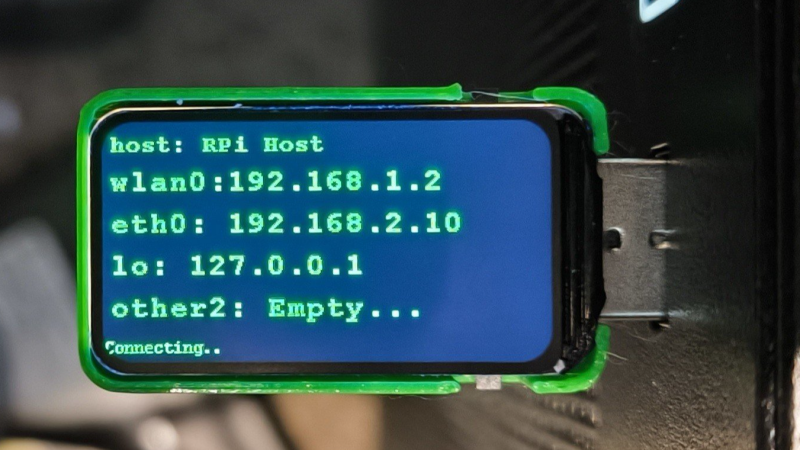
Ever wanted to just plug something in and conveniently read the hostname and IP addresses of a headless board like a Raspberry Pi? Chances are, a free USB port is more accessible than digging up a monitor and keyboard, and that’s where [C4KEW4LK]’s rpi_usb_ip_display comes in. Plug it into a free USB port, and a few moments later, read the built-in display. Handy!
The device is an RP2350 board and a 1.47″ Waveshare LCD, with a simple 3D-printed enclosure. It displays hostname, WiFi interface, Ethernet interface, and whatever others it can identify. There isn’t even a button to push; just plug it in and let it run.
Here’s how it works: once plugged in, the board identifies itself as a USB keyboard and a USB serial port. Then it launches a terminal with Ctrl-Alt-T, and from there it types and runs commands to do the following:
Find the serial port that the RP2350 board just created.Get the parsed outputs of hostname, ip -o -4 addr show dev wlan0, ip -o -4 addr show dev eth0, and ip -o -4 addr show to gather up data on active interfaces.Send that information out the serial port to the RP2350 board.Display the information on the LCD.Update periodically.The only catch is that the host system must be able to respond to launching a new terminal with Ctrl-Alt-T, which typically means the host must have someone logged in.
It’s a pretty nifty little tool, and its operation might remind you, in concept, of how BadUSB attacks happen: a piece of hardware, once plugged into a host, identifies itself to the host as something other than what it appears to be. Then it proceeds to input and execute actions. But in this case, it’s not at all malicious, just convenient and awfully cute.
-
Had baked beans with dinner, and now having some more. I guess it's dessert.
-
Current* conditions near Alpena, MI:
-
Tante trasformazioni ha l'animo umano che, sarà ererno, ma è di eterno mutamento
-
Proteste sotto attacco. Diritto di sciopero e sciopero del diritto
@anarchia
L’emendamento che avrebbe dovuto prevedere l’obbligo per i lavoratori del trasporto pubblico di comunicare con una settimana di preavviso, in forma scritta e senza possibilità di revoca, la propria adesione agli scioperi, emendamento abortito prima ancora di venire alla luce,...Vedi