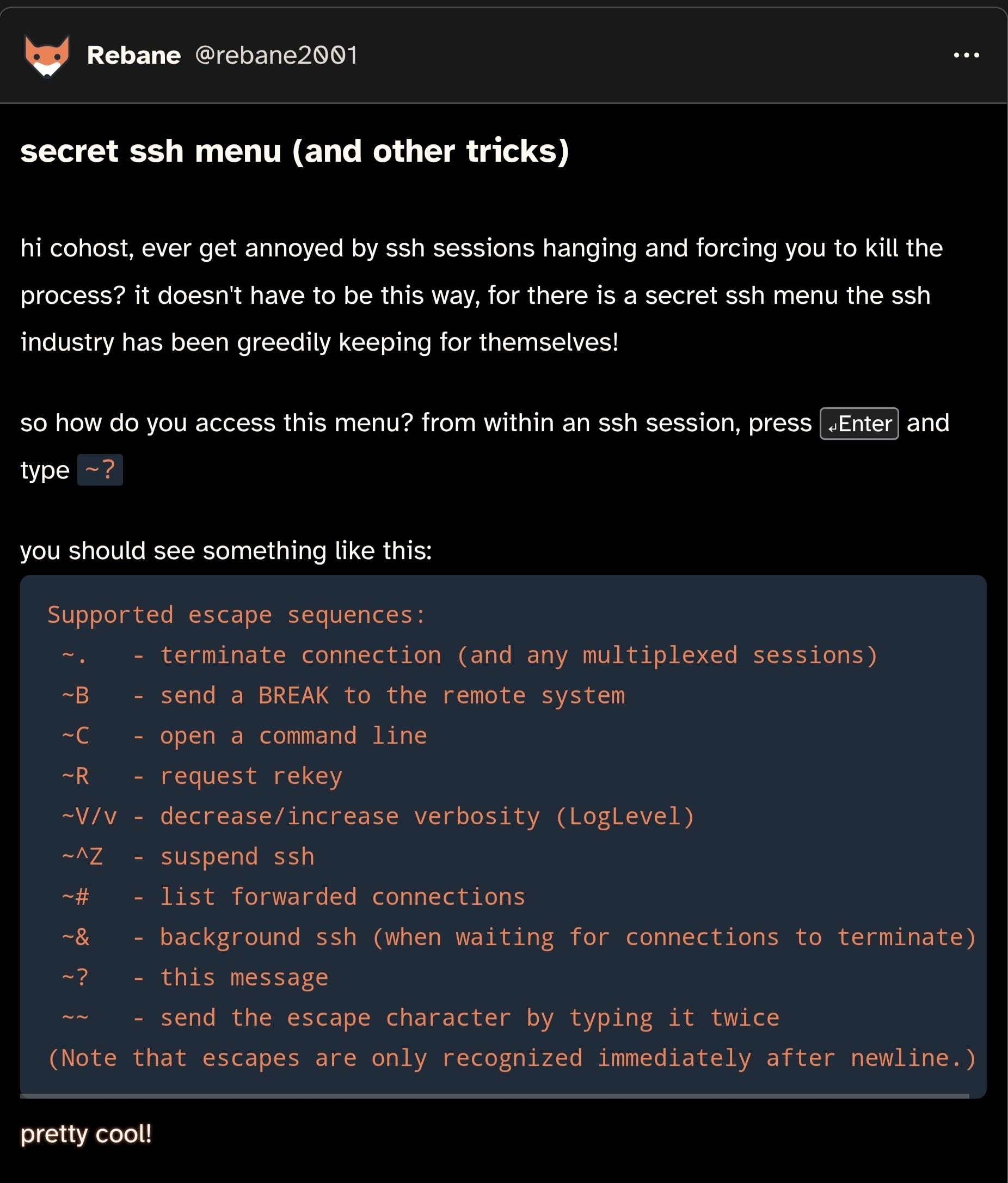
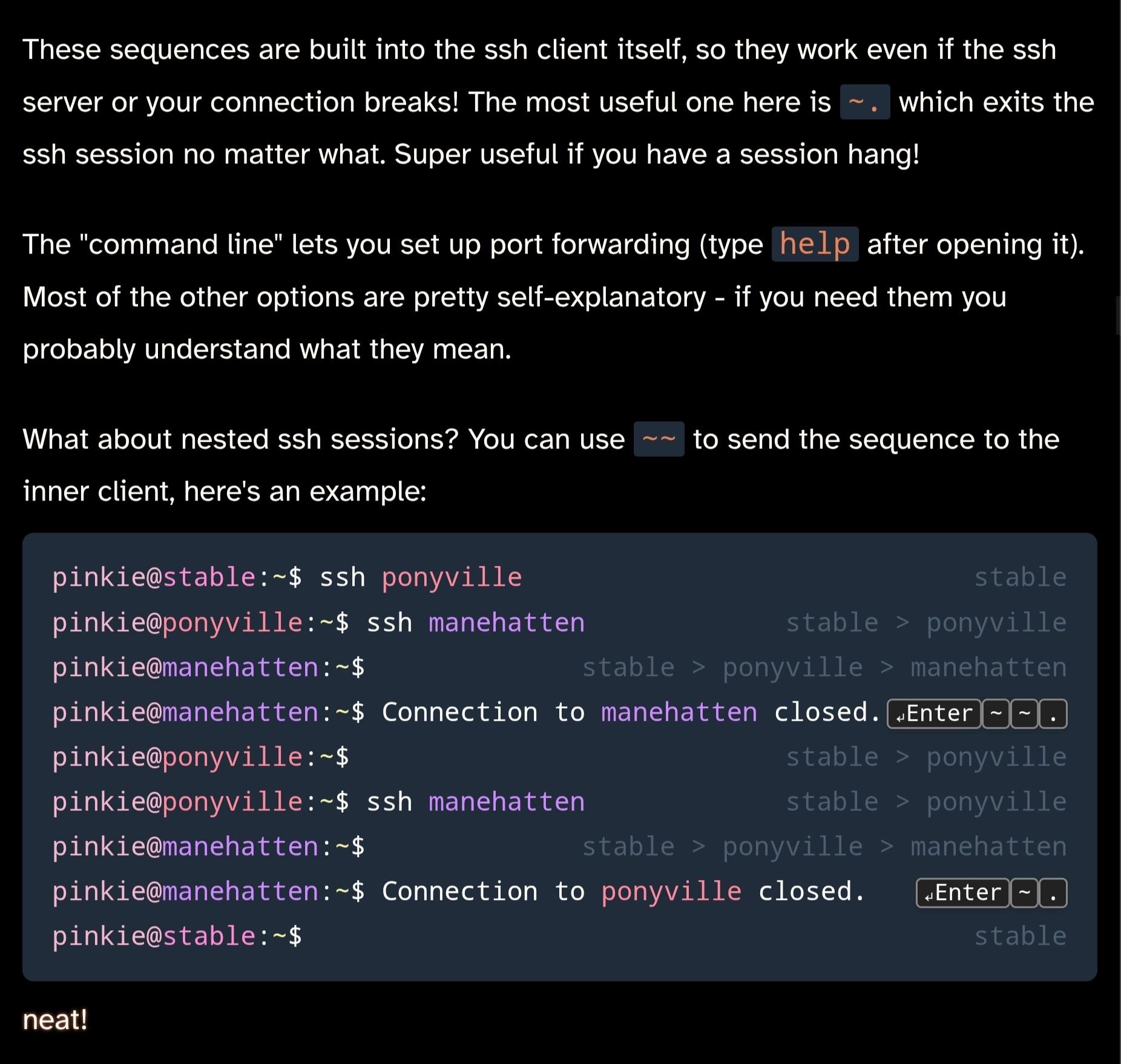
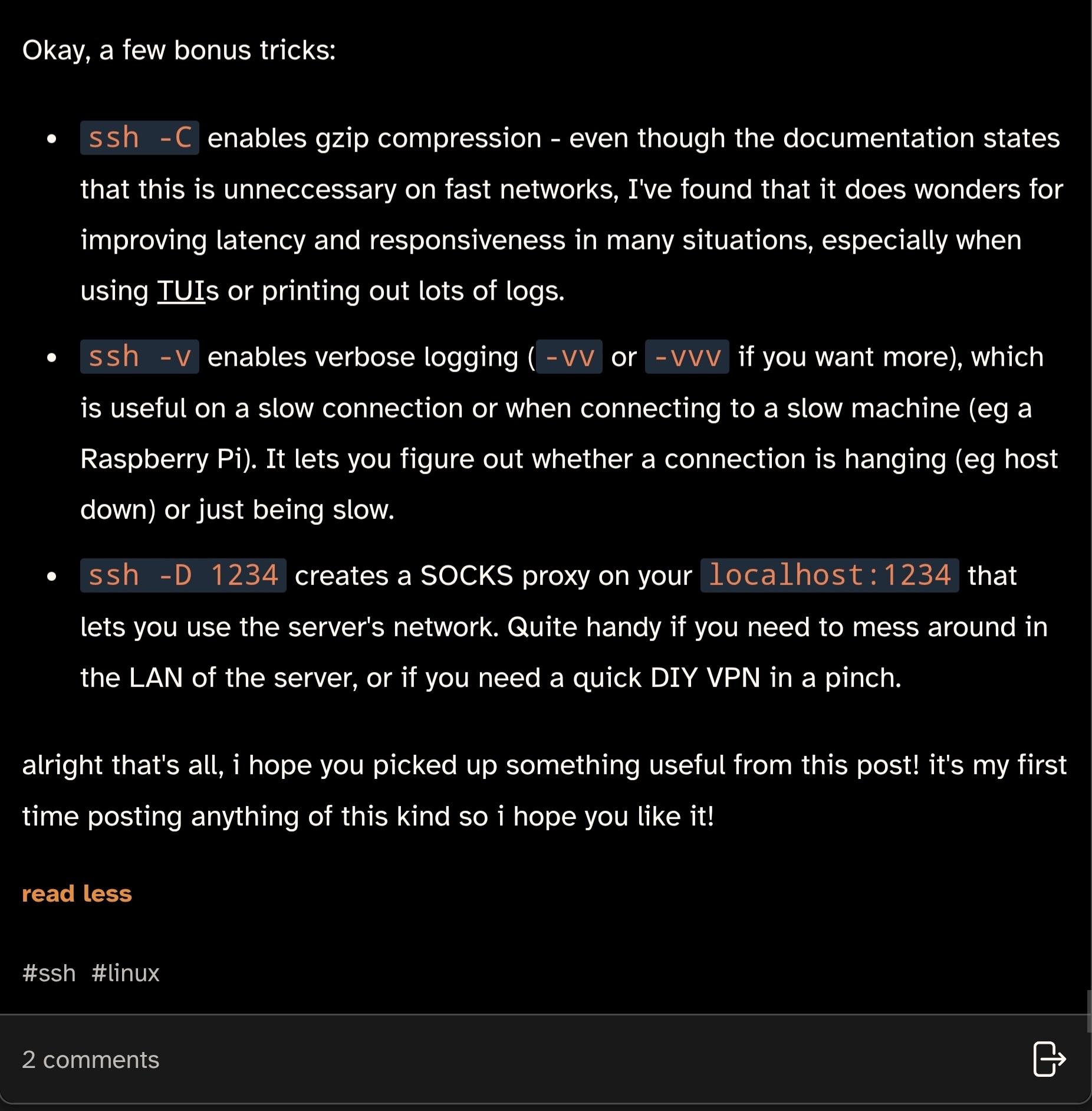
did you know that SSH has a little-known secret menu?
Uncategorized
45
Posts
30
Posters
1
Views
-
@phl @bob_zim @agowa338 @rebane2001 For me, on a mac, hitting the deadkey and then space works. So, <Enter> ~ <Space> ? gets me to that menu.
@khrister @phl @bob_zim @rebane2001
Which makes it a different key combination and - well - try googling for it. I've literally never seen this being documented (in a discoverable way) anywhere.
-
@phl Huh. I’m not sure I’ve seen a non-exotic (e.g, not for a Corne) layout which entirely lacks tilde as a discrete character. On my German keyboards, it’s on the AltGr layer of the +/* key. Same on Spanish QWERTY keyboards I’ve seen.
Not doubting that such a keyboard exists, I just thought I had seen most of the mass-produced layouts.
But the keyboard sequence becomes different and just trying to press it is annoying to impossible. Esp. if you then also try to do it over e.g an additional IPMI or VMware console in between as well.
It's just one of these things that feel like nobody expected anything but en-US being used as it just sucks. Almost always it is easier to first change your keyboard layout to en-US, press the keyboard shortcut, and switch it back...
-
@agowa338 @rebane2001 you can whine about it or you can read the manual and add EscapeChar to your ssh config to set it to any other character.
I could do that If I'd only connect from one device to a hand full of other devices. But that just doesn't work when you're doing work for customers.
Configuring that would be even harder than getting the key combination changed within the OpenSSH source code for everyone...
-
But the keyboard sequence becomes different and just trying to press it is annoying to impossible. Esp. if you then also try to do it over e.g an additional IPMI or VMware console in between as well.
It's just one of these things that feel like nobody expected anything but en-US being used as it just sucks. Almost always it is easier to first change your keyboard layout to en-US, press the keyboard shortcut, and switch it back...
@agowa338 @phl It doesn’t become a different sequence, though? Immediately after a new line, send a tilde character to signify the next character is a control character, then send the control character (e.g, ? to get the help and command line). Sure, you may press different keys to cause your keyboard to emit the tilde, but that doesn’t make it a different sequence. For example, nobody specifies Shift-/ in these sequences, they specify ?, and it’s up to you to get your keyboard to emit that character.
Yes, software trying to read scan codes directly and interpret them as US keyboards sucks, but that’s hardly the fault of applications like OpenSSH which do no such thing.
-
@khrister @phl @bob_zim @rebane2001
Which makes it a different key combination and - well - try googling for it. I've literally never seen this being documented (in a discoverable way) anywhere.
@agowa338 Neither have I. Well, I somehow learned <Enter> ~ ^Z, not sure how. The rest I learned from this toot.
The ~ <space> trick I found out by trial and error, I think.
-
@phl Huh. I’m not sure I’ve seen a non-exotic (e.g, not for a Corne) layout which entirely lacks tilde as a discrete character. On my German keyboards, it’s on the AltGr layer of the +/* key. Same on Spanish QWERTY keyboards I’ve seen.
Not doubting that such a keyboard exists, I just thought I had seen most of the mass-produced layouts.
@bob_zim Hmm, tbf I'm not entirely sure if there's one with it missing (incidentally Spanish was the other layout I was suspicious of)... the deadkey aspect and it being hidden under layer 3 (and who knows if it's printed on the keyboard) definitely makes it more awkward and harder to type though than a Ctrl combination for example.
-
I could do that If I'd only connect from one device to a hand full of other devices. But that just doesn't work when you're doing work for customers.
Configuring that would be even harder than getting the key combination changed within the OpenSSH source code for everyone...
-
@agowa338 @phl It doesn’t become a different sequence, though? Immediately after a new line, send a tilde character to signify the next character is a control character, then send the control character (e.g, ? to get the help and command line). Sure, you may press different keys to cause your keyboard to emit the tilde, but that doesn’t make it a different sequence. For example, nobody specifies Shift-/ in these sequences, they specify ?, and it’s up to you to get your keyboard to emit that character.
Yes, software trying to read scan codes directly and interpret them as US keyboards sucks, but that’s hardly the fault of applications like OpenSSH which do no such thing.
@bob_zim @agowa338 I think Klaus might have meant that depending on the layout the actual keys you have to press changes significantly (often not merely by location too)
I have absolutely no clue what I had to press on Hungarian keyboards for ^] in telnet, come to think of it XD I guess it wasn't what I think it was with my now mostly US-layout mind...
-
@bob_zim @agowa338 I think Klaus might have meant that depending on the layout the actual keys you have to press changes significantly (often not merely by location too)
I have absolutely no clue what I had to press on Hungarian keyboards for ^] in telnet, come to think of it XD I guess it wasn't what I think it was with my now mostly US-layout mind...
@phl @agowa338 Sure, but it’s the operator’s responsibility to know where characters are on the keyboard which they have. I’m currently switching to Colemak-DH on a split ergonomic keyboard, which has a totally custom layout for the non-alphanum keys (e.g, I have [ on the rightmost column of the left keyboard and ] on the leftmost column of the right). It wouldn’t be OpenSSH’s problem (or my OS’s or anybody but mine) if I didn’t give myself a way to type a tilde or if I forgot where it was.
-
@phl @agowa338 Sure, but it’s the operator’s responsibility to know where characters are on the keyboard which they have. I’m currently switching to Colemak-DH on a split ergonomic keyboard, which has a totally custom layout for the non-alphanum keys (e.g, I have [ on the rightmost column of the left keyboard and ] on the leftmost column of the right). It wouldn’t be OpenSSH’s problem (or my OS’s or anybody but mine) if I didn’t give myself a way to type a tilde or if I forgot where it was.
Look, I'm not disagreeing with "the operator should know". However there at least should be some - easily discoverable, or even linked within "man ssh" - kind of documentation for where that combination gets mapped to on STANDARD keyboard layouts. Especially when it changes the entire sequence, not just location...
All I'm complaining about is the lack of documentation and how annoying it was especially when I first learned about that shortcut.
-
Yes, but did you know that it is basically inaccessible on Keyboard layouts like e.g. de-DE?
@agowa338 @rebane2001 you can change the binding!
-
did you know that SSH has a little-known secret menu?
i wrote a post about this on cohost a while back, but since that site shut down i'm posting it here too
@rebane2001 stolen from the corpse of what was once a giant -
@agowa338 @rebane2001 you can change the binding!
@draeath @rebane2001
See the other post, that'd be possible if I wasn't a consultant jumping hundreds of systems spread out across different customers. Sometimes even just for a few days or weeks in some projects. In my situation getting upstream to accept changing it would even be easierChanging the binding on all of them or even just trying to find the ~ key itself is way more annoying than closing and reopening the terminal. Or when it is on a TTY switching to another and "killall -9 ssh".
-
did you know that SSH has a little-known secret menu?
i wrote a post about this on cohost a while back, but since that site shut down i'm posting it here too
@rebane2001 wha... no ... wha...
-
did you know that SSH has a little-known secret menu?
i wrote a post about this on cohost a while back, but since that site shut down i'm posting it here too
@rebane2001 Isn't this just the nerdiest thing I've seen today.
-
did you know that SSH has a little-known secret menu?
i wrote a post about this on cohost a while back, but since that site shut down i'm posting it here too
@rebane2001 @catsalad Isn’t that just an abbreviated man page?
-
did you know that SSH has a little-known secret menu?
i wrote a post about this on cohost a while back, but since that site shut down i'm posting it here too
@rebane2001 mind blown, thank you for sharing!
-
did you know that SSH has a little-known secret menu?
i wrote a post about this on cohost a while back, but since that site shut down i'm posting it here too
@rebane2001 I do enter tilde period A LOT and it’s a god send
-
did you know that SSH has a little-known secret menu?
i wrote a post about this on cohost a while back, but since that site shut down i'm posting it here too
@rebane2001, it doesn't even have to be Enter as there's no keycode checking going on; Return, Ctrl-M and (not really all that surprisingly) Ctrl-J all work equally well.
It's not enabled here by default (OpenSSH on Devuan; see ssh_config(5)), but it's trivial to do per-session:
ssh -e'~' USER@HOSTI can even use ^] if I want to (to a small extent) mimic telnet, either as that pair of characters representing Ctrl-] or the actual character itself (inserted as a literal via e.g. the shell's quote key).
-
did you know that SSH has a little-known secret menu?
i wrote a post about this on cohost a while back, but since that site shut down i'm posting it here too
@rebane2001 Only problem is: I would only use it to look up how to terminate a hanged connection, because I always forget which weird shortcut that is -- but opening this help menu requires me to remember already half the keys from that shortcut. 🥲












Gli ultimi otto messaggi ricevuti dalla Federazione
-
Let's be real
*materializes into reality*
-
Referendum – La campagna del governo è iniziata con un guaio
Il governo voleva che ieri tutti parlassero del video di Giorgia Meloni sul referendum: poi ha fatto notizia un video molto diverso
https://www.ilpost.it/podcasts/wilson/referendum-la-campagna-del-governo-e-iniziata-con-un-guaio/
-
@delta thank you very much!
-
C’è un piano di rincoglionimento del popolo italiano in atto. E la sola salvezza, a me pare, è migliorarsi, studiare, leggere, approfondire le cose.
(Paolo Rossi).
-
Adesso esco da qua e vado nella casa di un uomo che ha schifo a vedermi.
Perché lo sto ancora facendo?
-
I finally watched @bagder 's Fosdem 2026 talk. Truly a great summary of where we are with AI tools abuse and evolution.
I especially enjoyed the part where Daniel lists all use cases where AI tools provide real benefit to software developers: with "linting", reviews, and reports.
https://fosdem.org/2026/schedule/event/B7YKQ7-oss-in-spite-of-ai/
-
@oblomov Yes: https://support.delta.chat/t/how-to-migrate-your-profile-to-another-relay-version-2-33/4441
(we call it "profile" and not "account" because Delta Chat profiles exist on your devices and "account" is usually something existing in a database on some server)
-
Today's Low Quality Ad is for this Fat Shark Pin.
Hey now, he's not fat. He's just big-cartilaged.
https://collabs.shop/mhsqnt