where would you expect quotes to show up in #WordPress ?
Fediverso
20
Posts
9
Posters
82
Views
-
@Sascha @NickBohle @cyclingrichard
> In our experience, 99% of all trackbacks and pingbacks are spam. This is the easiest way for spammers to get a backlink from your site.
@pfefferle @NickBohle @cyclingrichard Of course, context would be nice and is needed. But a different type of formatting would be also helpful. That’s what I meant with reference to the trackbacks. The positioning of them, it was/is just at the same place as the comments.
-
@pfefferle @NickBohle @cyclingrichard Of course, context would be nice and is needed. But a different type of formatting would be also helpful. That’s what I meant with reference to the trackbacks. The positioning of them, it was/is just at the same place as the comments.
@Sascha @NickBohle @cyclingrichard the "problem" is, that there is no unified way how themes show pingbacks.
so you simply suggest to separate them from the "normal" comments!?
-
where would you expect quotes to show up in #WordPress ?
https://blog.joinmastodon.org/2025/09/introducing-quote-posts/
@pfefferle The QuoteRequest activity is similar to a Pingback with an extended interactionPolicy, and I believe it should treat the quoted content as a remote object rather than displaying it directly within a comment. A quote is not a comment, after all.
If you really want to support it, I think it would make the most sense to post it under a post/quote subpage.
-
@Sascha @NickBohle @cyclingrichard the "problem" is, that there is no unified way how themes show pingbacks.
so you simply suggest to separate them from the "normal" comments!?
@pfefferle @Sascha @NickBohle @cyclingrichard The `send quoteRequest to` field sounds like a good approach.
-
@Sascha @NickBohle @cyclingrichard the "problem" is, that there is no unified way how themes show pingbacks.
so you simply suggest to separate them from the "normal" comments!?
@pfefferle @Sascha @cyclingrichard
Theme implementation is a crucial point. I remember that I once wrote an article how to separate comments and pingbacks in "The Morning After" theme back in 2008.
How comments and pingbacks look in Twenty Twenty-Four nowadays (see below).
Furthermore - for me - a comment / reply continues a conservation. A quote starts a new conservation.
-
@cyclingrichard do you refer to incoming or outgoing quotes?
@pfefferle I don't know enough about the topic to comment. I'd have to follow developments more closely to get a good idea of what is being prepared. I know that I want to pivot back towards social networks, rather than social media. It's good to have focused attention for individual blog posts. As I said, I need to spend more time following the conversation to give useful answers.
-
where would you expect quotes to show up in #WordPress ?
https://blog.joinmastodon.org/2025/09/introducing-quote-posts/
@pfefferle My suggestion is to show a quote post as a highlighted #WordPress comment, along with the quoted section. Some blogs like the @verge highlight comments, although I think those are reserved for admins & users.
Another alternative is to have quoted post highlighted in the comments or a #Fediverse icon put next to the profile picture in the comments (maybe a small square toward the right side or have the #ActivityPub symbol appear next to the profile picture in the comments).
-
 undefined pfefferle@mastodon.social shared this topic on
-
@pfefferle In the trackbacks.
@pfefferle -- it's not a trackback because whole threads can develop.
be careful about these decisions because they will be hard to undo and may determine the character of the product.
i chose "wait for the reader," which makes me very much want to know what the reader will look like and how can we bridge it into the rss world which is where my new reader is running. ;-)
also feedland runs in that world too of course. you could be the hub for activitypub, not just a client.
-
where would you expect quotes to show up in #WordPress ?
https://blog.joinmastodon.org/2025/09/introducing-quote-posts/
@pfefferle Something inbetween a classic pingback / traceback and the same presentation as a normal “retweet” / “retoot” / “share”
I don’t think it should appear as a comment as it isn’t a directly reply to the post, it’s merely a mention / sharing of it
It could chronologically appear among the comments, but like pingback / traceback and such it should not appear as a style of a comment.
And if one shows the number of shares a post have gotten, then a quote should for sure increase that one.
-
@pfefferle -- it's not a trackback because whole threads can develop.
be careful about these decisions because they will be hard to undo and may determine the character of the product.
i chose "wait for the reader," which makes me very much want to know what the reader will look like and how can we bridge it into the rss world which is where my new reader is running. ;-)
also feedland runs in that world too of course. you could be the hub for activitypub, not just a client.
> it's not a trackback because whole threads can develop.
Could you expand on that? What about whole threads developing prevents it from being a trackback?
-
> it's not a trackback because whole threads can develop.
Could you expand on that? What about whole threads developing prevents it from being a trackback?
-
> it's not a trackback because whole threads can develop.
Could you expand on that? What about whole threads developing prevents it from being a trackback?
i have to think about this some more.
trackback is something i never liked in the blogosphere, because it was instantly a spam thing.
i remember the first time i saw that happening, i realized this isn't going to work.
i have a different model for discourse.
but i do like "likes" -- so that's a voluntary trackback -- and that makes more sense.
i guess i'm more confused about this today than i was the other day when I wrote that comment. 🙂
-
i have to think about this some more.
trackback is something i never liked in the blogosphere, because it was instantly a spam thing.
i remember the first time i saw that happening, i realized this isn't going to work.
i have a different model for discourse.
but i do like "likes" -- so that's a voluntary trackback -- and that makes more sense.
i guess i'm more confused about this today than i was the other day when I wrote that comment. 🙂
@davew @pfefferle Ha! Yeah, it's a mind bender alright!
At least the Spam aspect shouldn't be a concern with all the back-and-forth to even allow quote posts.
The way I look at it is integrating an ActivityPub concept with a blogging concept that's already familiar to WP users.







Gli ultimi otto messaggi ricevuti dalla Federazione
-

Every major version is a milestone, and 8.0.0 is no exception. Your WordPress blog just became a two-way street in the Fediverse. Visitors can like and boost your posts directly on your site. Media from federated replies is handled more reliably, and new block patterns make it easy to drop ActivityPub features into your pages.
Like and Boost, Right From Your BlogThe Fediverse Reactions block now has optional Like and Boost action buttons, inline with each reaction group. When a visitor clicks one, a modal opens where they can enter their Fediverse handle or copy the post URL to interact from their home server.
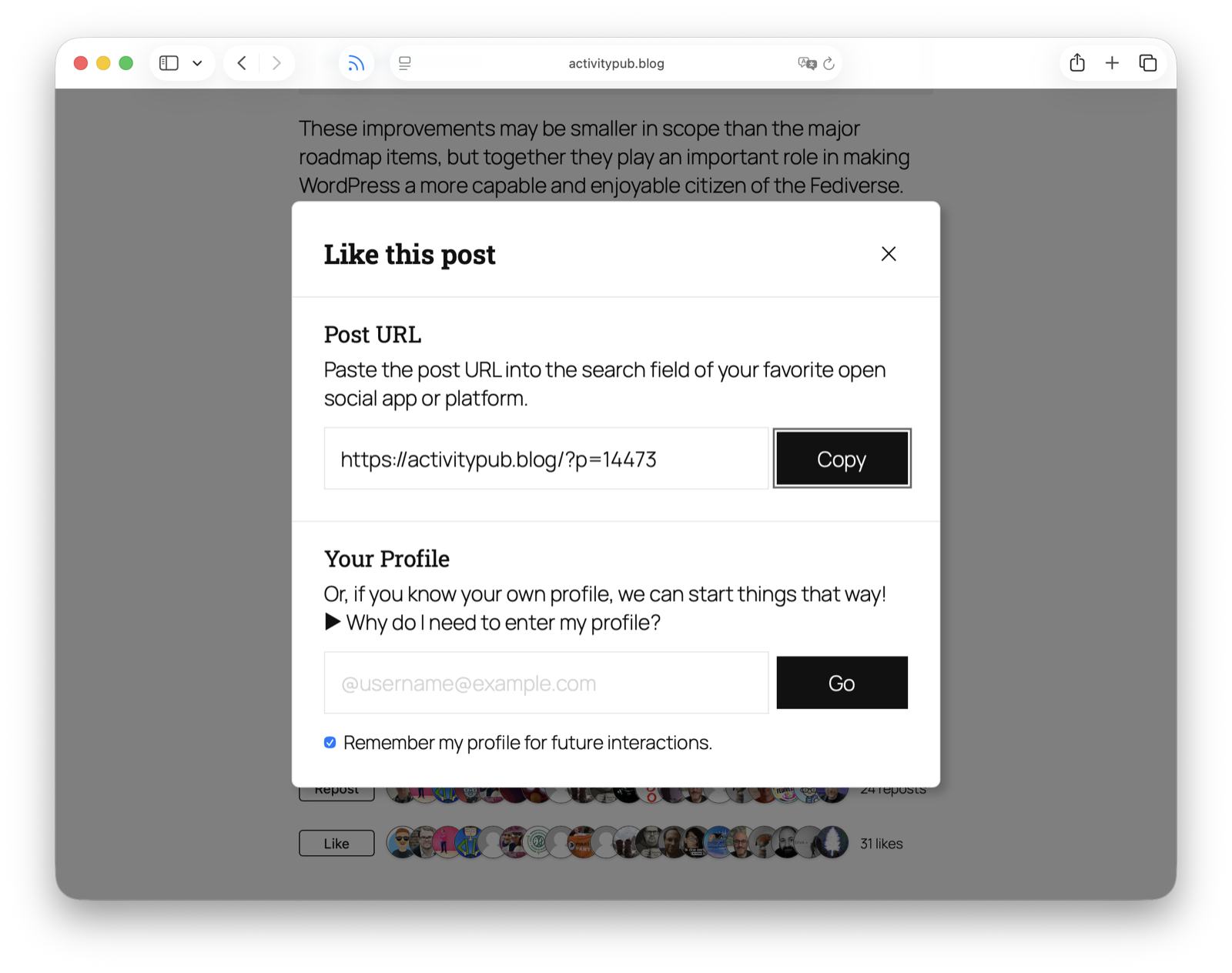
The plugin remembers the visitor’s profile in their browser, so the second time around it’s even faster. And for folks who aren’t familiar with how the Fediverse works, each modal now includes a collapsible “Why do I need to enter my profile?” help section that explains the open social web in plain language.
This dramatically lowers the friction for cross-platform engagement.
Block Patterns and TemplatesSetting up a Fediverse-ready profile page used to mean manually assembling Follow Me, Extra Fields, and Followers blocks. Not anymore.
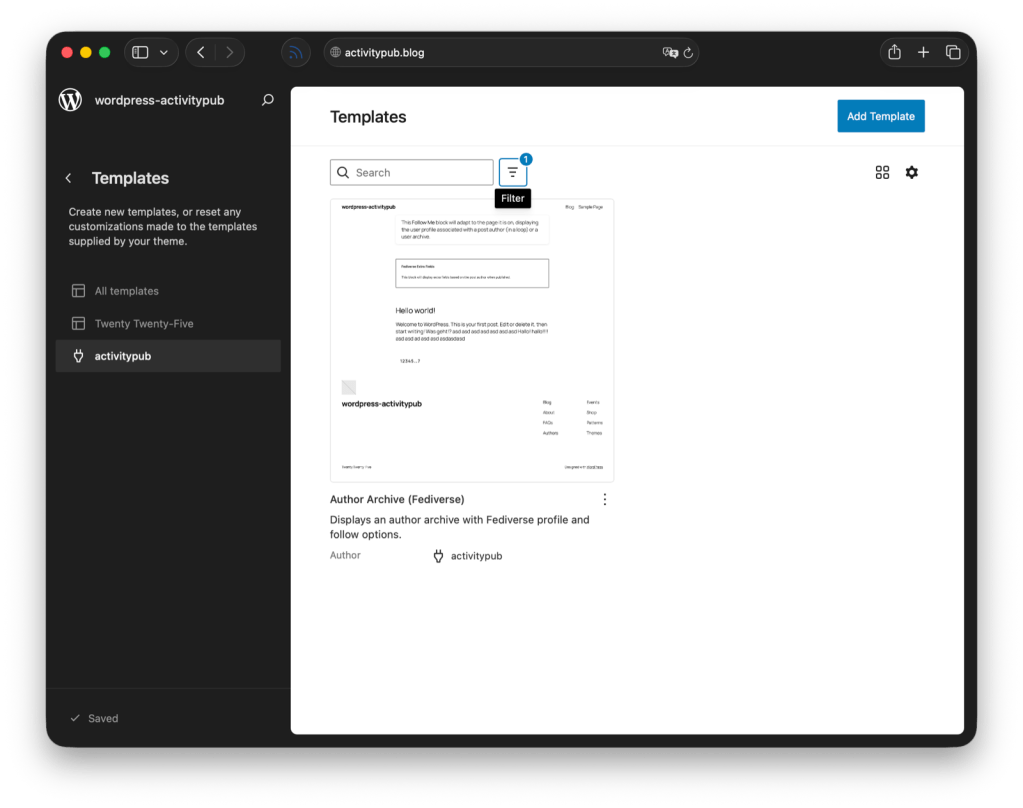
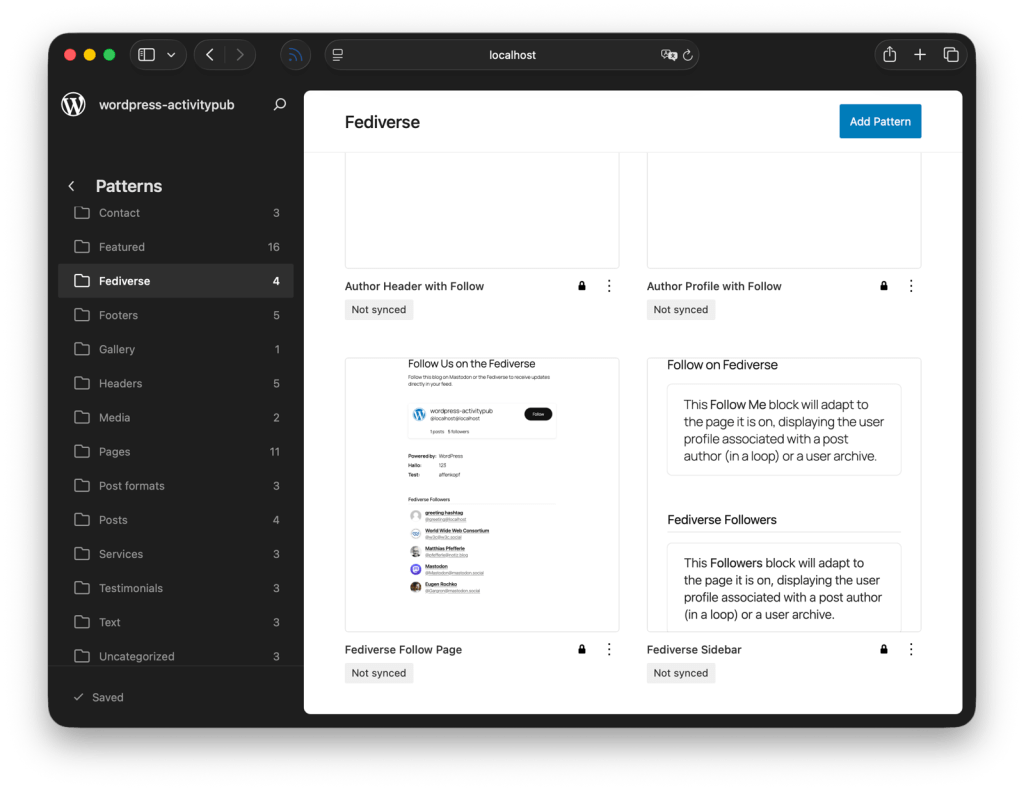
We’ve added a “Fediverse” block pattern category with four pre-configured layouts:
Author Profile with Follow, a compact profile card.Fediverse Follow Page, a full-page follow experience.Author Header with Follow, great for author archive headers.Fediverse Sidebar, drop it into any sidebar or widget area.If you’re running a block theme on WordPress 6.7+, there’s also a new Author Archive (Fediverse) block theme template ready to go.
Publish Smarter With Post Format SuggestionsA new pre-publish panel now analyzes your post content and suggests an appropriate post format when your object type is set to “Post Format.” Got a post that’s mostly images? It’ll nudge you toward the Image format. A video post? Video format.
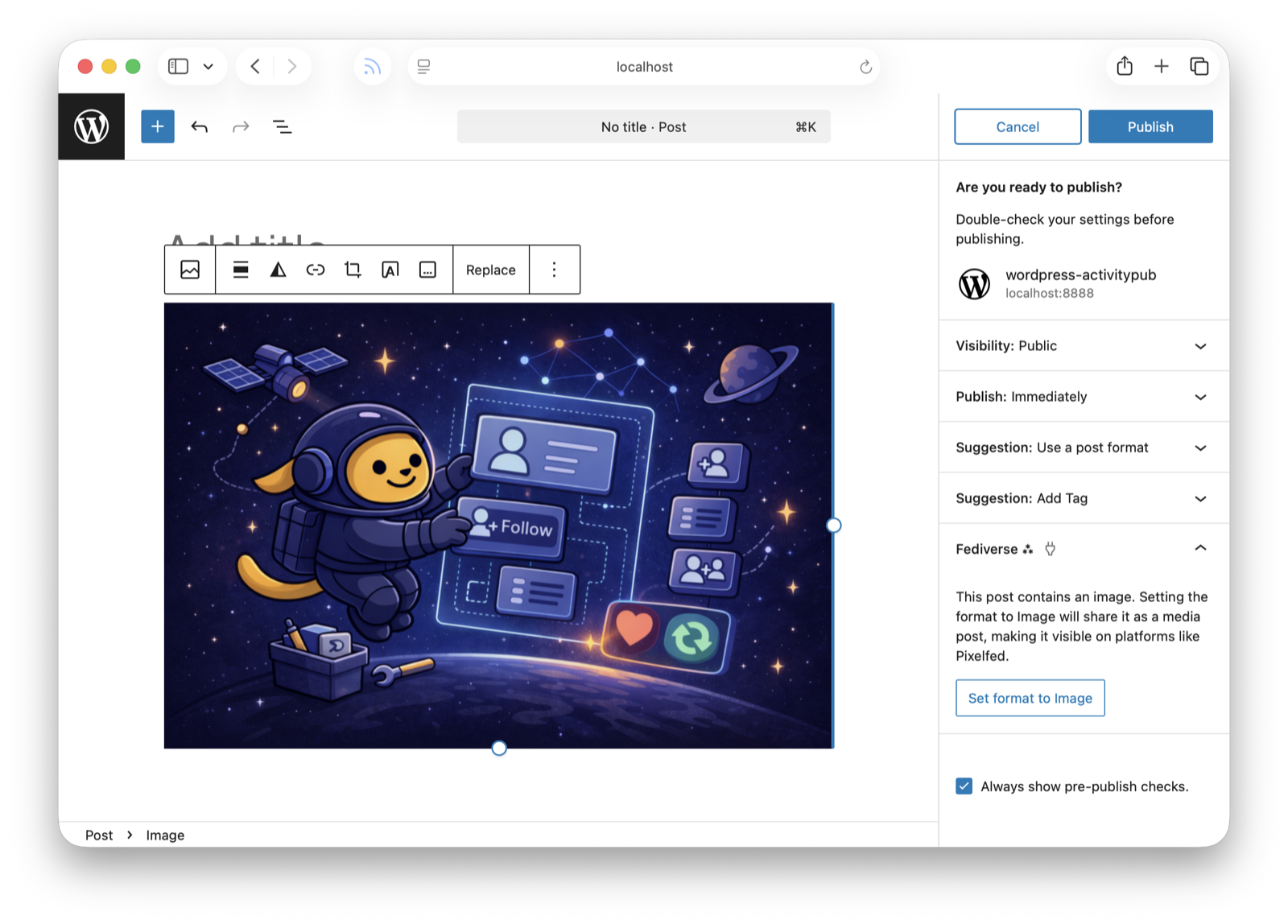
This matters because media-focused Fediverse platforms like Pixelfed and Vernissage display Notes differently than Articles, so choosing the right format means your content looks its best everywhere it lands.
Community SnippetsWe’ve added a snippets/ folder to the GitHub repository, a home for lightweight, community-contributed extensions that don’t belong in the core plugin but are too useful to lose. The first batch includes:
FediBlog Tag, automatically adds #FediBlog to standard blog posts for better Fediverse discovery.Locale from Tags, derives post locale from taxonomy tags.Bot Account, marks your profile as automated and displays a “BOT” badge in the Fediverse.Blockless ActivityPub, renders Fediverse reactions as pure server-side HTML, no JS required.Photon CDN, serves cached remote media through Jetpack’s Photon CDN for faster delivery.Got a snippet of your own? Check out the snippets folder and send a PR.
Smarter Media CachingUnder the hood, we’ve rebuilt how the plugin handles remote media, avatars, emoji, images, audio, and video from across the Fediverse. Instead of importing everything into the WordPress Media Library at insert time, media is now wrapped in custom blocks and cached lazily at render time.
What does that mean for you? Faster processing of incoming content, less disk usage, and better rendering of audio and video attachments. Original remote URLs are preserved in block attributes, so caches can be regenerated without data loss. If you’re using Jetpack’s Site Accelerator, that works too, the new system is built filter-first.
For site admins, there are new CLI commands to keep things tidy:
wp activitypub cache statuswp activitypub cache clearMinimum PHP 7.4With WordPress 7.0 deprecating PHP 7.2 and 7.3, we’ve raised the minimum requirement to PHP 7.4. This lets us clean up compatibility polyfills and use more modern PHP features going forward. If you’re still on an older version, update your PHP before updating the plugin.
ChangelogAddedAdd a help section to interaction dialogs explaining the Fediverse and why entering a profile is needed.Add a notice on the Settings page to easily switch from legacy template mode to automatic mode.Add a pre-publish suggestion that recommends a post format for better compatibility with media-focused Fediverse platforms.Add a Site Health check that warns when plugins are causing too many federation updates.Add backwards compatibility for the ACTIVITYPUB_DISABLE_SIDELOADING constant and activitypub_sideloading_enabled filter from version 7.9.1.Add bot account snippet that marks ActivityPub profiles as automated accounts, displaying a “BOT” badge on Mastodon and other Fediverse platforms.Add Cache namespace for remote media caching with CLI commands, improved MIME validation, and filter-based architecture.Add federation of video poster images set in the WordPress video block.Add Locale from Tags community snippet.Add optional Like and Boost action buttons to the Fediverse Reactions block, allowing visitors to interact with posts from their own server.Add pre-built Fediverse block patterns for easy profile, follow page, and sidebar setup.Add snippet for blockless fediverse reactions.Add wp activitypub fetch CLI command for fetching remote URLs with signed HTTP requests.ChangedImproved active user counting for NodeInfo to include all federated content types and comments.Improve language map resolution to strictly follow the ActivityStreams spec.Superseded outbox activities are now removed instead of kept, reducing clutter in the outbox.The minimum required PHP version is now 7.4.FixedAccept incoming activities from servers that use standalone key objects for HTTP Signatures.Fix a crash on servers where WordPress uses FTP instead of direct file access for media caching.Fix a crash when receiving posts from certain federated platforms that send multilingual content.Fix automatic cleanup of old activities failing silently on sites with large numbers of outbox, inbox, or remote post items.Fix comment count to properly exclude likes, shares, and notes.Fix follow button redirect from Mastodon not being recognized.Fix modal overlay not covering the full screen on block themes.Fix outbox invalidation canceling pending Accept/Reject responses to QuoteRequests for the same post.Fix QuoteRequest handler to derive responding actor from post author instead of inbox recipient.Fix reactions block buttons inheriting theme background color on classic themes.Fix reactions block layout on small screens and remove unwanted button highlight when clicking action buttons.Fix signature verification rejecting valid requests that use lowercase algorithm names in the Digest header.Fix soft-deleted posts being served instead of a tombstone when the post is re-saved.Improve compatibility with federated services that use a URL reference for the actor’s public key.Improve handling of all public audience identifiers when sending activities to followers and relays.Prevent private recipient lists from being shared when sending activities to other servers.Get ItDownload from WordPress.org or grab it on GitHub. Remember to check your PHP version first — 7.4 or higher is now required.
A huge thank you to everyone who contributed code, testing, bug reports, and ideas to this release. Special thanks to @kraft, @jeremy, and @futtta for their snippet contributions.
Update, try out those Like and Boost buttons, and let us know what you think — what’s the feature you’ve been waiting for? What would you like to see next?
-
@meuwese @grimjfoot @EUCommission @EC_DIGIT @HennaVirkkunen
I hope it helps
Glad to see attention is being put on it.Mastodon needs can easy link for websites to add.
-
@kevinrns @grimjfoot @EUCommission @EC_DIGIT @HennaVirkkunen
It's definitely an issue, but work is being done on it. This might help?
-
@grimjfoot@mastodon.uno @EUCommission@ec.social-network.europa.eu @EC_DIGIT@ec.social-network.europa.eu @HennaVirkkunen@ec.social-network.europa.eu
hopefully calling it fediverse, otherwise it risk sounds like my grannie saying internet explorer when she means the web.
-
@kevinrns @grimjfoot @HennaVirkkunen
It could be enough to make a link to this or to a EU hosted page about what is Fediverse and how to join it.
And, mixing up the Fediverse with a platform (Mastodon) should be avoided. I'm on Friendica and it's Fediverse too.
-
@grimjfoot @EUCommission @EC_DIGIT @HennaVirkkunen
A lot of the reason is there's no easy link to mastodon.
-
Yes! And remove X while you're at it.
-
The #EuropeanCommission and other #EU institutions have been present on #Mastodon for some time.
However, there is still no reference to #fediverse #socialmedia on European institutional websites, while the traditional ones are still present.
Why not update these pages, highlighting an ethical policy choice?