Is anyone using a card reader with the #SConnect plugin from #Gemalto / #Thales on #Firefox?
Uncategorized
21
Posts
3
Posters
0
Views
-
I'll take a look at their javascript to see if there is a version number for the plugin.
-
@leffe Sorry, I missed the part about the add-on.
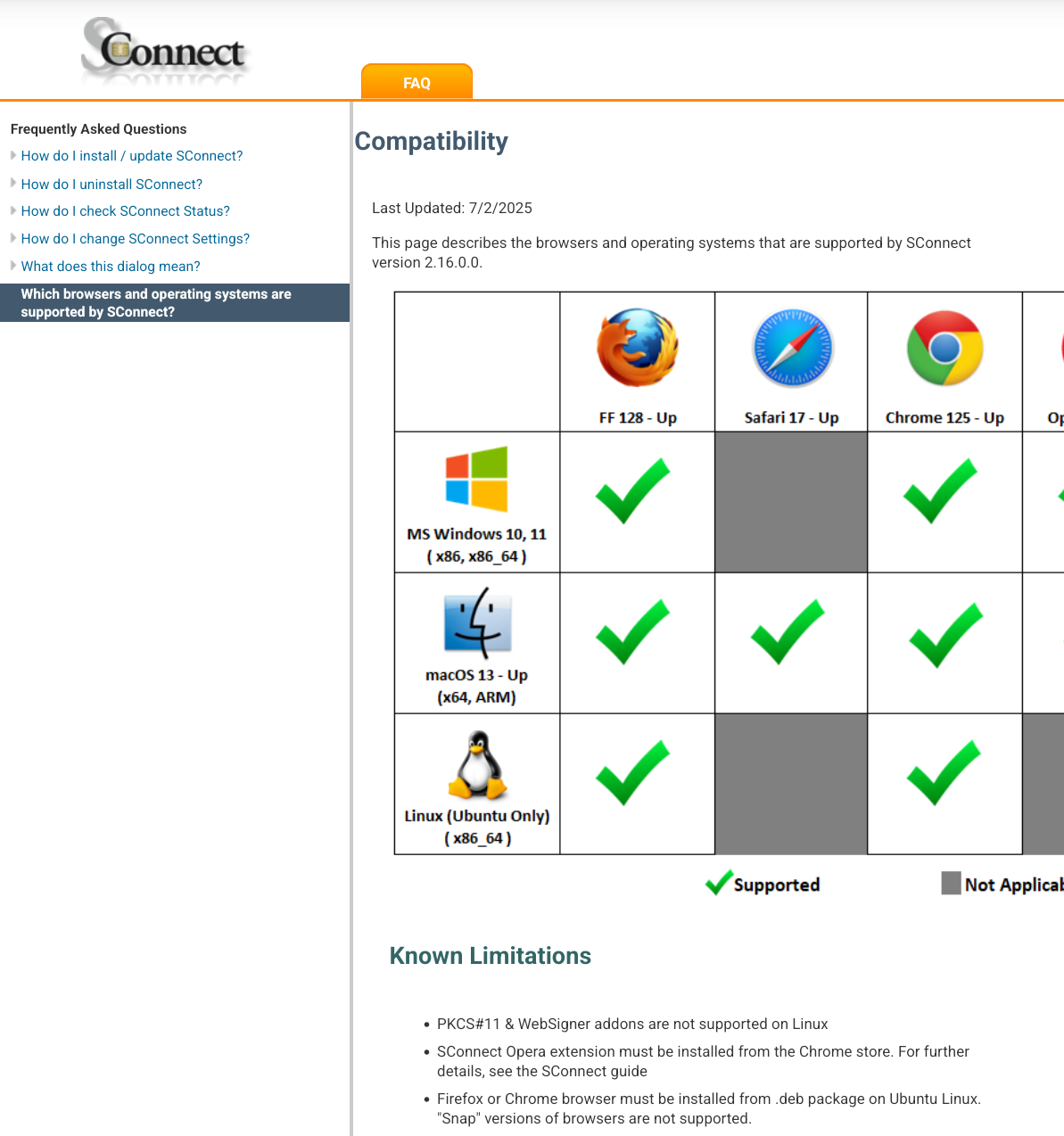
Googling took me to this page, and I can install the add-on from here? No clue if that helps https://www2.swift.com/3skey/help/browser_support.html
For what it's worth, I can't find any bug about skatteverket in Bugzilla.
-
@leffe Sorry, I missed the part about the add-on.
Googling took me to this page, and I can install the add-on from here? No clue if that helps https://www2.swift.com/3skey/help/browser_support.html
For what it's worth, I can't find any bug about skatteverket in Bugzilla.
Thanks, I'll give it a try later. I don't know if using the addon from a different source will work, but let's see.
The installation page from skatteverket.se goes via Svenska Pass (a printing company with no web presence) through a chain of redirects and obfuscated scripts. No wonder Mozilla blocked it. There is no customer service other than the tax hotline, where the response to my email was "try logging in again tomorrow".
-
@leffe Sorry, I missed the part about the add-on.
Googling took me to this page, and I can install the add-on from here? No clue if that helps https://www2.swift.com/3skey/help/browser_support.html
For what it's worth, I can't find any bug about skatteverket in Bugzilla.
That's where I ended up when I googled too. Got the menu below. I don't want "sconnect", so didn't click through.
I would say, be sure your adblocker is off.
Interestingly, I could not find "sconnect" on the Google extension store.
-
Yes, adblocker, noscript, and pihole all off. It's when I click on that first square that I get the vague error message in the console.
-
Did you get to this page? They seem to have an xpi for you to sideload.
-
Something I did made it go a step further. It downloads a script for me to run in a terminal. The script kills any running sconnect process and installs a binary executable in ~/.sconnect/sconnect_host_linux.
It doesn't run the executable though, and even if I do it manually, the extension still says there is no add-on installed, even after a browser restart. The instructions say that the web page will automatically detect the install after running the script, but no. There is a jumping non-clickable text box saying start installation, with an arrow pointing up to the toolbars. So weird.
-
Something I did made it go a step further. It downloads a script for me to run in a terminal. The script kills any running sconnect process and installs a binary executable in ~/.sconnect/sconnect_host_linux.
It doesn't run the executable though, and even if I do it manually, the extension still says there is no add-on installed, even after a browser restart. The instructions say that the web page will automatically detect the install after running the script, but no. There is a jumping non-clickable text box saying start installation, with an arrow pointing up to the toolbars. So weird.
-
Something I did made it go a step further. It downloads a script for me to run in a terminal. The script kills any running sconnect process and installs a binary executable in ~/.sconnect/sconnect_host_linux.
It doesn't run the executable though, and even if I do it manually, the extension still says there is no add-on installed, even after a browser restart. The instructions say that the web page will automatically detect the install after running the script, but no. There is a jumping non-clickable text box saying start installation, with an arrow pointing up to the toolbars. So weird.
Those instructions are for installing the native host. It's the executable that the browser extension knows how to connect to.
On the page I posted, there's an xpi. I would expect that you download that and side-load it via the FF extensions page. Might require developer mode for that.
That's the way similar projects that I've used work. A side-loaded xpi that connects to a local executable.
The arrow might point to your bookmarks. So maybe check if you have new bookmarks?
-
Those instructions are for installing the native host. It's the executable that the browser extension knows how to connect to.
On the page I posted, there's an xpi. I would expect that you download that and side-load it via the FF extensions page. Might require developer mode for that.
That's the way similar projects that I've used work. A side-loaded xpi that connects to a local executable.
The arrow might point to your bookmarks. So maybe check if you have new bookmarks?
I should have mentioned that it did install an extension also. Should Firefox start the host? So far it doesn't. I see that a json file with the path was added to ~/.mozilla/native-messaging-hosts. Maybe it should be moved down into ~/.mozilla/firefox/native-messaging-hosts? I'll try that tomorrow.
No new bookmark, as far as I can see.
-
I should have mentioned that it did install an extension also. Should Firefox start the host? So far it doesn't. I see that a json file with the path was added to ~/.mozilla/native-messaging-hosts. Maybe it should be moved down into ~/.mozilla/firefox/native-messaging-hosts? I'll try that tomorrow.
No new bookmark, as far as I can see.
The extension should talk to the native host, either when you navigate to a web site that knows how to use it, or when you click on the extension (if you've pinned it).
The JSON file is probably in the correct place. It probably is the manifest.json?
There's a value inside the manifest.json that should match the id of the extension in the extension details for your extension.
I'm assuming that you already have an application on your machine that uses Sconnect?
-
The extension should talk to the native host, either when you navigate to a web site that knows how to use it, or when you click on the extension (if you've pinned it).
The JSON file is probably in the correct place. It probably is the manifest.json?
There's a value inside the manifest.json that should match the id of the extension in the extension details for your extension.
I'm assuming that you already have an application on your machine that uses Sconnect?
This is all coming from logging in to skatteverket.se via svenskapass.se. The only manual step was supposed be to run the install script, and the web page should have continued automatically. But it didn't, which is why I'm suspecting that the path turned out wrong.
-
If you open up the .json file with a file editor there will probably be a path attribute with a file path to the executable you mentioned earlier. You can check that they match.
My ~/.mozilla/native-messaging-hosts actually has two files in it (one for keepass, and another for a tiddlywiki adjunct.) Both of them have path attributes.
You might also check that the executable isn't 0 bytes and that it has appropriate rights and ownership.
-
If you open up the .json file with a file editor there will probably be a path attribute with a file path to the executable you mentioned earlier. You can check that they match.
My ~/.mozilla/native-messaging-hosts actually has two files in it (one for keepass, and another for a tiddlywiki adjunct.) Both of them have path attributes.
You might also check that the executable isn't 0 bytes and that it has appropriate rights and ownership.
The json and the executable look good, but the extension doesn't pick it up. It says "No addon installed". This is after restarting Firefox.
When I click on the extension icon, I get an error in the console:
can't access property "messageManager", target is null ExtensionParent.sys.mjs:75:42
This is in function verifyActorForContext(actor, context) {
...
let target = actor.browsingContext.top.embedderElement;I am not familiar with extensions, but I could try to run debug on this to see where it is called from.
-
The json and the executable look good, but the extension doesn't pick it up. It says "No addon installed". This is after restarting Firefox.
When I click on the extension icon, I get an error in the console:
can't access property "messageManager", target is null ExtensionParent.sys.mjs:75:42
This is in function verifyActorForContext(actor, context) {
...
let target = actor.browsingContext.top.embedderElement;I am not familiar with extensions, but I could try to run debug on this to see where it is called from.
Are you sure you're not using snap, and if so how did you do it? I stopped with Ubuntu etc. distribution because I couldn't find a good way around snap. Well, that was one reason.
-
I recently moved it from snap to the deb install from Mozilla. The executable is now in /usr/lib/firefox/firefox.
-
Did you actually uninstall the old snap version? It feels like it's still being boxed in.
Unfortunately, when I hit situations like this, I usually ended up using Chrome or some other browser for whatever service I needed. For some reason Chrome wasn't distributed in a snap. The problem with Chrome was that eventually the packager for Alphabet stopped updating the distribution, even if you were using the long term kit.
-
Did you actually uninstall the old snap version? It feels like it's still being boxed in.
Unfortunately, when I hit situations like this, I usually ended up using Chrome or some other browser for whatever service I needed. For some reason Chrome wasn't distributed in a snap. The problem with Chrome was that eventually the packager for Alphabet stopped updating the distribution, even if you were using the long term kit.
I had disabled Firefox in snap, but I have now removed it completely, and restarted again. No difference, unfortunately.
My whole reason for this exercise is to see if it's possible to access banks and authorities here without depending on Google, Apple, or Microsoft. I feel that I am close, but right now I'm struggling with debugging the extension. I'll continue tomorrow or during the weekend.
-
 undefined oblomov@sociale.network shared this topic on



Feed RSS
Gli ultimi otto messaggi ricevuti dalla Federazione
-
@jhaas that's also true. There are third party commercial services that try to do that (coveragemap.com, etc., though the just let you choose between the FCC map and maps built from user-submitted data they called the "verified map", which is even less complete...ideally they'd be merged), but there's no public data source that I can find.
I mean, it's good that the government requires vendors to provide these maps. And, I guess it's good they're seemingly not exaggerating, in my experience.
-
@oblomov @d10c4n3 @lorcon @andre123 necessaria a finire il conflitto in modo volontario, immagino
Poi dove sta la volontarietà si può anche discutere, ma è altra discussione (quando ci si arrende perché sconfitti, non si ha più possibilità di continuare come guerra, per evitare distruzione totale ecc è cessazione "meno volontaria", resa)
E fino a dove è cessazione conflitto e fin dove ci si può spingere fino alla resa si può definire, ma la discussione verteva su cessazione conflitto, ok
-
Che odio il polline e la primavera
In tutto il giorno mi sarò finito 4 pacchetti di fazzolettini
-
I finally reached Tournai. The train controller announced a connection to Lille 5 min later. I boarded that train without a ticket. Luckily there were no ticket controls. Belgium was still in shock about the events.
I reached home half an hour later. My work laptop and my luggage would stay at Brussels airport for a month before I could make the trip to retrieve it. And luckily I live close enough to make that trip.
The whole thing made me reconsider my life.
/6
-
-
Svegliati al mattino con il cuore alato
e rendi grazie per un altro giorno da amare.Kahlil Gibran ... https://cctm.website/kahlil-gibran-cuore-alato/
#KahlilGibran #poesia #cctmwebsite #anoipiaceleggere #leggere
-
Hi @df what software are you running your instance on?
-
Many mills have unwelcome supernatural guests.
#Germany #folktale #folklore
https://wiki.sunkencastles.com/wiki/The_Nixie_as_a_Tomcat_in_the_Buschm%C3%BChle_Mill_near_L%C3%BCbbenau