I’m building a new tool and looking for volunteers to test it!
General Discussion
71
Posts
63
Posters
24
Views
-
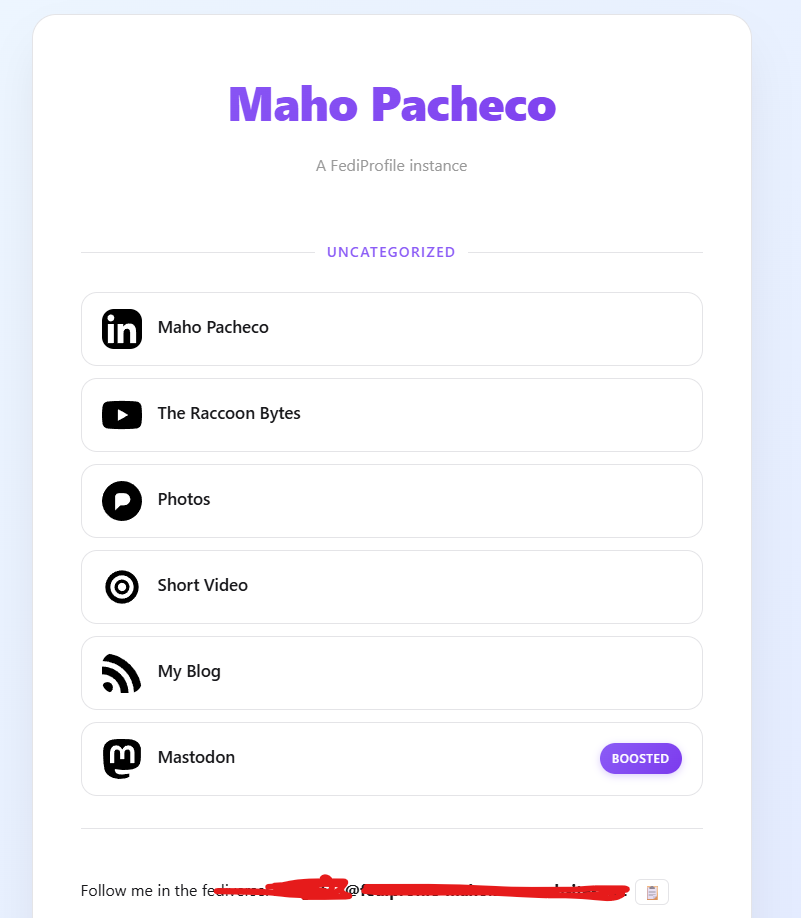
I’m building a new tool and looking for volunteers to test it! A #fediverse linktree.
It’s designed for two types of people:
Normies / newcomers – Think of it like a free, privacy-respecting Linktree. No trackers, no ads. But here's the cool par: it's a Trojan horse for the fediverse. Your profile link is itself an ActivityPub actor. That means people can interact with it directly in the fediverse, and it encourages exploration of open platforms.
Fediverse users, If you have multiple accounts (#Mastodon, #Pixelfed, Loops, a federated blog…), you know the struggle: sometimes you just want one persona to follow. This tool gives you that. It doesn’t post on its own (read-only), but it boosts all your other accounts and even has its own #ActivityPub inbox. PLUS it can receive and show your badges issued by @badgefed !
Interested in testing? Reply here.
@mapache I'd love to test this!
-
I’m building a new tool and looking for volunteers to test it! A #fediverse linktree.
It’s designed for two types of people:
Normies / newcomers – Think of it like a free, privacy-respecting Linktree. No trackers, no ads. But here's the cool par: it's a Trojan horse for the fediverse. Your profile link is itself an ActivityPub actor. That means people can interact with it directly in the fediverse, and it encourages exploration of open platforms.
Fediverse users, If you have multiple accounts (#Mastodon, #Pixelfed, Loops, a federated blog…), you know the struggle: sometimes you just want one persona to follow. This tool gives you that. It doesn’t post on its own (read-only), but it boosts all your other accounts and even has its own #ActivityPub inbox. PLUS it can receive and show your badges issued by @badgefed !
Interested in testing? Reply here.
-
I’m building a new tool and looking for volunteers to test it! A #fediverse linktree.
It’s designed for two types of people:
Normies / newcomers – Think of it like a free, privacy-respecting Linktree. No trackers, no ads. But here's the cool par: it's a Trojan horse for the fediverse. Your profile link is itself an ActivityPub actor. That means people can interact with it directly in the fediverse, and it encourages exploration of open platforms.
Fediverse users, If you have multiple accounts (#Mastodon, #Pixelfed, Loops, a federated blog…), you know the struggle: sometimes you just want one persona to follow. This tool gives you that. It doesn’t post on its own (read-only), but it boosts all your other accounts and even has its own #ActivityPub inbox. PLUS it can receive and show your badges issued by @badgefed !
Interested in testing? Reply here.
-
-
I’m building a new tool and looking for volunteers to test it! A #fediverse linktree.
It’s designed for two types of people:
Normies / newcomers – Think of it like a free, privacy-respecting Linktree. No trackers, no ads. But here's the cool par: it's a Trojan horse for the fediverse. Your profile link is itself an ActivityPub actor. That means people can interact with it directly in the fediverse, and it encourages exploration of open platforms.
Fediverse users, If you have multiple accounts (#Mastodon, #Pixelfed, Loops, a federated blog…), you know the struggle: sometimes you just want one persona to follow. This tool gives you that. It doesn’t post on its own (read-only), but it boosts all your other accounts and even has its own #ActivityPub inbox. PLUS it can receive and show your badges issued by @badgefed !
Interested in testing? Reply here.
@mapache interested :)
-
I’m building a new tool and looking for volunteers to test it! A #fediverse linktree.
It’s designed for two types of people:
Normies / newcomers – Think of it like a free, privacy-respecting Linktree. No trackers, no ads. But here's the cool par: it's a Trojan horse for the fediverse. Your profile link is itself an ActivityPub actor. That means people can interact with it directly in the fediverse, and it encourages exploration of open platforms.
Fediverse users, If you have multiple accounts (#Mastodon, #Pixelfed, Loops, a federated blog…), you know the struggle: sometimes you just want one persona to follow. This tool gives you that. It doesn’t post on its own (read-only), but it boosts all your other accounts and even has its own #ActivityPub inbox. PLUS it can receive and show your badges issued by @badgefed !
Interested in testing? Reply here.
I'm interested 😄
-
I’m building a new tool and looking for volunteers to test it! A #fediverse linktree.
It’s designed for two types of people:
Normies / newcomers – Think of it like a free, privacy-respecting Linktree. No trackers, no ads. But here's the cool par: it's a Trojan horse for the fediverse. Your profile link is itself an ActivityPub actor. That means people can interact with it directly in the fediverse, and it encourages exploration of open platforms.
Fediverse users, If you have multiple accounts (#Mastodon, #Pixelfed, Loops, a federated blog…), you know the struggle: sometimes you just want one persona to follow. This tool gives you that. It doesn’t post on its own (read-only), but it boosts all your other accounts and even has its own #ActivityPub inbox. PLUS it can receive and show your badges issued by @badgefed !
Interested in testing? Reply here.
@mapache I'm definitely interested in checking it out. Thanks!
-
I’m building a new tool and looking for volunteers to test it! A #fediverse linktree.
It’s designed for two types of people:
Normies / newcomers – Think of it like a free, privacy-respecting Linktree. No trackers, no ads. But here's the cool par: it's a Trojan horse for the fediverse. Your profile link is itself an ActivityPub actor. That means people can interact with it directly in the fediverse, and it encourages exploration of open platforms.
Fediverse users, If you have multiple accounts (#Mastodon, #Pixelfed, Loops, a federated blog…), you know the struggle: sometimes you just want one persona to follow. This tool gives you that. It doesn’t post on its own (read-only), but it boosts all your other accounts and even has its own #ActivityPub inbox. PLUS it can receive and show your badges issued by @badgefed !
Interested in testing? Reply here.
@mapache I'd love to test it. 🙂
-
I’m building a new tool and looking for volunteers to test it! A #fediverse linktree.
It’s designed for two types of people:
Normies / newcomers – Think of it like a free, privacy-respecting Linktree. No trackers, no ads. But here's the cool par: it's a Trojan horse for the fediverse. Your profile link is itself an ActivityPub actor. That means people can interact with it directly in the fediverse, and it encourages exploration of open platforms.
Fediverse users, If you have multiple accounts (#Mastodon, #Pixelfed, Loops, a federated blog…), you know the struggle: sometimes you just want one persona to follow. This tool gives you that. It doesn’t post on its own (read-only), but it boosts all your other accounts and even has its own #ActivityPub inbox. PLUS it can receive and show your badges issued by @badgefed !
Interested in testing? Reply here.
@mapache I am interested to test it.
-
I’m building a new tool and looking for volunteers to test it! A #fediverse linktree.
It’s designed for two types of people:
Normies / newcomers – Think of it like a free, privacy-respecting Linktree. No trackers, no ads. But here's the cool par: it's a Trojan horse for the fediverse. Your profile link is itself an ActivityPub actor. That means people can interact with it directly in the fediverse, and it encourages exploration of open platforms.
Fediverse users, If you have multiple accounts (#Mastodon, #Pixelfed, Loops, a federated blog…), you know the struggle: sometimes you just want one persona to follow. This tool gives you that. It doesn’t post on its own (read-only), but it boosts all your other accounts and even has its own #ActivityPub inbox. PLUS it can receive and show your badges issued by @badgefed !
Interested in testing? Reply here.
-
I’m building a new tool and looking for volunteers to test it! A #fediverse linktree.
It’s designed for two types of people:
Normies / newcomers – Think of it like a free, privacy-respecting Linktree. No trackers, no ads. But here's the cool par: it's a Trojan horse for the fediverse. Your profile link is itself an ActivityPub actor. That means people can interact with it directly in the fediverse, and it encourages exploration of open platforms.
Fediverse users, If you have multiple accounts (#Mastodon, #Pixelfed, Loops, a federated blog…), you know the struggle: sometimes you just want one persona to follow. This tool gives you that. It doesn’t post on its own (read-only), but it boosts all your other accounts and even has its own #ActivityPub inbox. PLUS it can receive and show your badges issued by @badgefed !
Interested in testing? Reply here.
@mapache @badgefed I played around with something like this before Glitch shut down - basically an app which took the URLs for my fedi identities and created a page using the webfinger data for each of them, with tiles and links. Happy to have a look at your tool, this looks much nicer than my thing (and I'm hunting around trying to find the code for that now, and failing...)
-
I’m building a new tool and looking for volunteers to test it! A #fediverse linktree.
It’s designed for two types of people:
Normies / newcomers – Think of it like a free, privacy-respecting Linktree. No trackers, no ads. But here's the cool par: it's a Trojan horse for the fediverse. Your profile link is itself an ActivityPub actor. That means people can interact with it directly in the fediverse, and it encourages exploration of open platforms.
Fediverse users, If you have multiple accounts (#Mastodon, #Pixelfed, Loops, a federated blog…), you know the struggle: sometimes you just want one persona to follow. This tool gives you that. It doesn’t post on its own (read-only), but it boosts all your other accounts and even has its own #ActivityPub inbox. PLUS it can receive and show your badges issued by @badgefed !
Interested in testing? Reply here.
Well, I guess we won’t be the only one out there pushing the wonders of trees this year, though ours serves a somewhat different audience. But I see a nice fit between this and what we’re doing. It’s going to be an interesting year.
-
I’m building a new tool and looking for volunteers to test it! A #fediverse linktree.
It’s designed for two types of people:
Normies / newcomers – Think of it like a free, privacy-respecting Linktree. No trackers, no ads. But here's the cool par: it's a Trojan horse for the fediverse. Your profile link is itself an ActivityPub actor. That means people can interact with it directly in the fediverse, and it encourages exploration of open platforms.
Fediverse users, If you have multiple accounts (#Mastodon, #Pixelfed, Loops, a federated blog…), you know the struggle: sometimes you just want one persona to follow. This tool gives you that. It doesn’t post on its own (read-only), but it boosts all your other accounts and even has its own #ActivityPub inbox. PLUS it can receive and show your badges issued by @badgefed !
Interested in testing? Reply here.
@mapache@hachyderm.io I might be able to help to check it out -
I’m building a new tool and looking for volunteers to test it! A #fediverse linktree.
It’s designed for two types of people:
Normies / newcomers – Think of it like a free, privacy-respecting Linktree. No trackers, no ads. But here's the cool par: it's a Trojan horse for the fediverse. Your profile link is itself an ActivityPub actor. That means people can interact with it directly in the fediverse, and it encourages exploration of open platforms.
Fediverse users, If you have multiple accounts (#Mastodon, #Pixelfed, Loops, a federated blog…), you know the struggle: sometimes you just want one persona to follow. This tool gives you that. It doesn’t post on its own (read-only), but it boosts all your other accounts and even has its own #ActivityPub inbox. PLUS it can receive and show your badges issued by @badgefed !
Interested in testing? Reply here.
-
I’m building a new tool and looking for volunteers to test it! A #fediverse linktree.
It’s designed for two types of people:
Normies / newcomers – Think of it like a free, privacy-respecting Linktree. No trackers, no ads. But here's the cool par: it's a Trojan horse for the fediverse. Your profile link is itself an ActivityPub actor. That means people can interact with it directly in the fediverse, and it encourages exploration of open platforms.
Fediverse users, If you have multiple accounts (#Mastodon, #Pixelfed, Loops, a federated blog…), you know the struggle: sometimes you just want one persona to follow. This tool gives you that. It doesn’t post on its own (read-only), but it boosts all your other accounts and even has its own #ActivityPub inbox. PLUS it can receive and show your badges issued by @badgefed !
Interested in testing? Reply here.
-
I’m building a new tool and looking for volunteers to test it! A #fediverse linktree.
It’s designed for two types of people:
Normies / newcomers – Think of it like a free, privacy-respecting Linktree. No trackers, no ads. But here's the cool par: it's a Trojan horse for the fediverse. Your profile link is itself an ActivityPub actor. That means people can interact with it directly in the fediverse, and it encourages exploration of open platforms.
Fediverse users, If you have multiple accounts (#Mastodon, #Pixelfed, Loops, a federated blog…), you know the struggle: sometimes you just want one persona to follow. This tool gives you that. It doesn’t post on its own (read-only), but it boosts all your other accounts and even has its own #ActivityPub inbox. PLUS it can receive and show your badges issued by @badgefed !
Interested in testing? Reply here.
@mapache I'd like to try this out as well!
-
I’m building a new tool and looking for volunteers to test it! A #fediverse linktree.
It’s designed for two types of people:
Normies / newcomers – Think of it like a free, privacy-respecting Linktree. No trackers, no ads. But here's the cool par: it's a Trojan horse for the fediverse. Your profile link is itself an ActivityPub actor. That means people can interact with it directly in the fediverse, and it encourages exploration of open platforms.
Fediverse users, If you have multiple accounts (#Mastodon, #Pixelfed, Loops, a federated blog…), you know the struggle: sometimes you just want one persona to follow. This tool gives you that. It doesn’t post on its own (read-only), but it boosts all your other accounts and even has its own #ActivityPub inbox. PLUS it can receive and show your badges issued by @badgefed !
Interested in testing? Reply here.
-
I’m building a new tool and looking for volunteers to test it! A #fediverse linktree.
It’s designed for two types of people:
Normies / newcomers – Think of it like a free, privacy-respecting Linktree. No trackers, no ads. But here's the cool par: it's a Trojan horse for the fediverse. Your profile link is itself an ActivityPub actor. That means people can interact with it directly in the fediverse, and it encourages exploration of open platforms.
Fediverse users, If you have multiple accounts (#Mastodon, #Pixelfed, Loops, a federated blog…), you know the struggle: sometimes you just want one persona to follow. This tool gives you that. It doesn’t post on its own (read-only), but it boosts all your other accounts and even has its own #ActivityPub inbox. PLUS it can receive and show your badges issued by @badgefed !
Interested in testing? Reply here.
-
I’m building a new tool and looking for volunteers to test it! A #fediverse linktree.
It’s designed for two types of people:
Normies / newcomers – Think of it like a free, privacy-respecting Linktree. No trackers, no ads. But here's the cool par: it's a Trojan horse for the fediverse. Your profile link is itself an ActivityPub actor. That means people can interact with it directly in the fediverse, and it encourages exploration of open platforms.
Fediverse users, If you have multiple accounts (#Mastodon, #Pixelfed, Loops, a federated blog…), you know the struggle: sometimes you just want one persona to follow. This tool gives you that. It doesn’t post on its own (read-only), but it boosts all your other accounts and even has its own #ActivityPub inbox. PLUS it can receive and show your badges issued by @badgefed !
Interested in testing? Reply here.
Something that collates multiple Fediverse accounts into a single followable profile is an idea that makes absolute sense.
Especially so if there's an option to show the latest updates from each of the feeds as part of the link page.
(Bonus points if it also boosts RSS updates)
Would love to have a dabble!
-
Something that collates multiple Fediverse accounts into a single followable profile is an idea that makes absolute sense.
Especially so if there's an option to show the latest updates from each of the feeds as part of the link page.
(Bonus points if it also boosts RSS updates)
Would love to have a dabble!
Absolutely! You hit the nail.
I think we can make a better linktree. We can have featured accounts, with people showing other accounts. We can have latest updates. We can allow normies to crosspost/boost from instagram, rss, bluesky, whatever. We can do many many things.

















Gli ultimi otto messaggi ricevuti dalla Federazione
-
@kitsune thanks! can you elaborate on what are you interested in?
-
-
cc @smallcircles for delightful apps
-
-
-
@mapache
Yes please!
-
@mapache A great idea! Oh.. looks like I’m late to the game. If you want another tester I’ll be here 🙂