Production KiCad Template Covers All Your Bases
Uncategorized
1
Posts
1
Posters
0
Views
-
Production KiCad Template Covers All Your Bases
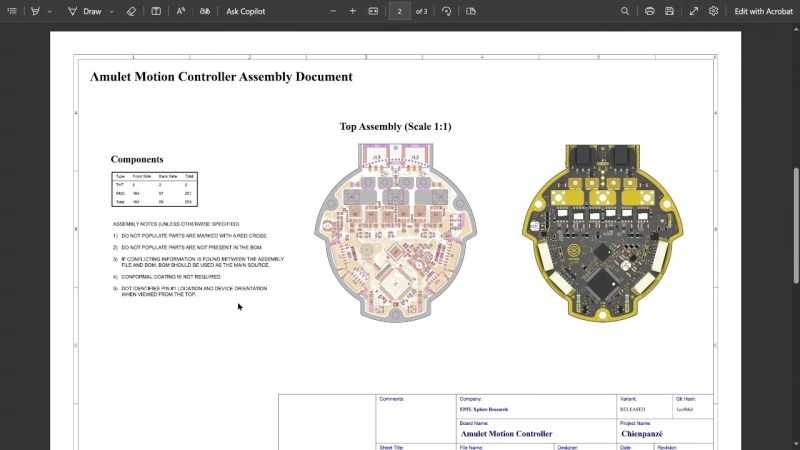
Ever think about all the moving parts involving a big KiCad project going into production? You need to provide manufacturer documentation, assembly instructions and renders for them to reference, every output file they could want, and all of it has to always stay up to date. [Vincent Nguyen] has a software pipeline to create all the files and documentation you could ever want upon release – with an extensive installation and usage guide, helping you turn your KiCad projects truly production-grade.
This KiBot-based project template has no shortage of features. It generates assembly documents with custom processing for a number of production scenarios like DNPs, stackup and drill tables, fab notes, it adds features like table of contents and 3D renders into KiCad-produced documents as compared to KiCad’s spartan defaults, and it autogenerates all the outputs you could want – from Gerbers, .step and BOM files, to ERC/DRC reports and visual diffs.
This pipeline is Github-tailored, but it can also be run locally, and it works wonderfully for those moments when you need to release a PCB into the wild, while making sure that the least amount of things possible can go wrong during production. With all the features, it might take a bit to get used to. Don’t need fully-featured, just some GitHub page images? Use this simple plugin to auto-add render images in your KiCad repositories, then.
youtube.com/embed/63R6Wnx44uY?…
We thank [Jaac] for sharing this with us!

Gli ultimi otto messaggi ricevuti dalla Federazione
-
@aeva lol yeah the set designers definitely copied Trek’s homework.
-
*grits teeth* full support to comrade GNOME
https://blogs.gnome.org/jrahmatzadeh/2025/12/06/ai-and-gnome-shell-extensions/
-
@brouhaha Next time someone asks, "What is Mastodon?" I'm showing them this.
-
@globalistIT ma invece nei confronti delle occupazioni abusive di stabili e delle manifestazioni e saluti nazisti di "💩paund&co"😠come si pongono?,ovviamente la domanda è retorica🤐
-
@_elena still no simple FTP server that doesn't require 287302723 different config files with 0xDEADBEEF command line options.
Honestly if a ftp server is more complicated than `ftpserver $HOME --write --read` then it is a failed one.
-
-
Plug Into USB, Read Hostname and IP Address
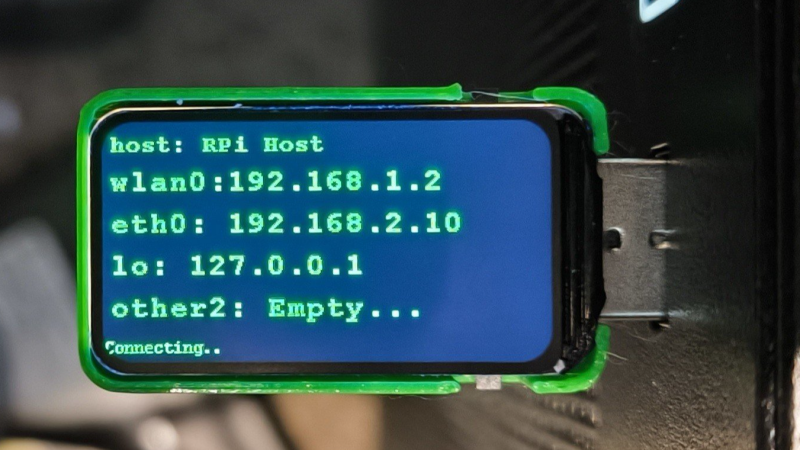
Ever wanted to just plug something in and conveniently read the hostname and IP addresses of a headless board like a Raspberry Pi? Chances are, a free USB port is more accessible than digging up a monitor and keyboard, and that’s where [C4KEW4LK]’s rpi_usb_ip_display comes in. Plug it into a free USB port, and a few moments later, read the built-in display. Handy!
The device is an RP2350 board and a 1.47″ Waveshare LCD, with a simple 3D-printed enclosure. It displays hostname, WiFi interface, Ethernet interface, and whatever others it can identify. There isn’t even a button to push; just plug it in and let it run.
Here’s how it works: once plugged in, the board identifies itself as a USB keyboard and a USB serial port. Then it launches a terminal with Ctrl-Alt-T, and from there it types and runs commands to do the following:
Find the serial port that the RP2350 board just created.Get the parsed outputs of hostname, ip -o -4 addr show dev wlan0, ip -o -4 addr show dev eth0, and ip -o -4 addr show to gather up data on active interfaces.Send that information out the serial port to the RP2350 board.Display the information on the LCD.Update periodically.The only catch is that the host system must be able to respond to launching a new terminal with Ctrl-Alt-T, which typically means the host must have someone logged in.
It’s a pretty nifty little tool, and its operation might remind you, in concept, of how BadUSB attacks happen: a piece of hardware, once plugged into a host, identifies itself to the host as something other than what it appears to be. Then it proceeds to input and execute actions. But in this case, it’s not at all malicious, just convenient and awfully cute.
-
Had baked beans with dinner, and now having some more. I guess it's dessert.