Linux non è solo per sviluppatori: è anche una vera e propria potenza creativa
Open Source italia
12
Posts
4
Posters
38
Views
-
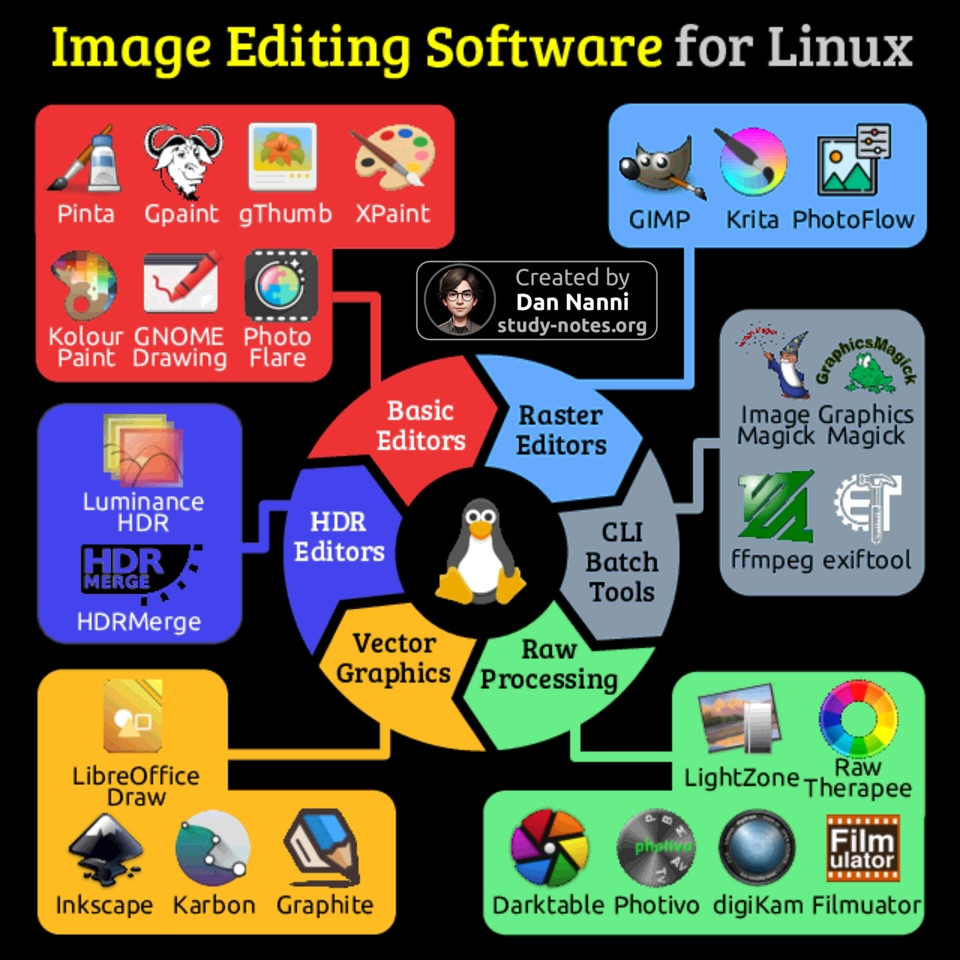
Linux non è solo per sviluppatori: è anche una vera e propria potenza creativa.
Dalla semplice modifica di foto alla grafica vettoriale, fino alla pittura digitale, su Linux trovi strumenti eccellenti per ogni livello, eccoli raggruppati per tipologia nella infografica di dan nanny 😎👇 Puoi trovare altre infografiche su Linux e sull'open source nel gruppo dedicato seguibile qui: @opensource@diggita.com
 -
 undefined diggita@mastodon.social shared this topic on
 undefined luciomarinelli@poliversity.it shared this topic on
-
Linux non è solo per sviluppatori: è anche una vera e propria potenza creativa.
Dalla semplice modifica di foto alla grafica vettoriale, fino alla pittura digitale, su Linux trovi strumenti eccellenti per ogni livello, eccoli raggruppati per tipologia nella infografica di dan nanny 😎👇 Puoi trovare altre infografiche su Linux e sull'open source nel gruppo dedicato seguibile qui: @opensource@diggita.com @opensource@mastodon.uno @opensource@diggita.com Sono il primo a lodare il software open source, ma quando si parla di graphic design è incubo: GIMP e compagnia hanno un workflow completamente diverso rispetto alle soluzioni di Adobe, un'azienda monopolista che sta facendo passare le pene dell'inferno a tutti i creativi. Gli unici settori messi bene su Linux sono quelli dello UI/UX design e del video-making, in questi campi ci sono tanti programmi aperti e pure buoni.
-
Linux non è solo per sviluppatori: è anche una vera e propria potenza creativa.
Dalla semplice modifica di foto alla grafica vettoriale, fino alla pittura digitale, su Linux trovi strumenti eccellenti per ogni livello, eccoli raggruppati per tipologia nella infografica di dan nanny 😎👇 Puoi trovare altre infografiche su Linux e sull'open source nel gruppo dedicato seguibile qui: @opensource@diggita.com grazie, conoscevo solo alcuni di questi software
-
@opensource@mastodon.uno @opensource@diggita.com Sono il primo a lodare il software open source, ma quando si parla di graphic design è incubo: GIMP e compagnia hanno un workflow completamente diverso rispetto alle soluzioni di Adobe, un'azienda monopolista che sta facendo passare le pene dell'inferno a tutti i creativi. Gli unici settori messi bene su Linux sono quelli dello UI/UX design e del video-making, in questi campi ci sono tanti programmi aperti e pure buoni.
sì, diciamo che con le ultime versioni di GIMP, la situazione sta un po' migliorando, però è ancora un po' macchinoso il tutto, anche Darktable rispetto alle soluzioni Closed Sources è un po' convoluto e non capisco mai quale tab devo aprire :D
-
sì, diciamo che con le ultime versioni di GIMP, la situazione sta un po' migliorando, però è ancora un po' macchinoso il tutto, anche Darktable rispetto alle soluzioni Closed Sources è un po' convoluto e non capisco mai quale tab devo aprire :D
@evilworld Qui le soluzioni sono solo 2: o aspettiamo che la comunità crei un fork fatto a mestiere del noto trittico (GIMP, InkScape e Scibus), oppure che roba ambiziosa come Graphite arrivi subito alla versione stabile
-
@evilworld Qui le soluzioni sono solo 2: o aspettiamo che la comunità crei un fork fatto a mestiere del noto trittico (GIMP, InkScape e Scibus), oppure che roba ambiziosa come Graphite arrivi subito alla versione stabile
@Ryoma123 un fork la vedo difficile, ma basterebbe che i programmatori dei 3 programmi si parlassero ed tutti insieme inizassero un processo di interoperabilità.
@evilworld -
@Ryoma123 un fork la vedo difficile, ma basterebbe che i programmatori dei 3 programmi si parlassero ed tutti insieme inizassero un processo di interoperabilità.
@evilworld@versodiverso @evilworld Orco demonio, no! Questa gente ha detto più volte che questa è la loro idea di software e che non cambieranno per nessuna ragione al mondo, perciò se si unissero farebbe un disastro senza pari.
-
@evilworld Qui le soluzioni sono solo 2: o aspettiamo che la comunità crei un fork fatto a mestiere del noto trittico (GIMP, InkScape e Scibus), oppure che roba ambiziosa come Graphite arrivi subito alla versione stabile
ma già adesso con gli effetti non distruttivi su gimp si è migliorato molto. Hanno messo anche la possibilità di mettere un bordo esterno colorato su un testo, senza dover smanettare troppo xD. Feci un tutorial su peertube su come fare quell'effetto in modo da ricordarmi ogni volta
-
ma già adesso con gli effetti non distruttivi su gimp si è migliorato molto. Hanno messo anche la possibilità di mettere un bordo esterno colorato su un testo, senza dover smanettare troppo xD. Feci un tutorial su peertube su come fare quell'effetto in modo da ricordarmi ogni volta
@evilworld Quella del testo è l'unica cosa sensata che hanno fatto, per il resto rimane un programma estremamente complesso, soprattutto per un Adobe user.
-
@versodiverso @evilworld Orco demonio, no! Questa gente ha detto più volte che questa è la loro idea di software e che non cambieranno per nessuna ragione al mondo, perciò se si unissero farebbe un disastro senza pari.
@Ryoma123 Ed allora non puoi nemmeno forkare, perché poi dovresti totalmente dissociati dalla versione base, se vuoi fare un unico programma, ma così devi sviluppare 3 programmi in uno.... Ha più senso il dialogo, che avere il doppio degli sviluppatori.
@evilworld -
@Ryoma123 Ed allora non puoi nemmeno forkare, perché poi dovresti totalmente dissociati dalla versione base, se vuoi fare un unico programma, ma così devi sviluppare 3 programmi in uno.... Ha più senso il dialogo, che avere il doppio degli sviluppatori.
@evilworld@versodiverso @evilworld Non esiste dialogo con questi sviluppatori. Se non mi sbaglio, hanno proprio scritto nelle FAQ che non vogliono cambiare la UI e il funzionamento del loro programma. Qualcuno potrebbe dirmi che ognuno fa le cose come vuole, ma qui parliamo di software per uso professionale, sta roba dovrebbe essere tutta uguale, altrimenti non si riesce a scalzare il leader del settore.
-
@versodiverso @evilworld Non esiste dialogo con questi sviluppatori. Se non mi sbaglio, hanno proprio scritto nelle FAQ che non vogliono cambiare la UI e il funzionamento del loro programma. Qualcuno potrebbe dirmi che ognuno fa le cose come vuole, ma qui parliamo di software per uso professionale, sta roba dovrebbe essere tutta uguale, altrimenti non si riesce a scalzare il leader del settore.
@Ryoma123 @evilworld Si concordo, ma è impossibile da forkare, bisognerebbe solo fare un unico programma professionle da zero. Servirebbe qualche privato che investa, è l'unica via



Gli ultimi otto messaggi ricevuti dalla Federazione
-
iPhotron: l’alternativa #OpenSource e " #Privacy-First" a #Google #Photos
@diggita @opensourcehttps://webappsmagazine.blogspot.com/2026/03/iphotron-lalternativa-open-source-e.html
-
Cleaner Advanced è stato aggiornato alla versione 2.0.
Si tratta di un piccolo script Bash pensato per la pulizia e la manutenzione dei sistemi Arch Linux direttamente dal terminale.
Nella nuova versione sono state sistemate alcune parti del codice.
Cleaner Advanced offre tre modalità di pulizia:
leggera, profonda, gestione manuale della cache (con supporto anche per i pacchetti AUR).Il progetto è disponibile su GitHub e su AUR.
-
Trasporto pubblico Open Source a Torino
Dice mio collega Emanuele:
«Se la città di Torino adottasse l'app Android @bus_torino_libre con tutti i soldi risparmiati potremmo mettere un distributore di frutta fresca a bordo di ogni mezzo. I bambini avranno diritto ad uno spicchio di mela o equivalente frutta di stagione al giorno esibendo il loro abbonamento a bordo.»(condivisione @opensource)
-
@android @opensource come dare torto a GrapheneOS? Anche se sicuramente sarebbe un passo avanti rispetto alla situazione attuale. Una delle cose che detesto delle rom ufficiali è la possibilità di inibire gli screenshot da alcune applicazioni. Perché posso fare uno screen dal sito della banca ma non dalla sua app?
-
@tsm le impronte sono NEL documento, più precisamente nel chip presente nella CIE e nel passaporto.
https://www.cartaidentita.interno.gov.it/info-utili/conservazione-delle-impronte/
-
@Daraf torniamo al fatto che non è un problema dell'app IO ma dei documenti. Le impronte digitali sono associate ad un documento, non sono inserite in un documento.
Ora non sappiamo ancora come sarà integrata ma i documenti digitali ora sono emessi dall'Istituto Poligrafico, quindi i dati dovrebbero essere su un altro server in cui non dovrebbero esserci le impronte digitali dei cittadini.
-
@tsm qui ti sbagli. Solo le credenziali biometriche DEL tuo dispositivo sono sul dispositivo. Ricordi che per la CIE e il passaporto ti han preso le impronte? Ecco, quelle del documento sono NEL documento. Se i documenti li metti nell'app IO i dati biometrici (impronte) sono anche centralizzati nei server nell'app IO (questo è quanto riferito da un avvocato ferrato sul tema).
-
@android
Il link è su un sito 'pay or okay'...
@opensource