Gli SSD esistono in diverse forme e interfacce, come 2,5”, M.2, U.2 e mSATA
Uncategorized
2
Posts
2
Posters
2
Views
-
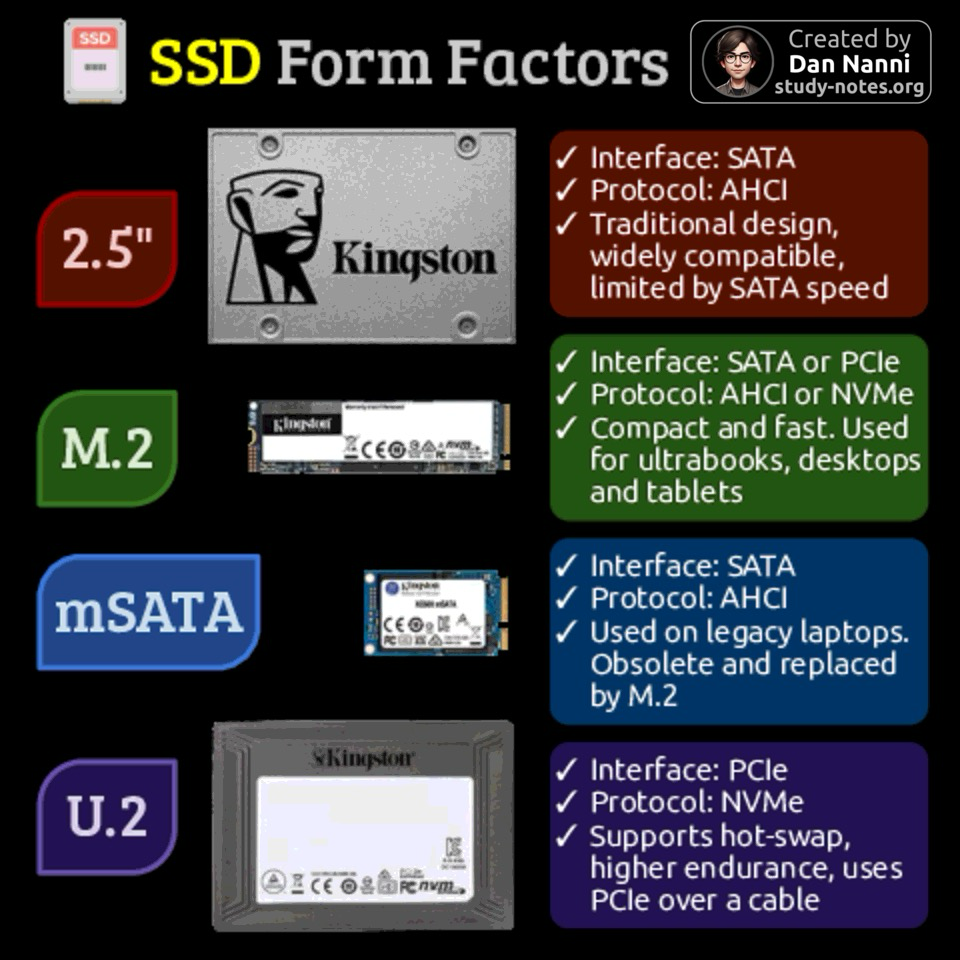
Gli SSD esistono in diverse forme e interfacce, come 2,5”, M.2, U.2 e mSATA.
Ognuno di questi formati è progettato per esigenze diverse di prestazioni, spazio fisico e tipo di connessione.Ecco un rapido confronto tra i principali form factor degli SSD 😎👇
Trovi tutte le info dedicate all’hardware nel gruppo computer seguibile qui: @computer@diggita.com
.
#ssd #hardware #sata #msata #hardware -
Gli SSD esistono in diverse forme e interfacce, come 2,5”, M.2, U.2 e mSATA.
Ognuno di questi formati è progettato per esigenze diverse di prestazioni, spazio fisico e tipo di connessione.Ecco un rapido confronto tra i principali form factor degli SSD 😎👇
Trovi tutte le info dedicate all’hardware nel gruppo computer seguibile qui: @computer@diggita.com
.
#ssd #hardware #sata #msata #hardware@computer Questa infografica, intitolata "Formati SSD", è stata creata da Dan Nanni (study-notes.org) e presenta uno sfondo nero. Include quattro sezioni dedicate ai formati SSD: 2.5" (etichetta rossa), M.2 (etichetta verde), mSATA (etichetta blu) e U.2 (etichetta viola), ognuna con un'immagine di un SSD con marchio Kingston e una casella di descrizione contenente delle spunte. La sezione 2.5" indica: "Interfaccia: SATA", "Protocollo: AHCI", "Design tradizionale, ampiamente compatibile, limitato dalla velocità SATA". La sezione M.2 elenca: "Interfaccia: SATA o PCIe", "Protocollo: AHCI o NVMe", "Compatto e veloce. Utilizzato per ultrabook, desktop e tablet". La sezione mSATA descrive: "Interfaccia: SATA", "Protocollo: AHCI", "Utilizzato su laptop più datati. Obsoleto e sostituito da M.2". La sezione U.2 specifica: "Interfaccia: PCIe", "Protocollo: NVMe", "Supporta lo scambio a caldo, maggiore durata, utilizza PCIe tramite un cavo". Un piccolo icona di SSD appare in alto a sinistra, e in alto a destra c'è un badge con la scritta "Creato da Dan Nanni study-notes.org".
Fornito da @altbot, generato localmente e privatamente utilizzando Qwen3-Vl:8b
🌱 Energia utilizzata: 0.752 Wh


Gli ultimi otto messaggi ricevuti dalla Federazione
-
These look great
-
@stevebate thanks for the great work on FEP-ae0c (relays). It's been really helpful for me.
-
Wood ordered ready to start work on building the new exterior baffles. And a sheet of perspex as a roof over them since ply isn't likely to hold up nearly as long, even with layers of enamel paint (plus then i'll be able to spot if any hedgehogs start snoozing in there, as happened last year)
-
@stefano I would ask them what features they need.
this reminds me of one support call I had when I was working for Rackspace in 2013. The customer wanted Ubuntu instead of RHEL because "the dev told me Ubuntu has newer software and RHEL is too old for new stuff".... too bad all software versions were equal thanks to our backport repos... And RHEL had better support anyway (at least at the time, nowadays they are almost on par).
-
You crossed this line
Do you find it hard to sit with me tonight?
I've walked these miles but
I've walked 'em straight lined
You'll never know what was like to be fine
-
@PhineasX Indeed, just isn't possible. So got bait stations up the yazoo and just hoping it works soon.
I'm making the feeding station bigger this time, building better baffles on the outside (with little see through perspex roofs!) so at least cats will be a non-issue. Eventually I'll rebuild the main feeding station in a similar vein
-
In a statement, CISA's acting director Nick Andersen said the agency is investigating the attack. "We are working shoulder-to-shoulder with our public and private sector partners as we continue to uncover relevant information and provide technical assistance."