Federated Replies and Reactions in Madblog
Uncategorized
1
Posts
1
Posters
3
Views
-
Federated Replies and Reactions in Madblog
Engage with the Web from plain text files
Madblog is founded on a simple principle: a blog is just a collection of #markdown files in a folder. No databases, no logins, no client-side bloat — just files.
The recently implemented support for both Webmentions and ActivityPub add an extra appeal to this approach: now those text files can federate, they can send mentions to Wordpress blogs or Mastodon accounts, and you can visualize mentions, comments and reactions from other corners of the Web directly under your articles.
But after receiving in the past few days a bunch of reactions on my blog that I couldn't interact with, which forced me to fall back on my standard Fediverse account to send replies and likes, I've decided to take the "everything is a file" philosophy a step further.
Now from #madblog you can also reply to comments and react to posts across the Fediverse - all from plain text files in your content folder.
Replying to Comments
When someone comments on your article from Mastodon or another ActivityPub-compatible services, their message appears on your blog.
Now you can also respond directly from your blog.
Or you can reply to any other post on the Fediverse or mention anyone, without those posts cluttering your blog's front page (I've learned to avoid this fatal design mistake made by e.g. Medium).
How it works
Create a Markdown file under
replies/<article-slug>/:[//]: # (reply-to: https://mastodon.social/@alice/123456789) Thanks for the kind words, Alice! I'm glad the tutorial helped. @alice@mastodon.socialSave the file, and Madblog automatically:
- Publishes your reply to the Fediverse as a threaded response
- Notifies Alice on her Mastodon instance
- Displays the reply on your blog, nested under her original comment
Your reply lives in your content folder. Just like with your articles, you can version replies and reactions on git, synchronize them over SyncThing or Nextcloud Notes, or run some analysis scripts on them that would just operate on text files.
Replying to replies
Conversations can go as deep as you want. Reply to a reply by pointing
reply-toat the previous message's URL:[//]: # (reply-to: https://mastodon.social/@alice/123456790) Great question! I'll write a follow-up post about that. @alice@mastodon.socialThe threading is preserved both on your blog and across the Fediverse.
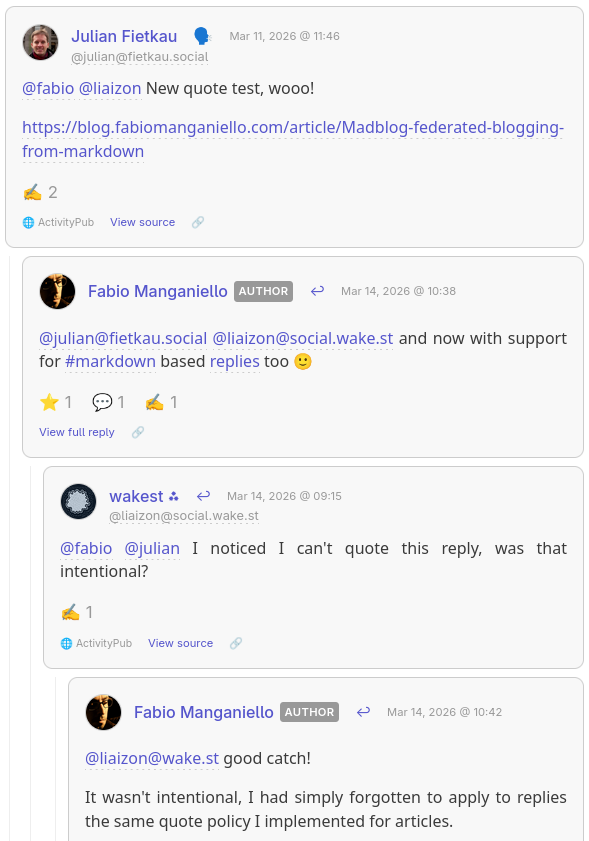
[Example of a nested thread rendered on Madblog]
(I hope that @julian@fietkau.social and @liaizon@social.wake.st won't mind for using a screenshot from their conversation on my blog 🙂)
Remember to mention your mentions
An important implementation note: if you're replying to someone else's ActivityPub post, it's important that you also mention them in the reply, otherwise your reply will be rendered under their comment but they may not be notified.
Usually you don't have to worry about this on Mastodon because the UI will automatically pre-fill the participating accounts in a sub-thread when you hit Reply.
But this is something to keep in mind when your posts are just text files.
Your replies are articles in their own right
Even though anything under
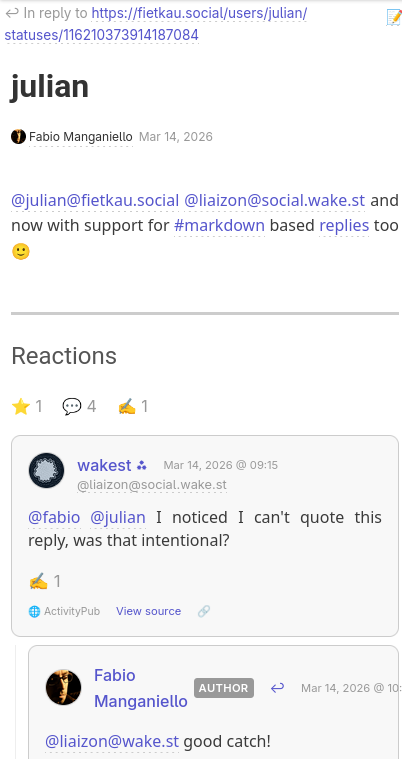
replies/won't appear on your blog's home page, it doesn't mean that it must be rendered just like a humble rectangle in a crowded comments section.By clicking View full reply you get redirected to a separate page where the reply is rendered as a blog article, and its comments sections consists in the sub-tree of the reactions that spawned from that specific reply.
[Example of a Madblog reply rendered as a blog article, with its own sub-thread of reactions]
Liking Posts
Sometimes a reply is too much — you just want to show appreciation. Now you can "like" any post on the Fediverse with a simple metadata header.
Standalone likes
Create a file under
replies/with just alike-ofheader:[//]: # (like-of: https://mastodon.social/@bob/987654321)This publishes a
Likeactivity to the Fediverse. Bob sees the notification, and your blog records the interaction.Like and comment
Want to like and say something? Combine both:
 [//]: # (like-of: https://mastodon.social/@bob/987654321)
 [//]: # (reply-to: https://mastodon.social/@bob/987654321)

This is such a great point! Bookmarking for later.

@bob@mastodon.social
Bob gets both the like and your reply as a threaded response.
Unlisted Posts
Not everything needs to appear on your blog's front page. Files under
replies/withoutreply-toandlike-ofheaders become "unlisted" posts — they're published to the Fediverse but don't clutter your blog index.Perfect for quick thoughts, threads, or conversations that don't warrant a full article.
 [//]: # (title: Thoughts of the day)

Quick thought: I've been experimenting with writing all my Fediverse posts
as Markdown files. It's oddly satisfying to `git log` my social media history.
Guestbook Replies
Your blog's guestbook works the same way. Reply to guestbook entries by placing files under
replies/_guestbook/:[//]: # (reply-to: https://someone.blog/mention/123) @alice@example.com welcome! Thanks for stopping by.Editing and Deleting
Changed your mind? Edit the file and an
Updateactivity is sent. Delete the file and your reply is removed from the Fediverse too.Accidentally liked something? Remove the
like-ofline (or delete the file) and anUndo Likeis published.Your content, your rules.
Getting Started
- Enable ActivityPub in your
config.yaml:
link: https://blog.example.com enable_activitypub: true activitypub_username: blog # Only specify these if you want your ActivityPub domain to be different from your blog domain # activitypub_link: https://example.com # activitypub_domain: example.com- Install Madblog
- From
pip:
pip install madblog- From Docker:
docker pull quay.io/blacklight/madblog- Run Madblog from your Markdown folder (it is recommended that your articles are stored under
<data-dir>/markdown):
- From a
pipinstallation:
madblog /path/to/data- From Docker:
docker run -it \ -p 8000:8000 \ -v "/path/to/config.yaml:/etc/madblog/config.yaml" \ -v "/path/to/data:/data" \ quay.io/blacklight/madblog- Any text file you create under
markdown/becomes a blog article. Any text file you create underreplies/becomes an unlisted post, a reply or a like reaction.
Check the README for detailed configuration options.
Happy blogging!

Gli ultimi otto messaggi ricevuti dalla Federazione
-
😂😂😂 basta 😂
-
@konrad ja bitte ☕️
-
@konrad@fedi.neuwirth.priv.at Guten Morgen
-
Guten Morgen. Caffee.
-
-
-
@roberto_lm questo non è un governo
-
@autonomysolidarity
I was raised by Anti-fascist parents who were in the Army in Europe in WWII, teachers and acquaintances, served there & in the Pacific