Another work week starting
Uncategorized
7
Posts
2
Posters
0
Views
-
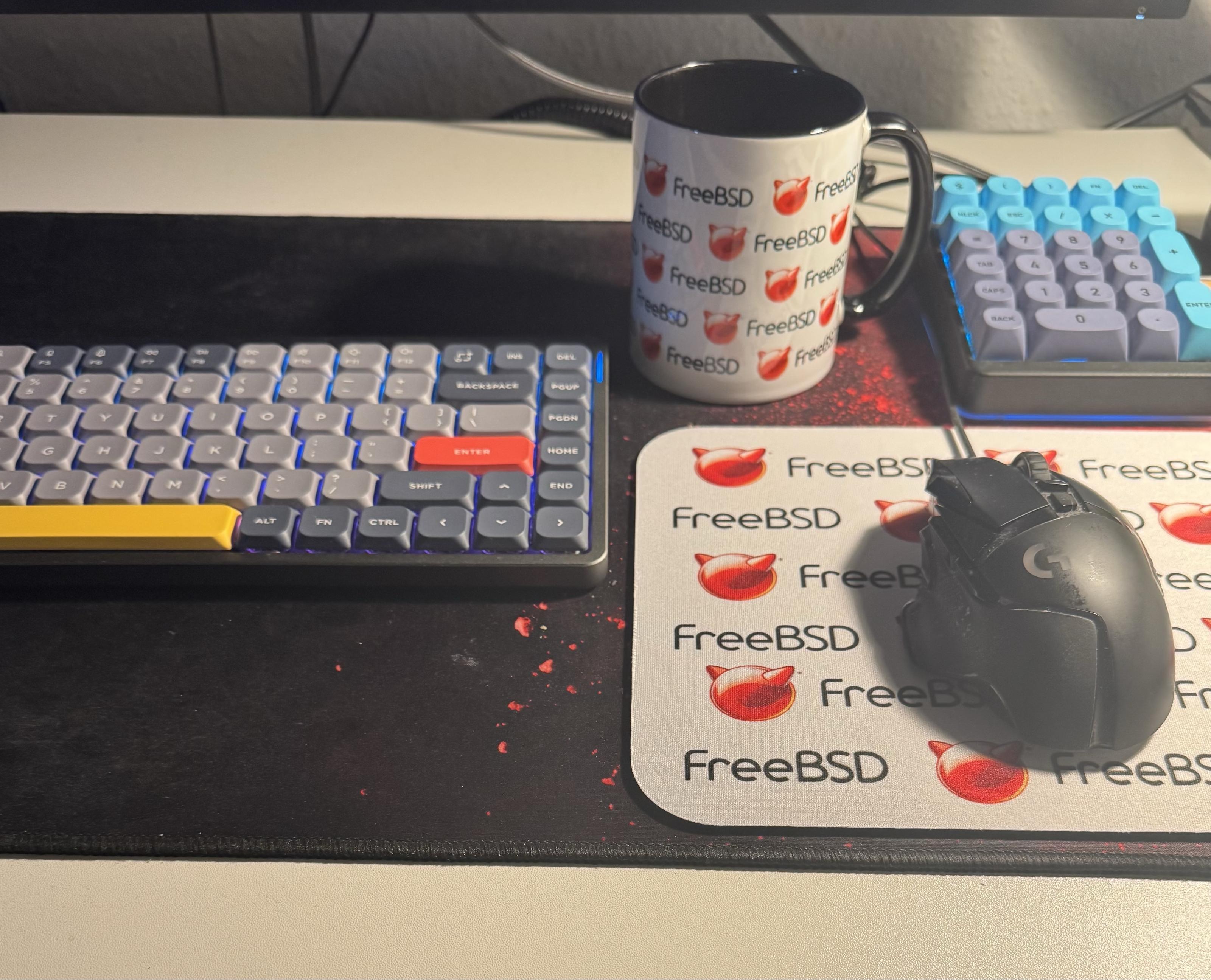
Another work week starting

Short one (just 3 days) and the last before I’ll move to another city next week.
-
Another work week starting
Short one (just 3 days) and the last before I’ll move to another city next week.
@Larvitz is that a NuPhy Air? How do you like it?
-
@Larvitz is that a NuPhy Air? How do you like it?
@joel yes, that’s the Nuphy air 75 v2 with tactile “Moss” switches. I really like the keyboard and use it everyday for almost a year now. It’s very pleasant to type on.
-
@joel yes, that’s the Nuphy air 75 v2 with tactile “Moss” switches. I really like the keyboard and use it everyday for almost a year now. It’s very pleasant to type on.
@Larvitz cool! Been wondering about getting an Air version to replace my Field75. But now tuned and being unable to find an Air that would have the same look, I haven’t made the jump yet.
-
@Larvitz cool! Been wondering about getting an Air version to replace my Field75. But now tuned and being unable to find an Air that would have the same look, I haven’t made the jump yet.
@joel The air75 v2 stock does sound relatively hollow.
I don't mind that too much, but some find the acoustics annoying.
The air75 v3 fixed that with a rubber mat inside the bottom of the keyboard (there's plenty of sound comparisons on YouTube)
-
@joel The air75 v2 stock does sound relatively hollow.
I don't mind that too much, but some find the acoustics annoying.
The air75 v3 fixed that with a rubber mat inside the bottom of the keyboard (there's plenty of sound comparisons on YouTube)
@Larvitz it took time until I found the "perfect" switches that were really silent. I fear jumping in the rabbit hole again 😆
And I love the dark grey / light green ambiance from the Field. Others look way to much like keyboards 😆 -
@Larvitz it took time until I found the "perfect" switches that were really silent. I fear jumping in the rabbit hole again 😆
And I love the dark grey / light green ambiance from the Field. Others look way to much like keyboards 😆@joel I have an entire collection here ans swap them on occasion ...
Keychron K8 Pro with Cherry MX purple (super heavy tactile)
Second Keychron K8 Pro (currently no switches)
GMMK Pro 2 with Holy Panda switches
Keychron Q3 with Voyager V2 switches
NuPhy Air75 v2 with Moss switchesI generally tend towards tactile to super tactile and don't optimize for acoustics as much. Typing feel is way more important to me.
-
 undefined stefano@mastodon.bsd.cafe shared this topic


Feed RSS
Gli ultimi otto messaggi ricevuti dalla Federazione
-
@raccoon proprio così...serve per i gonzi che si farebbero intortare
-
si diceva che la capacità di pensiero astratto cominciasse a manifestarsi dopo i 14 anni
...ma come ricorda Odifreddi, quella è l'età in cui ben altre occupazioni impegnano il pensiero... 🤣
Però bisogna anche stare attenti a non limitarsi a conoscenze procedurali
Sono d'accordo, ma infatti non bisogna escludere l'aspetto teorico, anche perché ci sono alcuni bambini che già in età prescolare sono in grado di astrarre alla perfezione. La scuola però deve essere vantaggiosa per tutti
NB: ricordo che una volta dovevamo fare un pranzo velocissimo e mia moglie tirò fuori dal freezer due spinacine; allora dissi a mio figlio grande che aveva 4/5 anni che purtroppo le spinacine erano due e quindi non bastavano per tutti 🤣 😈
Lui allora ci pensò un paio di secondi e mi disse che bastava dividere in tre parti ciascuna spinacina e ognuno di noi ne avrebbe potuto mangiare due dei sei pezzetti.Ovviamente oggi frequenta matematica 😂
-
@Otttoz@mastodon.uno
Ma tanto non capiscono un cazzo, se capissero qualcosa non sarebbero fascisti.
-
@macfranc @matematica mah, quando ero ragazzo io (nel mesozoico o giù di lì) si diceva che la capacità di pensiero astratto cominciasse a manifestarsi dopo i 14 anni. Mi immagino ora.
Però bisogna anche stare attenti a non limitarsi a conoscenze procedurali, perché poi è difficile riuscire a passare all'astrazione. Molto meglio portare i ragazzi a farsi domande, sapendo che non sempre si potrà dare loro una risposta.
-
@djoerd One the one hand, reputation and safety is a thing. On the other; the "Mastodon friend score" kind of reminds me of the Black Mirror episode NoseDive where everyone has a social score that is constantly being monitored. Not sure if I'm a fan 😅
-
RE: https://mastodon.uno/@valigiablu/116039712172620137
Informare sui contenuti, senza slogan.
Ottimo.
-
https://www.youtube.com/watch?v=hSLE5Psfs6U
Il Muppet Show come ragione di vita, sempre!
W l'analogico e l'animazione tradizionale!
-
@Otttoz non date CD a Pucci