Vuoi un tuo angolino di Internet ma non sei “sistemista”
Uncategorized
13
Posts
6
Posters
28
Views
-
Vuoi un tuo angolino di Internet ma non sei “sistemista”?
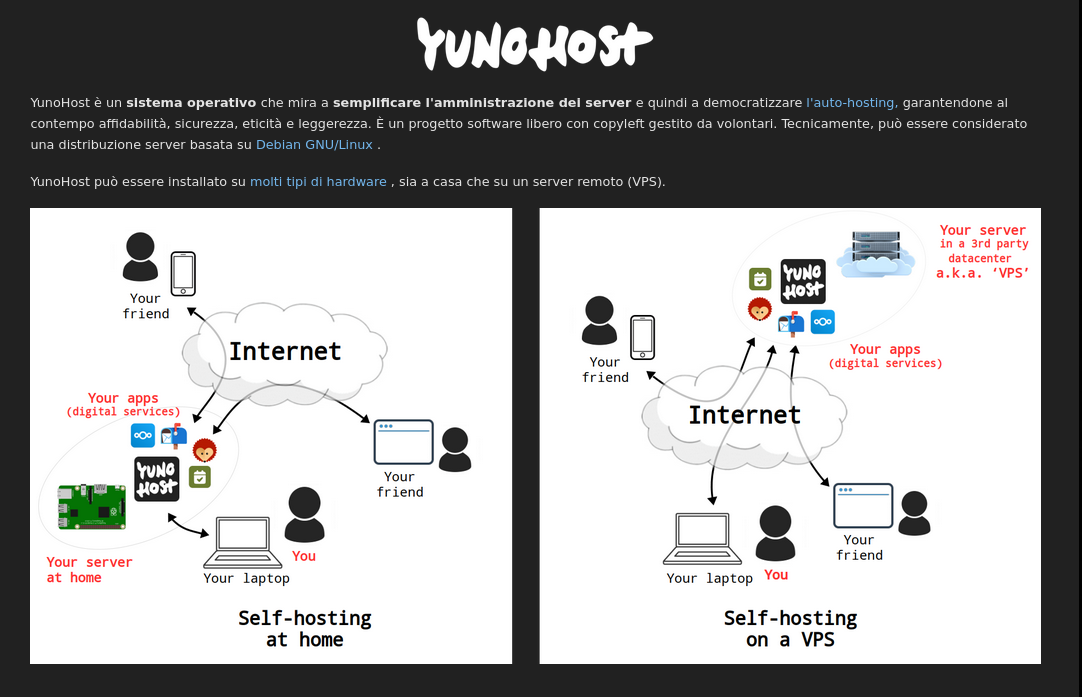
Esiste una cosa che si chiama #YunoHost: è un sistema basato su #Linux che trasforma un computer (o un piccolo server affittato online) in un coltellino svizzero di servizi digitali.In pratica, invece di installare tutto “a mano” con comandi strani, hai un pannello web semplice e un catalogo di applicazioni (un po’ come lo store del telefono) da cui puoi installare con pochi clic un sacco di cose:
👉 posta elettronica
👉 siti e blog
👉 cloud personale per file, contatti e calendari
👉 chat, note condivise, piccoli strumenti per gruppi e associazioni
👉 e persino software del Fediverso (tipo social e media federati)Il bello è che così puoi:
usare un indirizzo email tuo (tipo nome@tuodominio.it),
creare il tuo piccolo social per amici e community,
avere i tuoi dati in casa tua (o sul tuo server), senza dipendere sempre dai soliti grandi servizi.
Non serve essere ingegnere informatico: serve solo un po’ di curiosità, un computer da dedicare (o un VPS economico), un nome di dominio e la voglia di seguire una guida passo passo.
Se ti intriga l’idea di riprenderti i tuoi dati e costruirti il tuo spazio online, qui trovi il catalogo delle app installabili con YunoHost:
-
Vuoi un tuo angolino di Internet ma non sei “sistemista”?
Esiste una cosa che si chiama #YunoHost: è un sistema basato su #Linux che trasforma un computer (o un piccolo server affittato online) in un coltellino svizzero di servizi digitali.In pratica, invece di installare tutto “a mano” con comandi strani, hai un pannello web semplice e un catalogo di applicazioni (un po’ come lo store del telefono) da cui puoi installare con pochi clic un sacco di cose:
👉 posta elettronica
👉 siti e blog
👉 cloud personale per file, contatti e calendari
👉 chat, note condivise, piccoli strumenti per gruppi e associazioni
👉 e persino software del Fediverso (tipo social e media federati)Il bello è che così puoi:
usare un indirizzo email tuo (tipo nome@tuodominio.it),
creare il tuo piccolo social per amici e community,
avere i tuoi dati in casa tua (o sul tuo server), senza dipendere sempre dai soliti grandi servizi.
Non serve essere ingegnere informatico: serve solo un po’ di curiosità, un computer da dedicare (o un VPS economico), un nome di dominio e la voglia di seguire una guida passo passo.
Se ti intriga l’idea di riprenderti i tuoi dati e costruirti il tuo spazio online, qui trovi il catalogo delle app installabili con YunoHost:
This post is deleted! -
This post is deleted!
@DigiDavidex C'è tutto scritto, basta leggere i link.🙏
-
@DigiDavidex C'è tutto scritto, basta leggere i link.🙏
This post is deleted! -
 undefined filobus@sociale.network shared this topic on
-
This post is deleted!
This post is deleted! -
This post is deleted!
This post is deleted! -
This post is deleted!
@DigiDavidex mi intrometto, il dominio di secondo livello te lo offrono loro.
Vero che trovi tutto scritto come detto da @snow era solo per una risposta veloce alla tua richiesta. -
 undefined lasolitalaura_@sociale.network shared this topic on
-
Vuoi un tuo angolino di Internet ma non sei “sistemista”?
Esiste una cosa che si chiama #YunoHost: è un sistema basato su #Linux che trasforma un computer (o un piccolo server affittato online) in un coltellino svizzero di servizi digitali.In pratica, invece di installare tutto “a mano” con comandi strani, hai un pannello web semplice e un catalogo di applicazioni (un po’ come lo store del telefono) da cui puoi installare con pochi clic un sacco di cose:
👉 posta elettronica
👉 siti e blog
👉 cloud personale per file, contatti e calendari
👉 chat, note condivise, piccoli strumenti per gruppi e associazioni
👉 e persino software del Fediverso (tipo social e media federati)Il bello è che così puoi:
usare un indirizzo email tuo (tipo nome@tuodominio.it),
creare il tuo piccolo social per amici e community,
avere i tuoi dati in casa tua (o sul tuo server), senza dipendere sempre dai soliti grandi servizi.
Non serve essere ingegnere informatico: serve solo un po’ di curiosità, un computer da dedicare (o un VPS economico), un nome di dominio e la voglia di seguire una guida passo passo.
Se ti intriga l’idea di riprenderti i tuoi dati e costruirti il tuo spazio online, qui trovi il catalogo delle app installabili con YunoHost:
@snow @addio-big-tech @fediverso
Io grazie a Snow che ha postato un articolo alcuni mesi fa e grazie sempre a Lui che mi è stato di grandissimo aiuto (senza se e senza ma) lo uso con successo.
Senza essere sistemista e con basiche conoscenza di linux gestisco alcuni siti internet, posta, un gestore password e nextcloud (alternativa open source a google drive).
Mi sento davvero di consigliare questo strumento e se serve posso dare, nel mio piccolo, tutto l'aiuto possibile. -
 undefined oblomov@sociale.network shared this topic on
-
Vuoi un tuo angolino di Internet ma non sei “sistemista”?
Esiste una cosa che si chiama #YunoHost: è un sistema basato su #Linux che trasforma un computer (o un piccolo server affittato online) in un coltellino svizzero di servizi digitali.In pratica, invece di installare tutto “a mano” con comandi strani, hai un pannello web semplice e un catalogo di applicazioni (un po’ come lo store del telefono) da cui puoi installare con pochi clic un sacco di cose:
👉 posta elettronica
👉 siti e blog
👉 cloud personale per file, contatti e calendari
👉 chat, note condivise, piccoli strumenti per gruppi e associazioni
👉 e persino software del Fediverso (tipo social e media federati)Il bello è che così puoi:
usare un indirizzo email tuo (tipo nome@tuodominio.it),
creare il tuo piccolo social per amici e community,
avere i tuoi dati in casa tua (o sul tuo server), senza dipendere sempre dai soliti grandi servizi.
Non serve essere ingegnere informatico: serve solo un po’ di curiosità, un computer da dedicare (o un VPS economico), un nome di dominio e la voglia di seguire una guida passo passo.
Se ti intriga l’idea di riprenderti i tuoi dati e costruirti il tuo spazio online, qui trovi il catalogo delle app installabili con YunoHost:
@snow @addio-big-tech @fediverso YunoHost è quello che sto pensando di utilizzare io. Devo solo capire quanta banda mi serve, che tipo di vps, ci è riuscita Elena Rossini che a quanto pare sapeva poco di tecnico fino a qualche anno fa. Dovrei trovare una vps che abbia un buon servizio di assistenza e soprattutto europea.
-
@snow @addio-big-tech @fediverso YunoHost è quello che sto pensando di utilizzare io. Devo solo capire quanta banda mi serve, che tipo di vps, ci è riuscita Elena Rossini che a quanto pare sapeva poco di tecnico fino a qualche anno fa. Dovrei trovare una vps che abbia un buon servizio di assistenza e soprattutto europea.
@elettrona Dipende da quello che ci metti sopra ... Mastodon, GoToSocial ecc ... @addio-big-tech @fediverso
-
@elettrona Dipende da quello che ci metti sopra ... Mastodon, GoToSocial ecc ... @addio-big-tech @fediverso
@snow @addio-big-tech @fediverso Non ho ancora idea. Una istanza mastodon avrei intenzione di mettercela. Poi eventualmente Castopod ma non ne sono ancora sicura. Peertube e pixelfed sicuramente no, Nextcloud non lo so, perché ha dei problemi di accessibilità proprio dove mi serve (scrittura testi on line). E la posta elettronica, anche se mi tenterebbe, mi fa paura la questione spam perché con altri collaboratori più esperti di me, un servizio vps che avevamo insieme e che gestivano a linea di comando, ricevevamo tutti una strage di messaggi indesiderati
-
@snow @addio-big-tech @fediverso Non ho ancora idea. Una istanza mastodon avrei intenzione di mettercela. Poi eventualmente Castopod ma non ne sono ancora sicura. Peertube e pixelfed sicuramente no, Nextcloud non lo so, perché ha dei problemi di accessibilità proprio dove mi serve (scrittura testi on line). E la posta elettronica, anche se mi tenterebbe, mi fa paura la questione spam perché con altri collaboratori più esperti di me, un servizio vps che avevamo insieme e che gestivano a linea di comando, ricevevamo tutti una strage di messaggi indesiderati
@elettrona Mastodon da solo è già pesante, ma se è monoutente (o quasi) te la cavi con poco, circa 4-5 euro al mese con una buona qualità.@addio-big-tech @fediverso
-
@elettrona Mastodon da solo è già pesante, ma se è monoutente (o quasi) te la cavi con poco, circa 4-5 euro al mese con una buona qualità.@addio-big-tech @fediverso
@snow @elettrona YunoHost per caso ha anche friendica? che per istanze con pochi utenti mi risulta che chieda decisamente meno risorse di mastodon
(poi ovviamente deve piacere, l'approccio è un po' diverso)






Gli ultimi otto messaggi ricevuti dalla Federazione
-
Bari: 12 fascisti di casapound condannati per disciolto partito fascista. “una sentenza storica”
@anarchia
Il Tribunale di Bari ha condannato 12 fascisti di CasaPound per i reati di riorganizzazione del disciolto partito fascista e manifestazione fascista. Sette di loro sono stati condannati anche per lesioni. Le pene vanno da 1 anno e 6 mesi...
-
@antonine Boh.
-
-
Siamo a cinque, in un giorno.
Ah, che bella la sicurezza!🚨 nuova rivendicazione #ransomware Italia 🚨
🏴☠️ gruppo #Qilin
🧬 Casartigiani - Confederazione Autonoma Sindacati Artigiani | Roma
🎯 settore: attività dei sindacati di lavoratori
🔗 casartigiani.org
🗓️ 16 febbraio 2026📄 sample: sì
▪️ dati esfiltrati dichiarati: -
▪️ dati esfiltrati pubblicati: -
⏲️ scadenza: -
-
@panormus me la porto io
-
GeoQuest #1458 7/7
🟩🟩🟩🟩🟩🟩🟩
-
@angel I've read it's probably an "automated rejection" because something was missing. Sure, I didn't provide credentials to test the app. In this case, I can understand it but...please, tell me, otherwise we're all wasting time.