Skip to content

Piero Bosio Social Web Site Personale Logo Fediverso

Social Forum federato con il resto del mondo. Non contano le istanze, contano le persone

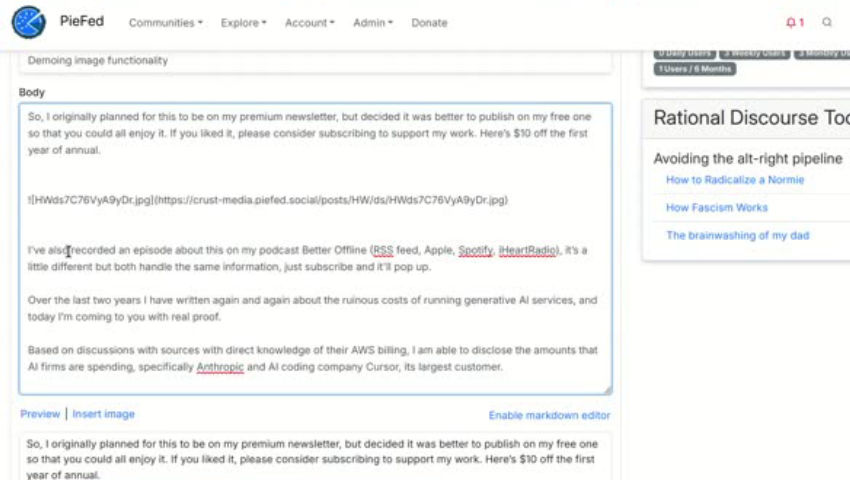
New: inserting images into post body from a media library

PieFed Meta
1 1 14

Gli ultimi otto messaggi ricevuti dalla Federazione
  • Deploy PieFed on Elest.io and get a working dedicated instance in less than 3 minutes. You can Relax knowing that we are taking care for you of install, configuration, encryption, backups, software updates, os upgrades, live monitoring, alerts, live migrations without downtime ... and more!

    read more

  • @povoq@slrpnk.net okay, yes. This is true, once it leaves the local server there are no guarantees.

    However I'd have to ask whether there is an acceptable tradeoff in risk of content exposure.

    After all, even in local private groups, things could get leaked via copy-paste, screenshots, etc. The weakest link is the social element.

    read more

  • At a guess, private piefed communities don't federate because once content federates, you can't control who can see it. All you can do is hope that the remote instance will follow the privacy settings, but you can't enforce them.

    Private lemmy communities don't federate because they don't exist.

    read more

  • Because once it leaves the server there is no guarantee that the remote server understands or even respects the notion that it should be private.

    Lemmy doesn't have private communities yet afaik.

    read more

  • Is that different for Lemmy? If so, why is PieFed's approach to private communities different from Lemmy's?

    read more

  • Ah true! NodeBB doesn't support emoji reactions yet.

    Thanks for reminding me of yet another way we're behind Piefed :muscle:

    read more

  • Emoji reactions are a big one - rather than voting you can apply an emoji, which is a much richer expression.

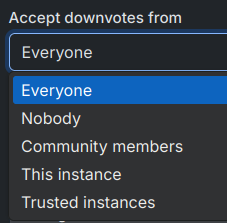
    Every community can have different settings for who can downvote. Here are the options:

    image

    If you downvote more than you upvote, pretty soon you can't downvote anymore.
    read more

  • ngl sometimes someone gotta take one for the team 🫡

    read more
Post suggeriti
  • 0 Votes
    1 Posts
    17 Views
    And I found out why my #Peertube was running a bit ropey... The version was about 3 years out of date. Now on 8.0 and wow does it look better - and it also now works with the app. Thanks #fediverse!
  • 0 Votes
    6 Posts
    39 Views
    @lost_in_chaos :)das ist anders leider nicht möglich. mastodon holt sich die "alten" posts nicht automatisch und alle posts einmal ins fediverse zu pushen würde deinen followern die timeline zumüllen.
  • 0 Votes
    3 Posts
    30 Views
    @chris @directory great name!
  • 0 Votes
    1 Posts
    6 Views
    Guest?
    EDIT - informationThis tutorial is supposed to be published by the tutorial profile of this server.It is designed to have several chapters, each being distinctively seperated by an own titel. In total as of now there are like besides this introduction like 6 chapters.posting and edition time of and by this EDIT profileof ver05 as of now 1hsmastodon review contact: @bitpickup--Categories:@helpers@forum.friendi.ca SPOILER - click to open/close || IntroductionThis tutorial is an adaption of the tutorial "creating a friendica server - ubuntu" by @hankg based on the experience of the installation report by @jesuisatirebitpickup:squeet.me/display/962c3e10-576…and specific help by @raroun.Server specs and friendica version used:VPS server | Ubuntu 22.04 LTSPHP Version 8.1.2-1ubuntu2.144 Core CPU, 8 GB Ram with 300GB NVME DiskFriendica [STABLE] | 'Giant Rhubarb' 2023.05 - 1518SPOILER - click to open/close || Installation environment and HowToThe only reasonable way to work with a VPSserver on the web is using the console.If you are not familiar with that don't worry, it is easy and the only thing you have to do is being able to copy/paste the commands displayed:¡Copy/paste only the codeBoxes like this one, located outside of the spoilers of this tutorial one after another without altering the sequence!Of course it is necessary to change the specific file names and passwords for you indiviual site, but that's all. promise!On the console you wont be able to copy/paste with the keyboard ctrl-C/ctrl-V technique, you'll have to use the mouse "right click, chose option" technique.This tutorial was created on a #debian #linux desktop environment.There shouldn't be differences if you want to do this from a #windows machine.The method used for communication between your local computer and the VPS server is called #SSH:Wikipedia - Secure Shell:"Cryptographic network protocol for secure data communication, remote shell services or command execution and other secure network services between two networked computers."#linux #debian #ubuntu #friendica #fediVerse #fediTutorial #tutorial #fediHelp #fediTips #activityPub #HowTo #DIY #VPS #server #selfHosting@admin@tupambae.org @tutorial@tupambae.org