Skip to content

Piero Bosio Social Web Site Personale Logo Fediverso

Social Forum federato con il resto del mondo. Non contano le istanze, contano le persone

🥳 42 anni fa nasceva GNU

Uncategorized
1 1 17

Gli ultimi otto messaggi ricevuti dalla Federazione
Post suggeriti
  • 0 Votes
    39 Posts
    101 Views
    @jon Is it easy to migrate from Firefox and keep saved bookmarks and login passwords ?
  • 0 Votes
    1 Posts
    6 Views
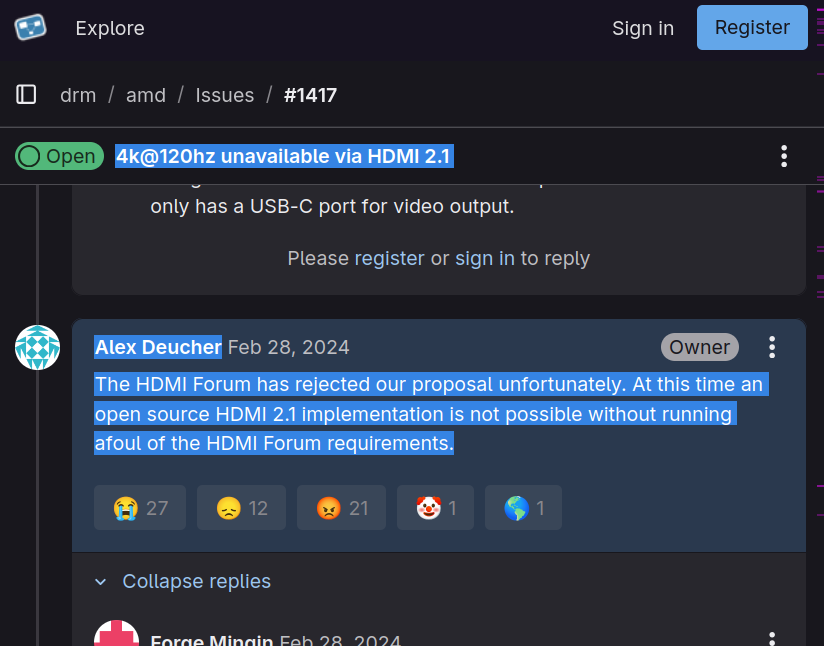
    Quick reminder on the likely reason why Valve's New Steam Machine only supports #HDMI 2.0:""At this time an open source HDMI 2.1 implementation is not possible without running afoul of the HDMI Forum requirements.""This is what Alex Deucher, the maintainer of the amdgpu #kernel driver, said one and a half years ago here:https://gitlab.freedesktop.org/drm/amd/-/issues/1417#note_2303163And from the ticket it looks like the problem remains.See also Alex's earlier comment from early 2021 in the ticket:https://gitlab.freedesktop.org/drm/amd/-/issues/1417#note_830547""HDMI 2.1 is not available on #Linux due to the HDMI Forum.""#LinuxKernel #Valve #SteamMachine
  • We celebrate #Devuan 6 release day

    Uncategorized devuan linux systemd
    1
    0 Votes
    1 Posts
    8 Views
    We celebrate #Devuan 6 release dayDevuan 6 Excalibur Review:https://youtu.be/k5isjbhVnaY#Linux #systemd
  • 0 Votes
    1 Posts
    6 Views
    Guest?
    EDIT - informationThis tutorial is supposed to be published by the tutorial profile of this server.It is designed to have several chapters, each being distinctively seperated by an own titel. In total as of now there are like besides this introduction like 6 chapters.posting and edition time of and by this EDIT profileof ver05 as of now 1hsmastodon review contact: @bitpickup--Categories:@helpers@forum.friendi.ca SPOILER - click to open/close || IntroductionThis tutorial is an adaption of the tutorial "creating a friendica server - ubuntu" by @hankg based on the experience of the installation report by @jesuisatirebitpickup:squeet.me/display/962c3e10-576…and specific help by @raroun.Server specs and friendica version used:VPS server | Ubuntu 22.04 LTSPHP Version 8.1.2-1ubuntu2.144 Core CPU, 8 GB Ram with 300GB NVME DiskFriendica [STABLE] | 'Giant Rhubarb' 2023.05 - 1518SPOILER - click to open/close || Installation environment and HowToThe only reasonable way to work with a VPSserver on the web is using the console.If you are not familiar with that don't worry, it is easy and the only thing you have to do is being able to copy/paste the commands displayed:¡Copy/paste only the codeBoxes like this one, located outside of the spoilers of this tutorial one after another without altering the sequence!Of course it is necessary to change the specific file names and passwords for you indiviual site, but that's all. promise!On the console you wont be able to copy/paste with the keyboard ctrl-C/ctrl-V technique, you'll have to use the mouse "right click, chose option" technique.This tutorial was created on a #debian #linux desktop environment.There shouldn't be differences if you want to do this from a #windows machine.The method used for communication between your local computer and the VPS server is called #SSH:Wikipedia - Secure Shell:"Cryptographic network protocol for secure data communication, remote shell services or command execution and other secure network services between two networked computers."#linux #debian #ubuntu #friendica #fediVerse #fediTutorial #tutorial #fediHelp #fediTips #activityPub #HowTo #DIY #VPS #server #selfHosting@admin@tupambae.org @tutorial@tupambae.org