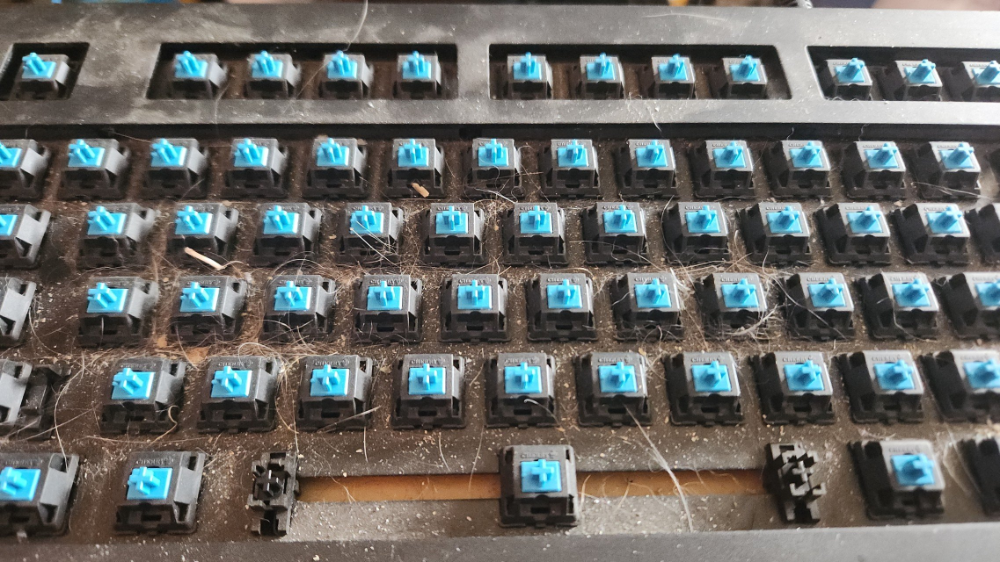
Just a friendly reminder to clean your keyboard!!
Uncategorized
14
Posts
4
Posters
48
Views
-
Just a friendly reminder to clean your keyboard!! It's grosser than you think!
-
Just a friendly reminder to clean your keyboard!! It's grosser than you think!
@dbtechyt that definitely deserves to be behind a content warning. Sheesh.
-
@dbtechyt that definitely deserves to be behind a content warning. Sheesh.
@petejohanson This is an old picture of my previous keyboard. My current one is more open frame and easier to keep clean :)
-
@petejohanson This is an old picture of my previous keyboard. My current one is more open frame and easier to keep clean :)
@dbtechyt my strategy is to just keep designing/building new keyboards before any one keeb can get to that level.
-
@dbtechyt my strategy is to just keep designing/building new keyboards before any one keeb can get to that level.
@petejohanson I would love to get into building keyboards. It really seems like something that would sooth my ADHD brain
-
@petejohanson I would love to get into building keyboards. It really seems like something that would sooth my ADHD brain
-
@petejohanson I've heard that's the case. Maybe I'll just start with one and see what happens lol
-
@petejohanson I've heard that's the case. Maybe I'll just start with one and see what happens lol
-
Just a friendly reminder to clean your keyboard!! It's grosser than you think!
@dbtechyt @selfhosting I have two objects to clean - keyboard and Braille display. Can I say, if a Braille display could talk...
As a woman I don't think I'm saying too much, referring to every blind man whose porn content reading is limited (too many undescribed images, too many videos with music and less sounds); in this case they turn on their imagination by looking for something else. And they go in self-satisfaction mode even just listening to another person's voice talking gentle to them, even about weather!
I'm talking about men because I have experienced some awful harassment by those sample blind folks; but even women search for pleasure while on the pc/smartphone. It's not a sin. But it's a sin to leave hardware input devices dirty!
I use a microfiber cloth with an alcoholic solution, don't know if english word is isopropan or isopropilic alcohol, that one used with paper. Because if dust or liquids enter inside Braille cells, you ruin a device which costs at least 2000 euro, the smallest. With 100 euro cost for each cell repaired. -
@dbtechyt @selfhosting I have two objects to clean - keyboard and Braille display. Can I say, if a Braille display could talk...
As a woman I don't think I'm saying too much, referring to every blind man whose porn content reading is limited (too many undescribed images, too many videos with music and less sounds); in this case they turn on their imagination by looking for something else. And they go in self-satisfaction mode even just listening to another person's voice talking gentle to them, even about weather!
I'm talking about men because I have experienced some awful harassment by those sample blind folks; but even women search for pleasure while on the pc/smartphone. It's not a sin. But it's a sin to leave hardware input devices dirty!
I use a microfiber cloth with an alcoholic solution, don't know if english word is isopropan or isopropilic alcohol, that one used with paper. Because if dust or liquids enter inside Braille cells, you ruin a device which costs at least 2000 euro, the smallest. With 100 euro cost for each cell repaired.@elettrona Sounds like you've got a pretty good system in place. Some people will go the entire life of their keyboard without cleaning it and that scares me a bit! 😊
-
@elettrona Sounds like you've got a pretty good system in place. Some people will go the entire life of their keyboard without cleaning it and that scares me a bit! 😊
@dbtechyt People assume that things you use every day, will never get dirty. They think that washing your hands is sufficient to clean. Not talking about "exceptional" situations, I'm talking about everyday life now. No need to touch the keys with hands dirty of chocolate. All sticky. But even sneezing on a keyboard could generate dirt there. In this, covid taught nothing.
-
@dbtechyt People assume that things you use every day, will never get dirty. They think that washing your hands is sufficient to clean. Not talking about "exceptional" situations, I'm talking about everyday life now. No need to touch the keys with hands dirty of chocolate. All sticky. But even sneezing on a keyboard could generate dirt there. In this, covid taught nothing.
@elettrona That's exactly right! I bounce from one thing to another to another all day long. I touch everything I'm working with. Even with regular hand washing, things will cross contaminate and get dirty. Like... a lot of people won't wash their hands after using the toilet. How many people clean their phone after they use it while on the toilet? The more we touch, the more should be cleaning everything!
-
Just a friendly reminder to clean your keyboard!! It's grosser than you think!
-
@Gina totally agree! This is an old photo I took of a previous keyboard. I try to do better now. And sometimes I post things like this to help other people remember to clean their keyboards 😃



Gli ultimi otto messaggi ricevuti dalla Federazione
-
«Obiettivo quota 1,9 euro». Quindi, se i prezzi dovessero continuare ad aumentare, mettiamo un cap a 1,9 e immoliamo decine di miliardi di soldi pubblici?
-
Overcoats – Young (2017)
Dopo il primo omonimo EP del 2015, tornano le Overcoats, duo al femminile di Brooklyn, con "Young". Il loro debutto sulla distanza mixa elettronica, folk, soul e pop a testi profondi e armonie vocali sorprendenti.
Overcoats è il nuovo duo al femminile delle newyorkesi Hana Elion e JJ Mitchell. Il loro debutto, “Young”, incarna un so... https://noblogo.org/available/overcoats-young-2017Segui il blog e ascolta un album al giorno: @available
-
Nel 1870 è finito il potere del papa-re ma ancora oggi l'Italia subisce l'influenza clericale.
Aiutaci a costruire un Paese più laico e civile!
Iscriviti o rinnova l'iscrizione per il 2026.
Più saremo, più avremo forza e capacità di incidere! 👇
https://www.uaar.it/adesione
-
@nuranyak @AzulCrescent
it's quite common in concept art for example
-
5 settembre 1996. Pochi minuti dopo mezzanotte. Un paio di jeans indossati al volo, una camicia spiegazzata, occhi assonnati e capelli spettinati. Una valigia in mano, e una cesta in vimini nell’altra. Le acque si sono rotte, si corre verso l’ospedale. Sto per chiudere la porta dietro di me, e per un attimo … https://cctm.website/elogio-del-perfetto-padre-imperfetto/
Federico Taddia
#festadelpapa #federicotaddia #cctmwebsite #anoipiaceleggere #leggere
-
Ah dimenticavo: buona festa del papà!
Ieri mio figlio di nove anni mi ha chiesto di insegnargli a fare il nodo per la cravatta.
Io non lo so fare e ogni volta che vado a un matrimonio spendo due ore a impararlo di nuovo, lui ha imparato quello semplice in dieci minuti.
Mi è venuto in mente che da bambini quando si disegnava o faceva un lavoretto a scuola, l'immagine del papà era un generico umano in cravatta. Chissà cos'è oggi.
-
Appuntamento con la dottoressa Chiara Castellani
-
Philippe Le Tellier - Fillette dansant avec son ours en peluche, 1961.